30
Controller Update
The CD that was shipped with the sharpener has controller software and revision for that point
in time. If there is a controller update or the controller software crashes on the sharpener,
follow these instructions to re-download the controller software.
1. Turn on power for the sharpener.
2. Open X-Loader on PC.
3. Plug the supplied USB cable into
PC and the mini-USB side of
cable into upper mini-USB port
on display bezel.
4. The X-Loader connectivity
changes from Disconnected to
Connected.
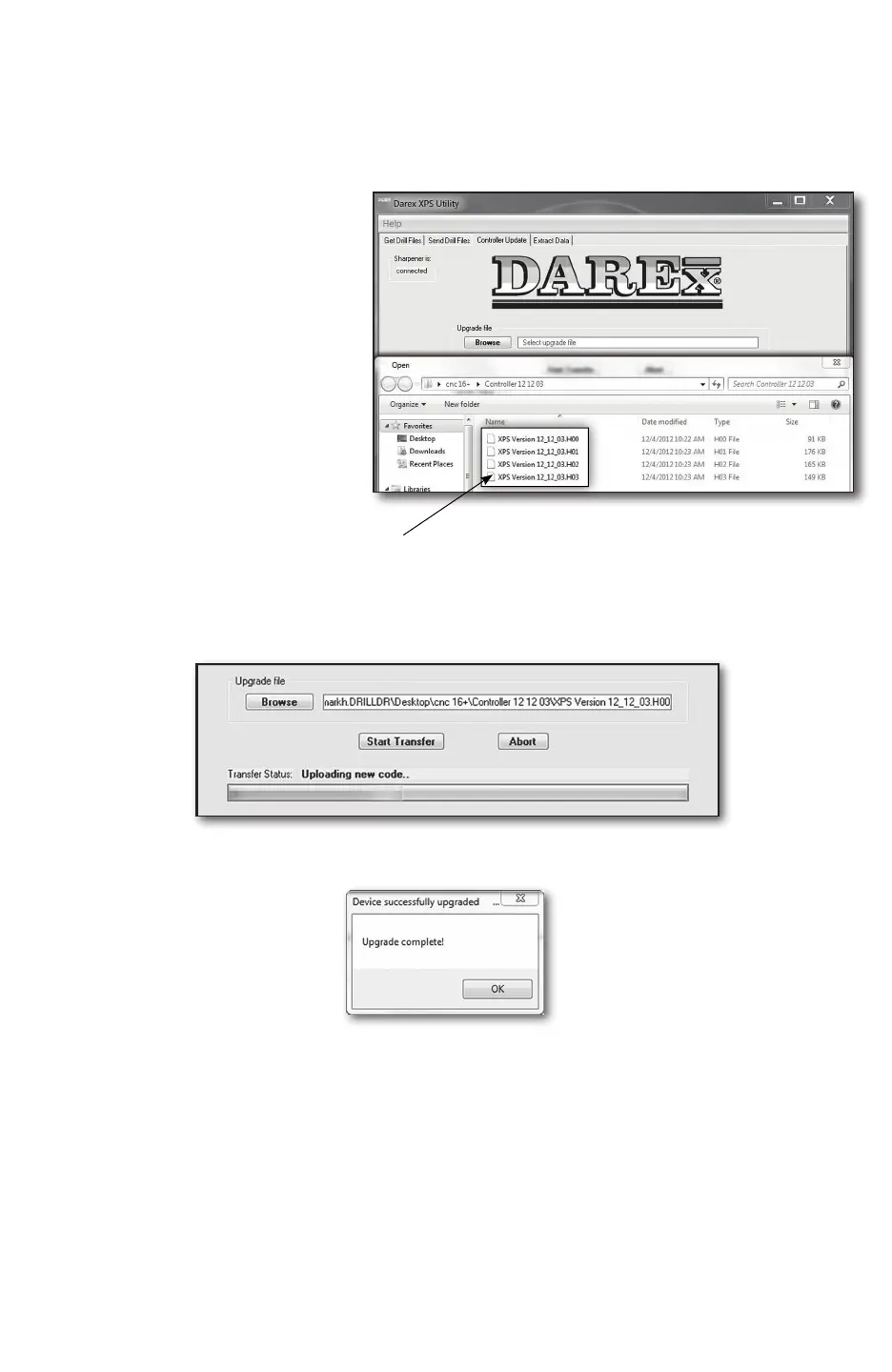
5. Click the [CONTROLLER
UPDATE] tab at the upper left
hand corner of the X-Loader
screen.
6. Follow instructions on the
bottom of X-Loader.
7. Click the [FILE UPGRADE BROWSE] button to load new controller le onto X-Loader
(Example: XPS Version 12_12_03.H00). Click on any one of the four le options ending in
.H00, .H01, .H02, or .H03. All of these les will load automatically.
8. Click the [START TRANSFER] button. Wait for operation to complete. This operation can
take several minutes.
9. When complete the X-Loader pop up will display Upgrade Complete. The sharpener will
re-initialize and is now ready to sharpen.


 To Next Page