Need help?
Do you have a question about the Darkglass Electronics ALPHA OMEGA PHOTON and is the answer not in the manual?
Describes how to connect instruments, headphones, and other devices to the pedal.
Details the primary instrument input on the Alpha Omega Photon.
Explains the stereo input for playback of backing tracks.
Information on connecting headphones and adjusting volume.
Discusses routing versatility and audio interface capabilities.
Visual representation of the default and optional signal chains.
Details the compressor block within the signal chain.
Describes the distortion block in the signal chain.
Explains the cabinet simulation feature in the signal chain.
Describes the blend control for mixing signals.
Details the equalizer block in the signal chain.
Information about the XLR output for connecting to mixers.
Explains the MIDI input for external controller connection.
Details the USB-C port for audio interface and app interaction.
Discusses changing the Cabsim block position via the Suite.
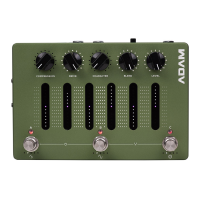
Introduces the five smart potentiometers for sound sculpting.
Details the one-knob compression control.
Explains the blend control for mixing signals.
Describes the 6-band graphic equalizer.
Explains how the DRIVE knob adds distortion to the signal.
Details the MOD knob for selecting Alpha/Omega circuits.
Controls the master volume of the Alpha-Omega Photon.
Describes the touch-sensitive sliders for the 6-band graphic EQ.
Explains the function of the three rotary footswitch encoders (A, B, C).
Covers general operation and preset management.
Details the process of editing, auditioning, and saving presets.
Instructions for entering and using the built-in chromatic tuner.
How to engage and exit bypass mode for signal processing.
Explains how to lock controls to prevent accidental changes.
Steps to pair the Alpha Omega Photon with Bluetooth devices.
Information on using the pedal as a USB audio interface.
Guidance on installing necessary drivers for Windows users.
Details the available USB audio output routing options.
Describes the different USB input signal types.
Explains how instrument, Aux, and Bluetooth audio is routed.
Information about the library of Impulse Response (IR) files.
Lists key technical specifications like impedance, current, and voltage.
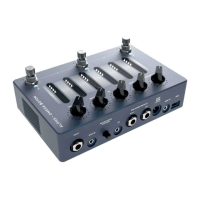
The Alpha·Omega Photon is a versatile audio interface and signal processor designed for musicians, particularly bass and guitar players. It integrates a range of effects and routing options into a compact pedal-style unit, making it suitable for practice, recording, and live performance.
At its core, the Alpha·Omega Photon serves as an instrument input, allowing you to connect your guitar or bass directly. It features a sophisticated signal chain that includes a compressor, distortion, cabinet simulation, blend control, and a 6-band graphic equalizer. This comprehensive suite of effects enables extensive sound sculpting, from subtle tone shaping to aggressive, raw distortion.
The device's distortion circuit is a key feature, offering an accurate model of the Alpha·Omega distortion developed in collaboration with Jon Stockman. It provides two distinct distortion types—Alpha (punchy, tight with definition) and Omega (brutal and raw)—which can be blended for greater versatility. Additionally, "Growl" and "Bite" boost functions are available to add low-end and high-end sparkle to the distorted signal.
The compressor is a one-knob solution that controls the input gain to the compressor, with an intelligent make-up gain algorithm to maintain usable output levels. It offers five selectable ratios: 4:1, 8:1, 12:1, 20:1, and ALL IN, providing flexibility for different compression needs.
Cabinet simulation is handled via Impulse Response (IR) technology, with five onboard cabinet slots pre-loaded with default IRs selected by the Darkglass Team. Users can also load their own IRs into these slots using the Darkglass Suite desktop or mobile app, expanding the sonic possibilities. The position of the cabinet simulation block within the signal chain can be adjusted via the Suite.
The blend control allows users to mix the distorted signal with a clean sidechain signal, offering a way to retain clarity and low-end presence even with heavy distortion. A programmable 6-band graphic equalizer, positioned at the end of the signal chain, provides precise tonal control. Its frequency bands include a low shelf, 250 Hz, 500 Hz, 1.5 kHz, 3 kHz, and a high shelf, with alternative frequency bands (100 Hz, 200 Hz, 400 Hz, 800 Hz, 1.6 kHz, 3.2 kHz) available through the Darkglass Suite.
Beyond its core effects, the Alpha·Omega Photon functions as a USB audio interface, allowing direct recording of processed and unprocessed signals to a Digital Audio Workstation (DAW). It supports stereo recording from the Aux input simultaneously. The device also includes Bluetooth pairing for wireless audio playback, enabling users to practice along with backing tracks from mobile devices or laptops.
For live performance and practice, the Alpha·Omega Photon offers a chromatic tuner with a five-octave range, ensuring accurate tuning for various instruments and tunings. It also features a bypass mode, which passes the unprocessed input signal directly to the outputs, and a performance lock mode to prevent accidental parameter changes during live use.
The Alpha·Omega Photon is designed for intuitive operation with a combination of smart potentiometers, touch-sensitive sliders, and rotary footswitch encoders.
While the manual does not explicitly detail "maintenance features" in the traditional sense (e.g., cleaning instructions), it highlights aspects that contribute to the device's longevity and optimal performance through software and connectivity:
In summary, the Alpha·Omega Photon is a comprehensive and user-friendly device that combines powerful signal processing with versatile connectivity, designed to be a central tool for musicians in various scenarios, supported by software for ongoing customization and updates.
 General
| Footswitch | True bypass |
|---|---|
| Input Impedance | 1 MΩ |
| Output Impedance | 1 kΩ |
| Bypass | True bypass |
| Power Supply | 9V DC (center negative) |

 To Next Page