Need help?
Do you have a question about the Darkglass Electronics ADAM and is the answer not in the manual?
Details on connecting various inputs and outputs to the ADAM unit.
Visual representation of the signal path through the ADAM unit's effects.
Controls input gain and applies intelligent make-up gain for compression.
Models Nolly's favorite vintage distortion unit with 5 distinct modes.
Supports Impulse Response (IR) cabinet simulations with 5 onboard slots.
Features a fixed multiband compressor in the clean sidechain with Nolly's settings.
Blends the distorted signal with the clean sidechain signal.
Programmable 6-band graphic equalizer to tailor the sound.
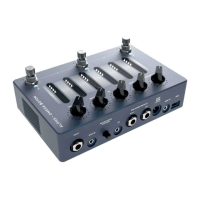
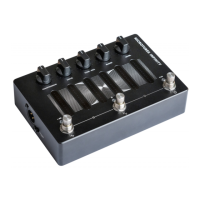
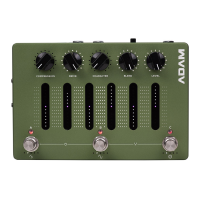
Five potentiometers for sculpting the signal chain and overall sound.
Touch-sensitive sliders controlling the 6-band graphic EQ.
Three footswitch encoders for controlling presets and various functions.
Guidance on creating, auditioning, and saving new sound presets.
Features a five-octave chromatic tuner for precise instrument tuning.
Mode to pass the unprocessed signal through the unit.
Prevents accidental parameter changes during live performance.
Instructions for pairing the ADAM unit wirelessly via Bluetooth.
Information on installing necessary drivers for Windows users.
Access to an extensive library of Impulse Response (IR) cabinet simulations.
The Darkglass ADAM is a versatile audio interface and signal processing unit designed for musicians, particularly bass and guitar players, offering a comprehensive suite of tools for shaping their sound. It functions as a powerful pedalboard, an audio interface for recording, and a hub for integrating with other gear.
At its core, ADAM is an instrument preamplifier and signal processor that allows users to sculpt their tone with a variety of effects and routing options. It features a sophisticated signal chain that includes compression, distortion, cabinet simulation, multiband compression, blend, and a programmable 6-band graphic equalizer.
The device serves as a primary instrument input, allowing users to connect their instrument or pedalboard directly. It also includes an auxiliary input for playing backing tracks from mobile phones or laptops, making it ideal for practice and recording. For monitoring, ADAM offers a dedicated headphone output that can drive a wide range of headphone impedances.
For output, ADAM provides two balanced 1/4" outputs, enabling connection to studio monitors, amplifiers, or other effects. These outputs offer routing versatility, allowing the ADAM to function as a fully equipped audio interface. Additionally, a direct XLR output with a ground lift switch ensures a reliable, low-noise connection to mixing desks or external audio interfaces.
MIDI input via a standard 1/8" TRS jack expands ADAM's flexibility by allowing connection to external MIDI controllers, enabling more advanced control over its functions. The USB-C port unlocks ADAM's capabilities as a USB audio interface, facilitating recording and interaction with the Darkglass Suite desktop app. This app is crucial for software updates and accessing the Darkglass IR library, which contains hundreds of cabinet simulations.
ADAM is pre-programmed with three selectable presets (A, B, and C) accessible via dedicated footswitches. Users can easily save their customized settings into any of these presets by pressing and holding a footswitch for two seconds. The device features "smart potentiometers" for Compression, Drive, Character, Blend, and Level. These knobs are designed to store their positions within each preset, with LED rings indicating the stored setting, providing a visual cue when switching between presets.
The Compression potentiometer acts as a one-knob solution, controlling the input gain to the compressor and intelligently applying makeup gain to maintain appropriate signal levels. The Drive potentiometer adds distortion, utilizing a model of Nolly's favorite vintage distortion unit, offering five distinct distortion modes from mild to synth-like fuzz. The Character potentiometer adjusts the tone of the distortion, adding brightness. The Blend potentiometer allows for mixing the distorted signal with the clean sidechain signal, while the Level potentiometer controls the master volume.
Central to ADAM's sound-shaping capabilities are the touch-sensitive sliders, which control the 6-band graphic EQ. Users can swipe upwards to boost or downwards to cut frequency bands, with each slider offering a -12 dB to 12 dB range across specific frequency bands: low shelf, 250 Hz, 500 Hz, 1.5 kHz, 3 kHz, and a high shelf. Double-tapping a slider resets its band to 0 dB.
Below the sliders are three rotary footswitch encoders (A, B, and C). Pressing these switches between presets. Rotating encoder A allows users to change the compressor ratio or bypass the compressor. Rotating encoder B changes the distortion mode or bypasses the distortion. Rotating encoder C allows selection of the active IR in the signal chain or bypasses the IR. LEDs under each encoder indicate its rotational position and whether a function is bypassed (all LEDs off).
ADAM includes a five-octave chromatic tuner, activated by pressing footswitches B and C simultaneously. The tuner displays the note being tuned and indicates pitch accuracy, with LEDs transitioning from red to green as the perfect pitch is approached. During tuning, ADAM mutes its audio output.
A bypass mode, activated by pressing footswitches A and B simultaneously, allows the input signal to pass through unprocessed, with all LEDs turning off. A "performance lock" mode, activated by pressing A and C simultaneously, prevents accidental parameter changes during live performances, indicated by gently breathing LEDs. In this mode, preset changes, tuner, and bypass modes are still accessible, but potentiometer, slider, and encoder adjustments are locked.
Bluetooth pairing is initiated by pressing and holding an encoder while simultaneously rotating it. The five LEDs under the encoder illuminate sequentially, and pairing begins when all five are lit, allowing users to connect to "ADAM" from their Bluetooth devices.
Software updates and access to the Darkglass IR library are managed through the Darkglass Suite desktop app, which connects to ADAM via the USB-C port. This ensures the device stays current with the latest features and provides an expanding library of cabinet simulations. For Windows users, specific USB audio drivers are required and can be downloaded from the Darkglass website, while Mac users typically do not need additional drivers. The Darkglass website also serves as a resource for more detailed information regarding USB audio and MIDI capabilities.
 General
| Power Supply | 9V DC (Center Negative) |
|---|---|
| Current Draw | 100 mA |
| Input Impedance | 1 MΩ |
| Output Impedance | 100 Ω |
| Type | Bass Preamp Pedal |
| Inputs | 1 x 1/4" Instrument Input |
| EQ | 3-Band (Bass, Mid, Treble) |
| Footswitch | Bypass |
| Connectivity | USB |

 To Next Page