Datacom Systems Inc
SPAN and Multi-Link Aggregators/Regenerators • USERguide
21
MONITOR:
These ports are either RJ45 or duplex-LC connectors used for connection to
NIC
MONITOR
card connectors of each network monitoring tool. network con-
nections. The LED Display Code Table deciphers the RJ45 jacks with inte-
grated LEDs that display line status and line speed of each port. The LED
associated with each duplex-LC jack indicates when light signal has been
detected on the respective Rx
MONITOR
port.
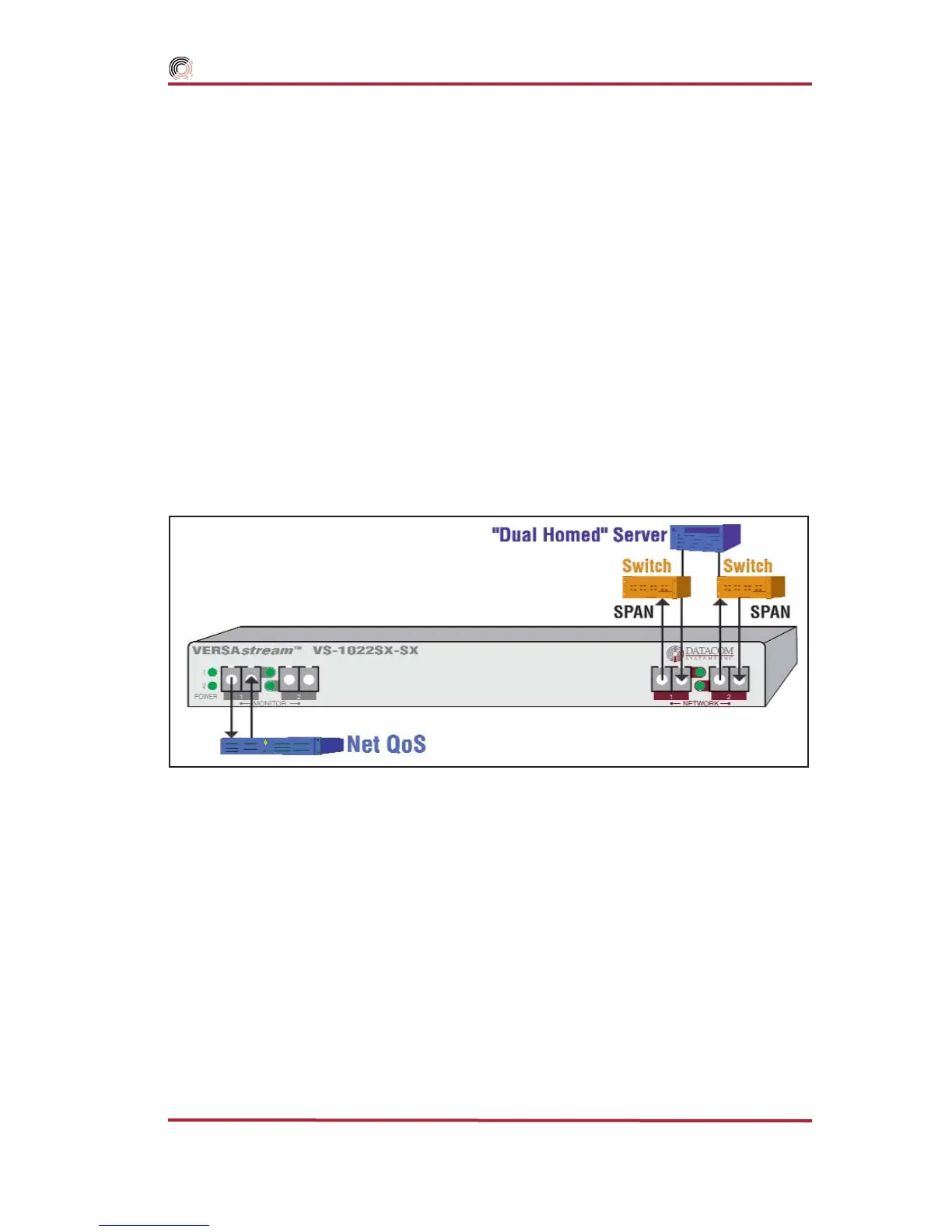
Application & Hardware Installation — Figure 13
through Figure 15 depict typical application installations of VERSAstream
™
SPAN
aggregator/regenerator series models.
‘Dual-Homed’ Server Application — shown in Figure 13, focus-
es on monitoring and analyzis of the
“Dual Homed” Server Distribution Network. This
VS-1022SX-SX is similiar to other VERSAstream
™
SPAN series installations:
To connect the VERSAstream
™
VS-1022SX-SX
SPAN Series aggregator/regenerator,
refer to Figure 13 and follow these steps:
1. Two power supplies are provided. Use of the second power supply is strongly
recommended to assure uninterrupted monitoring. Connect both power supply
barrel connectors into the power 1 and 2 ports, respectively, of the VERSA-
stream
™
. Plug the power supplies into the external power source, furthermore,
connecting the second power supply to a different external power source circuit
than the first power supply eliminates power as a single point of failure. The
POWER 1 and 2 LEDs illuminate indicating power 1 and 2, respectively, are on.
Either LED not illuminated indicates a defective power source and immediate
replacement is required to insure redundant power integrity.
Figure 13 - VS-1022SX-SX Hardware Installation



 To Next Page