QUICKSTART GUIDE 15
The WATCHPAX 40 may also be addressed by name and/or cluster. Please see the “Network Win-
dow” section in Chapter 3: Windows, “WATCHOUT User’s Guide” for more information about this
feature.
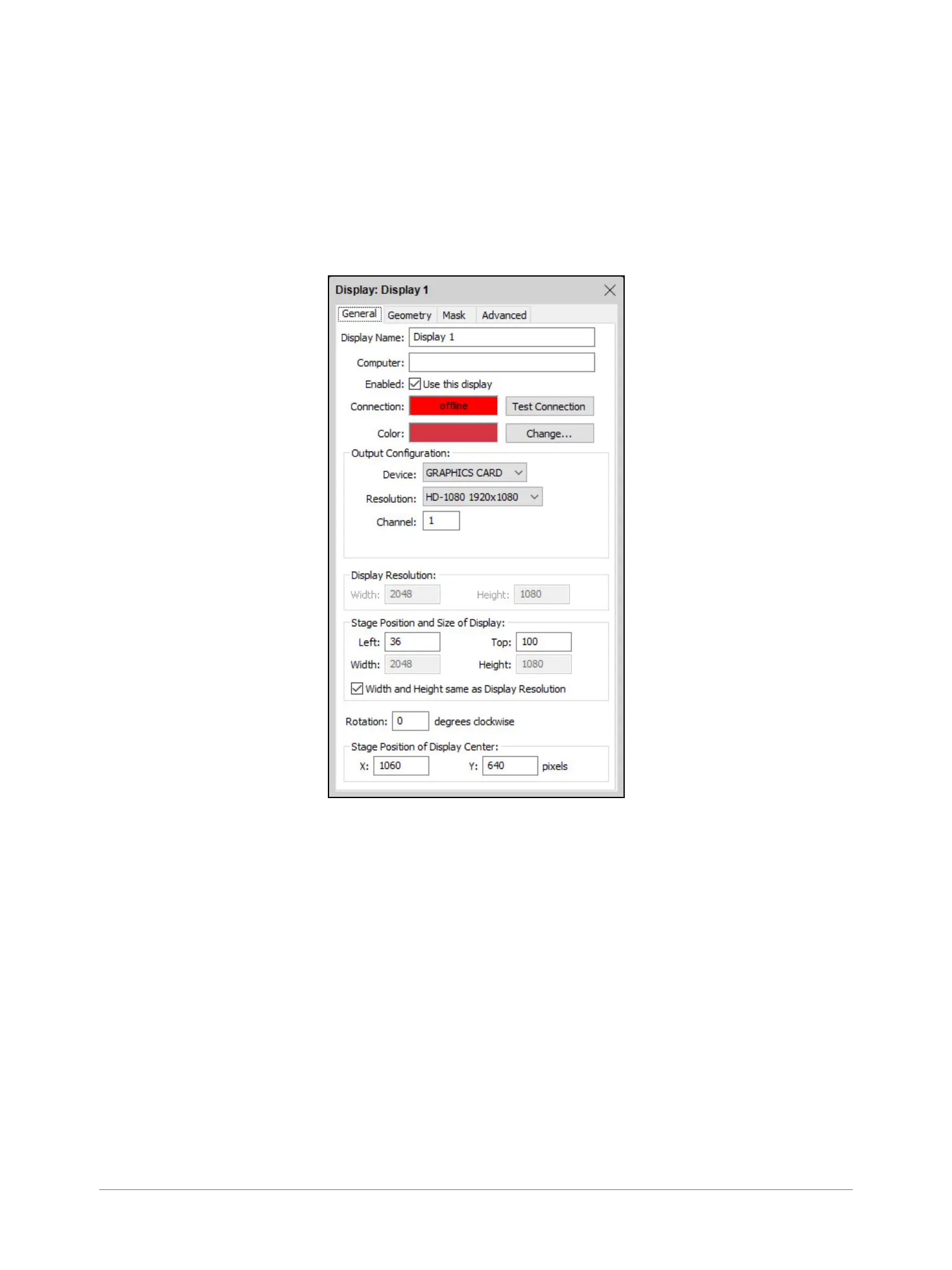
SET NATIVE RESOLUTION
Double-click the display in the Stage window and set the native resolution of your screen or projector,
see screenshot.
AUTO START
A WATCHOUT production computer has to be connected when you compose or create your show.
Once you have composed your show, you can replace the production computer with an external
control system, or auto-start the WATCHPAX by using the built-in Startup Script.
NOTE: Use Edit Startup Script in WATCHOUT to dene initial WATCHPAX settings. This lets you load
shows and perform other WATCHOUT protocol commands. For more information, please see the
section on“Display Software,” Command Line Options, “WATCHOUT User’s Guide”.


 To Next Page