Need help?
Do you have a question about the Datavideo RMC-180 MARK II and is the answer not in the manual?
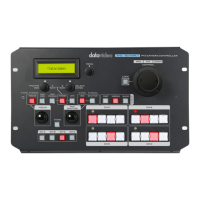
Detailed description of the front panel layout, buttons, dials, and display.
Manually adjust camera focus using the dedicated dial and activate manual focus mode.
Control camera exposure by manually adjusting iris aperture and shutter speed for desired lighting.
Operate Pan, Tilt, and Zoom functions of connected PTZ cameras using the integrated joystick.
Details the rear panel ports and connectors for system integration.
Connect up to four PTZ cameras using RS-422 interface via RJ-45 ports on the rear panel.
Select the desired video output format from a list of available resolutions and frame rates.
Wiring scheme for directly connecting the RMC-180 MARK II to PTZ cameras via RS-422.
Wiring scheme for connecting via the HBT-11 Receiver Box using RS-422.
 General
| Model | RMC-180 MARK II |
|---|---|
| Category | Controller |
| Number of Channels | 8 |
| Power Supply | DC 12V |
| Display | LCD |
| Connectors | RJ45 |
| Control Protocol | VISCA |
| Compatibility | Datavideo PTZ cameras |

 To Next Page