EasyManua.ls Logo

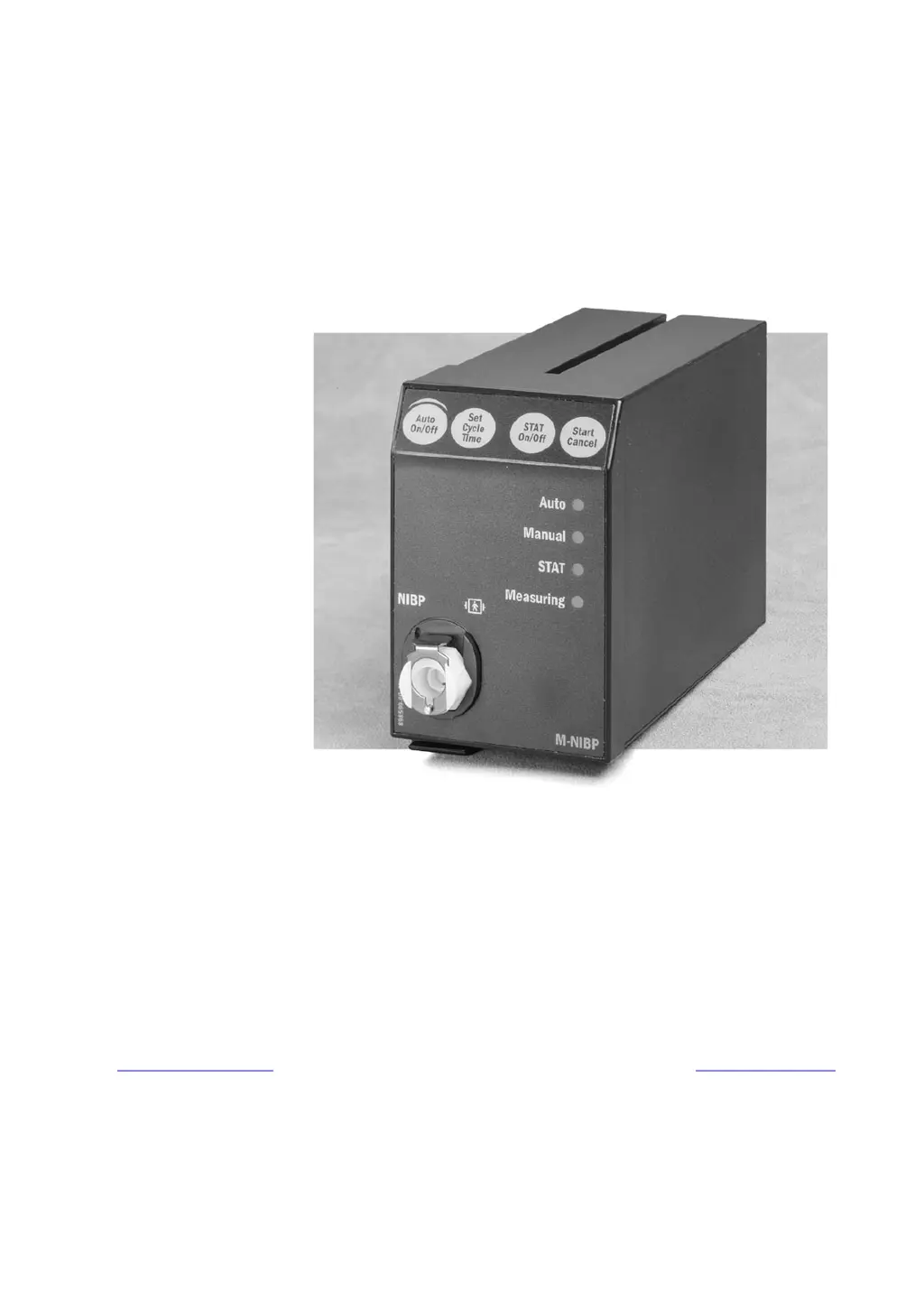
Datex-Ohmeda S/5 M-NIBP - User Manual

Datex-Ohmeda S/5 M-NIBP
48 pages
Print Icon
To Next Page IconTo Next Page
Loading...
Datex-Ohmeda
S/5
TM
NIBP Module, M-NIBP (Rev. 05)
Technical Reference Manual Slot
All specifications are subject to change without notice.
Document No. 800 1015-1
June 2001
Datex-Ohmeda Inc.
3030 Ohmeda Drive
53707-7550 MADISON, WIS
USA
Tel. +1-608-221 1551, Fax. +1-608-222 9147
www.us.datex-ohmeda.com
Datex-Ohmeda Division,
Instrumentarium Corp.
P.O. Box 900, FIN-00031
DATEX-OHMEDA, FINLAND
Tel. +358 10 394 11 Fax +358 9 146 3310
www.datex-ohmeda.com
Instrumentarium Corp. All rights reserved.

Questions and Answers

  • B
    bhillAug 16, 2025
    What to do if Datex-Ohmeda S/5 M-NIBP Medical Equipment shows ‘Cuff loose’ message?
    • V
      Vanessa KeithAug 16, 2025
      If your Datex-Ohmeda Medical Equipment displays a ‘Cuff loose’ message, ensure the hose and cuff are properly connected. If they are connected, try tightening the cuff. If the issue persists, consider replacing the cuff or hose. Also, check the internal tubing and air chamber for any issues and fix if necessary. Inspect the pump connector; if it's okay, replace the pump. Finally, verify the cuff's positioning on the patient.
  • J
    Jennifer StoneAug 19, 2025
    What to do if Datex-Ohmeda S/5 M-NIBP Medical Equipment shows ‘Air leakage’ message?
    • A
      Angelica SharpSep 12, 2025
      If the Datex-Ohmeda Medical Equipment displays an ‘Air leakage’ message, the hose or cuff might be leaking, so replace the cuff. If the fault is in the hose connector, replace the hose. Also, consider replacing the O-ring. If the hose and cuff are okay, connect or replace the tube. If the issue continues, replace the whole tubing, fix connections, or replace the valve(s).
  • G
    grantjoseAug 22, 2025
    What to do if Datex-Ohmeda Medical Equipment shows ‘Cuff occlusion’ message?
    • C
      Cheryl OnealAug 22, 2025
      If your Datex-Ohmeda Medical Equipment displays a ‘Cuff occlusion’ message, first straighten the tube. If that doesn't work, remove any occlusion. If the cuff, hose, and tubes are okay, replace the NIBP board. You may also need to check the calibration or recalibrate the device.
  • A
    Amanda CohenAug 26, 2025
    Why Datex-Ohmeda Medical Equipment shows ‘Unable to measure Sys’ message?
    • M
      Martin BarnesAug 26, 2025
      The ‘Unable to measure Sys’ message on your Datex-Ohmeda Medical Equipment likely means the systolic blood pressure is higher than the maximum inflation pressure. The device should automatically retry with increased pressure.
  • A
    Ashley Walter MDAug 28, 2025
    What to do if Datex-Ohmeda Medical Equipment displays ‘Calibration switch on’ message?
    • M
      michelle55Aug 28, 2025
      If your Datex-Ohmeda Medical Equipment shows a ‘Calibration switch on’ message, it means the EEPROM protection switch at the bottom of the module is turned to the right. This enables setting the protection OFF in the Calibration menu. If you are not going to calibrate, turn the switch to the left.
  • N
    Nicole FordAug 31, 2025
    What does ‘Calibration not protected’ message mean on Datex-Ohmeda Medical Equipment?
    • A
      Andrea PhillipsAug 31, 2025
      The ‘Calibration not protected’ message on your Datex-Ohmeda Medical Equipment indicates that calibration protection is set to OFF. To resolve this, set the protection ON in the NIBP Calibration menu.
  • B
    bakerblakeSep 3, 2025
    What to do if the Datex-Ohmeda Medical Equipment displays 'Call service Error X-message'?
    • M
      Melissa WellsSep 3, 2025
      If your Datex-Ohmeda Medical Equipment displays a 'Call service Error X-message', it indicates a NIBP hardware error where X represents the error number. Check the description of the error message code, the causes and the solutions.
  • D
    Derek BassSep 6, 2025
    How to fix weak pulsation message on Datex-Ohmeda S/5 M-NIBP Medical Equipment?
    • K
      krystalgatesSep 6, 2025
      If you receive a weak pulsation message on the Datex-Ohmeda Medical Equipment, first check the patient's condition and retry the measurement. Inspect for any leaks and retry. Ensure you are using the correct cuff size and that it is properly attached.
  • N
    nsimsSep 9, 2025
    How to solve NIBP menu fading on Datex-Ohmeda S/5 M-NIBP Medical Equipment?
    • E
      Emily AcostaSep 9, 2025
      If the NIBP menu is fading on your Datex-Ohmeda Medical Equipment, it could be due to the absence of an M-NIBP module, the module not being properly connected, or simultaneous connection of the NIBP and NE(12)STPR/MRI module. Ensure the module is correctly plugged in.
  • Z
    zbuchananSep 12, 2025
    How to display NIBP value on Datex-Ohmeda Medical Equipment?
    • J
      Jennifer CookSep 12, 2025
      If no NIBP value is displayed on your Datex-Ohmeda Medical Equipment, check the monitor setup to ensure NIBP is selected on the screen.

Summary

Introduction

Specifications

General Specifications

Module dimensions, weight, and power consumption.

Typical Performance

Measurement range, HR, interval, time, and inflation pressure.

Technical Specifications

Deflation/inflation rates, software limits, over-pressure, and safety valve limits.

Functional Description

Measurement Principle

Explains the oscillometric method for NIBP measurement.

Main Components

Lists the key internal components of the NIBP module.

Connectors and Signals

Details the module bus connector pinout and signal assignments.

Test Points

Describes test pad locations and their voltage signals on the NIBP board.

Service Procedures

General Service Information

Outlines field service limitations and service advice.

Service Check

Procedures for performing a service check and recommended tools/parts.

Disassembly and Reassembly

Step-by-step instructions for disassembling and reassembling the module.

Adjustments and Calibrations

Procedures for pressure safety level detection and NIBP calibrations.

Troubleshooting

Troubleshooting Chart

Table of common troubles, causes, and treatments.

NIBP Error Code Explanation

Explanation of diagnostic error codes and their meanings.

Troubleshooting Flowchart

Flowchart for diagnosing and resolving NIBP module issues.

Service Menu

NIBP Demo Menu

Service menu for demonstrating NIBP measurement and displaying signals.

NIBP Calibration Menu

Menu for checking and performing NIBP calibrations.

NIBP Safety Valve Menu

Menu for testing the safety valve's pressure limits.

NIBP Pulse Valve Menu

Menu for testing and adjusting the pulse valve opening.

NIBP Buttons;Leds Menu

Menu for checking front panel buttons and LEDs.

NIBP Pneumatics Menu

Menu for controlling and checking pneumatic components.

NIBP Watchdog Menu

Menu for testing the watchdog timer functionality.

Spare Parts

Spare Parts List

Lists spare parts with order numbers for different module revisions.

NIBP Module, M-NIBP Rev. 01 Spare Parts

Spare parts for M-NIBP Module Revision 01.

NIBP Module, M-NIBP Rev. 02 Spare Parts

Spare parts for M-NIBP Module Revision 02.

NIBP Module, M-NIBP Rev. 03 Spare Parts

Spare parts for M-NIBP Module Revision 03.

NIBP Module, M-NIBP Rev. 04 Spare Parts

Spare parts for M-NIBP Module Revision 04.

NIBP Module, M-NIBP Rev. 05 Spare Parts

Spare parts for M-NIBP Module Revision 05.

Front Panel Stickers for AS;3 Modules

Front panel stickers for AS/3 modules with adaptation codes.

Front Panel Stickers for S;5 Modules

Front panel stickers for S/5 modules with adaptation codes.

Earlier Revisions

NIBP Module Revision 01 Service Information

Service Manual for NIBP Module revision 01.

NIBP Module Revision 02 Service Information

Service Manual for NIBP Module revision 02.

NIBP Module Revision 03 Technical Reference

Technical Reference Manual for NIBP Module revision 03.

Appendix A

Service Check Form

Form for recording service check results and test outcomes.

Datex-Ohmeda S/5 M-NIBP Specifications

General IconGeneral
CategoryMedical Equipment
TypeNon-invasive Blood Pressure Monitor
ManufacturerDatex-Ohmeda
Measurement MethodOscillometric
Pressure Range0 - 300 mmHg
Operating ModesManual, Automatic, STAT
Overpressure ProtectionYes
CompatibilityS/5 Anesthesia Monitor
Pulse Rate Range20-250 bpm
Cuff SizesAdult, Pediatric, Neonatal
Automatic Measurement Intervals2, 3, 5, 10, 15, 30, 60, 90 minutes
DisplayIntegrated with S/5 Anesthesia Monitor
ConnectivityIntegrated with S/5 Anesthesia Monitor
Power SupplyPowered by the host monitor
WeightVaries by configuration
DimensionsVaries by configuration

Related product manuals