3: Operation
3-2 PRC-BC4-MS
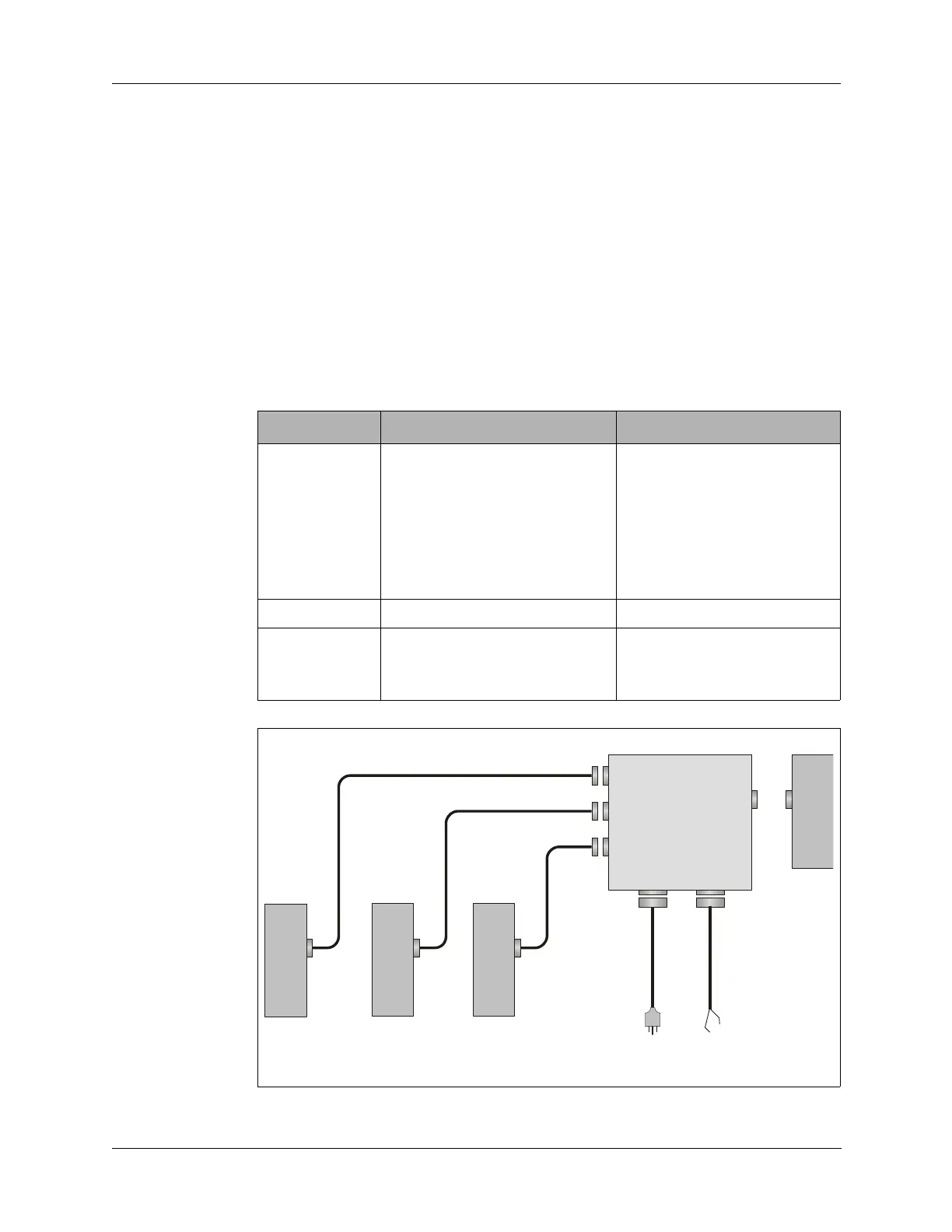
3. Connect up to three DC charging cables (C991610) from the front
panel charging station connectors to BB-LA6 batteries.
4. Install an additional BB-LA6 battery to the rear of the PRC-BC4.
To charge BB-LA6 batteries:
1. Turn the front panel POWER switch to ON.
2. Push the front panel RESET button to start charging for each charging
station.
3. Observe the front panel status LEDs for the charging stations in use.
The yellow CHARGING LED should be lit. Table 3-1 below provides
additional LED indications.
Table 3-1 Status LED Indications
LED Meaning Required Action
FAULT Battery fuse is blown or battery
voltage is below 4 VDC.
Note: It is normal for the
FAULT LED to go on
if you press RESET
when a battery is not
installed.
Check battery fuse. If the
battery fuse is okay, the
battery is faulty. Discard the
battery.
CHARGING Battery is charging normally. None.
READY Battery is fully charged. Remove battery.
The battery may be left
connected to the charger.
Figure 3-2 Charging Configuration
BB-LA6
to
115/230 Vac
source
C991610
C991610
C991610
BB-LA6BB-LA6BB-LA6


 To Next Page