H4
1. Start the Program
Users / km total
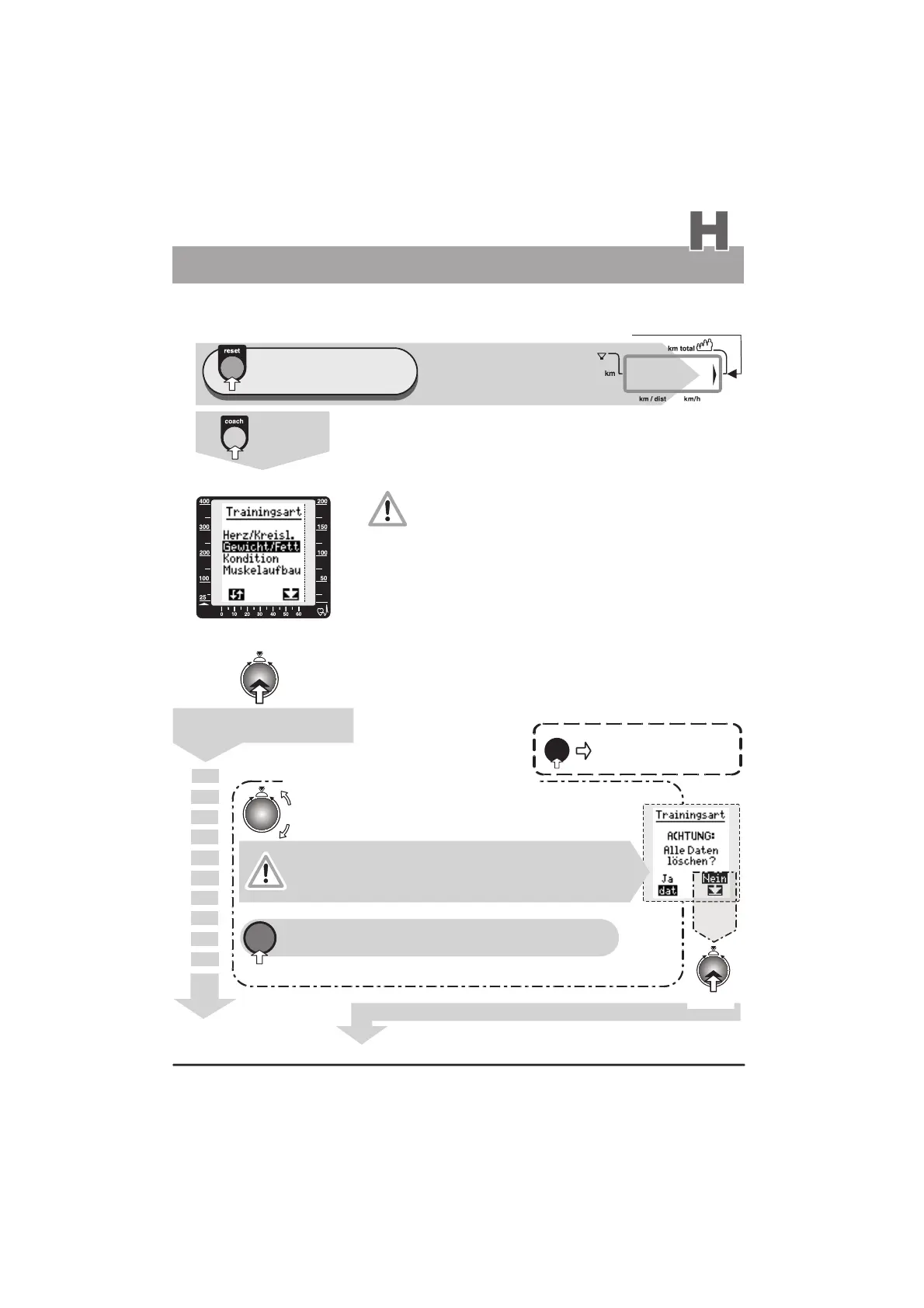
Window No. 4 displays
e. g. km total 3054
Window No. 6
see the graphic display (window no. 6) page L1
1. Setting the training type
e.g. of training objective / training type
weight and/or fat content reduction
With this setting the user determines his basic training objective
and thus the type of program profile.
This setting cannot be changed during a training plan!
This setting can be changed only after confirming the
safety message “Delete all data?” (see C below). If this
message is confirmed by pressing the dat key (no. 11), then all
the programmed Coaching settings and stored training data for
the actual training plan for the selected user identification number
will be permanently erased! After this step, a new Coaching
training can be started with the setting of another
training objective.
displays
1 x
press
)
)
)
3054
watt
Press repeatedly
until the arrow pointing to km total
appears in window no. 4 (right side)
Coaching
A/ First Time Training
1.
2.
reset
dat
A
B
C
Press the control button /
confirm training type
A
If the reset key is pressed during the
selection of the training type, the system
will return to the main menu.
Turn the control button to select a new training type
back to the main menu
(if required)
No
(Do not change the program / do not delete data)
=
Yes
Warning message
new “training type”
If you answer “yes” then
the data related to e.g. weight/fat
content reduction will be lost!
press
Changing the training objective is only possible if the user confirms
a safety warning message, which causes the interruption of the
presently set coaching program and the loss of the related data!
(See above the note about the safety warning message
“Delete all data?”)
The program will return to step no. 1 “Setting the training type”
the training type is changed only
if you answer “Yes”
Decision “No”
press
C
or
Continued on page H5
(Window No.6 switches to “Training plan”)


 To Next Page