5
3.
2.
188
OK
0
1.
reset
C
)
)
)
3054
watt
watt
User:
User:
guest
guest
5
0
prog
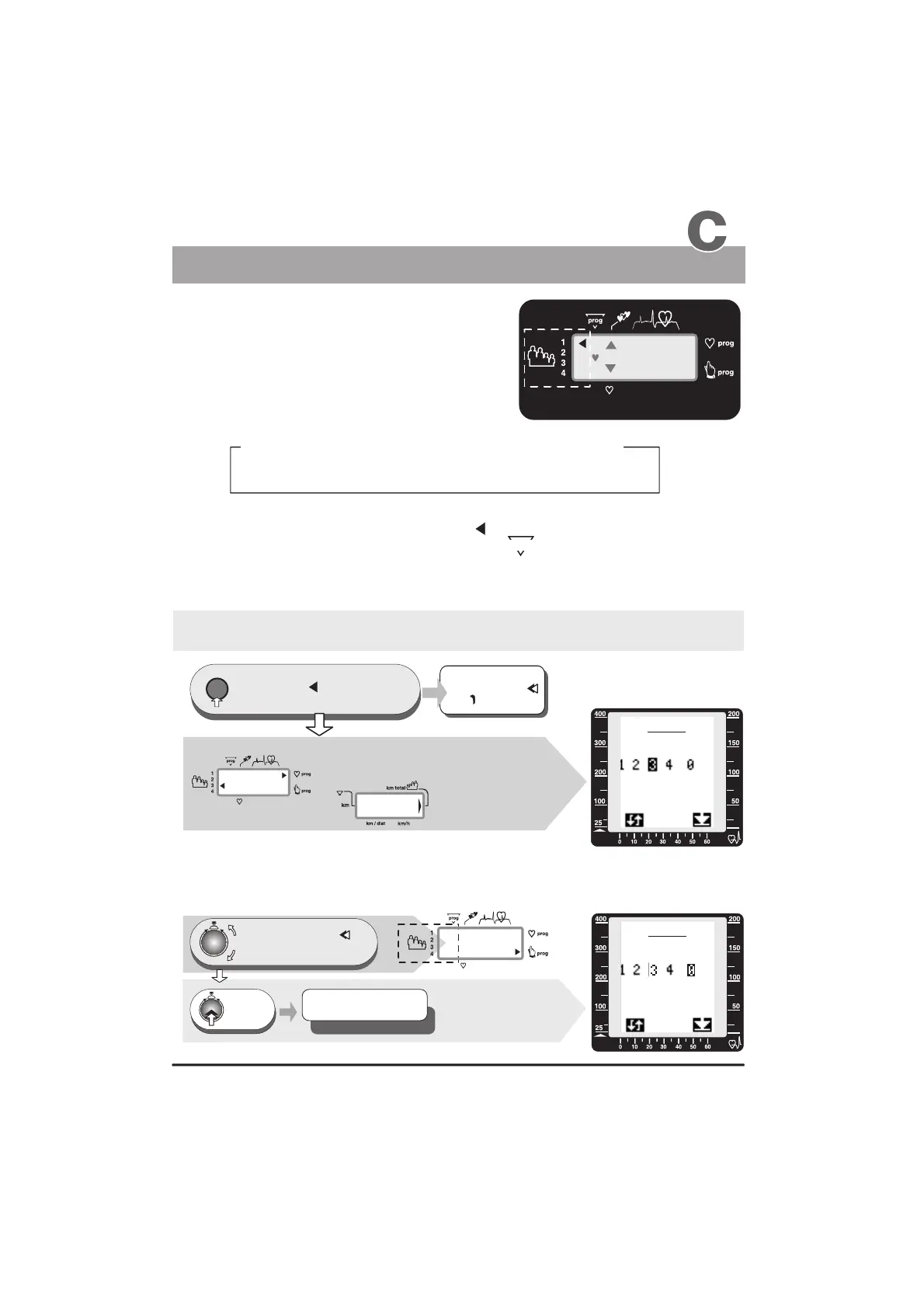
Before using the equipment, you must assign
a user number to every user.
The ergo_bike computer will record, store and evaluate
the training data of up to four users separately.
Guest users, or any persons, whose training data will not be saved, should use identification
number “0”. When using this ID number the arrow pointing to User 1 to 4 will not
be displayed. Instead the number “0” is displayed under .
No training data will be saved for the “Guest” user when the ergo_bike is turned off!
However, the distance traveled in kilometers will be added to the total kilometer
counter (km-total).
Turn, (to the right or left) until
the blinking user arrow
points to the required user number
or
“0” blinks under prog
1x
Press
Window no. 1
Changing the selection
Window 1
- the right arrow points to
the selected program
and the program number
is displayed under prog, e.g. C
- the total number
of travelled kilometres,
e.g. 3054km
Window no. 6
The graphic display
(window no. 6)
will simultaneously
display the setup
procedure as shown
to the right
The graphic display
(window No. 6) will
simultaneously display
the setup procedure
as shown to the right.
(see appendix L)
LCD graphic display
press repeatedly until the
user arrow or the “0”
under prog starts to flash
the user arrow
or
blinks
0
Either
Window 1
Window 4
Set up of the User identification number 1 to 4 or Guest 0
- the left arrow points to the
selected user number, e.g. 3
User instruction
Window No. 1
1. Selecting the user
identification number
The Dashboard
Mother Father Daughter
Son
User 1
User 2
User 3
User 4
The following is an example of a possible number attribution scheme in a family:
Window no. 6
The settings are confirmed
and saved
User 1 - 4 or e.g. Guest 0


 To Next Page