1.Heartrate
2.Dissipatedenergyandtime
3.RPM
4.Speedanddistance
5.Loadinwatt
6.Graphicscreen
7.Controlbutton
8.Pulsesensorconnector
9.Relaxsensorconnector
10.Menukey
11.Infokey
12.Fitnesskey
13.Functionkey
14.Resetkey(recessed)
15.PCconnector
16.User
17.Memorycardreader/writer
18.Sliderswitch:1.Cardreaderoperation
2.ErgoWin&DashboardUpdateoperation
3.Cardreaderupdateoperation
19.Dashboardcableconnection
20.Dashboardbattery
6.
5.
2.
16.
1.
17.
4.
3.
9.
8.
7.
10. 11.
12.
13.
menu
fitne ss
inf
o
TheDashboard
2
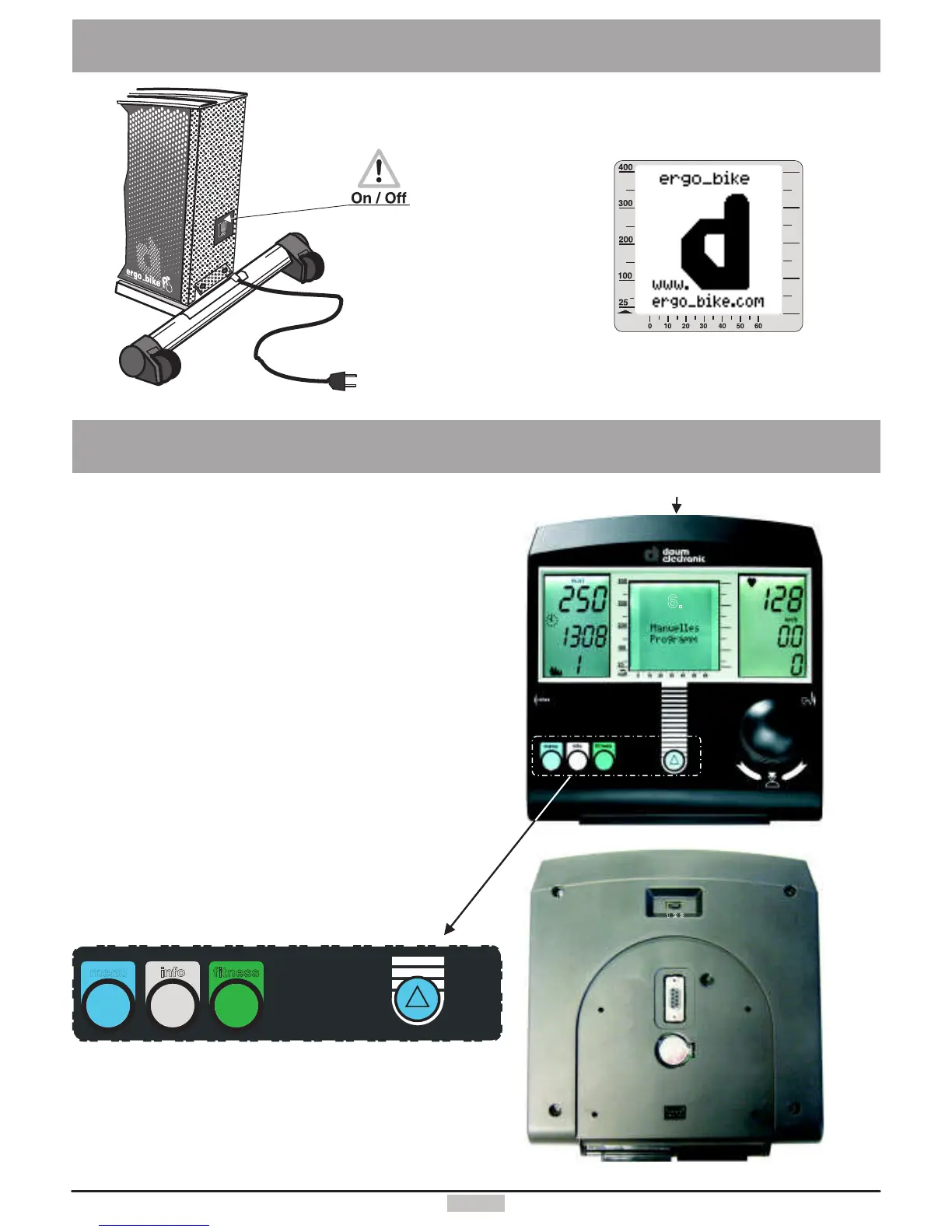
The switchislocated
ontherearofthedevice.
On/Off
SettingUp
WhenthedeviceisswitchedON,the
LCDscreendisplaysabig“d”andthe
systemplaysastart-upmelody.
Afterthisthesystemdisplaystheprogram
lastused.Themanualprogramis
displayedonthefirststart-up.
watt
18.
15.
14.
19.
20.


 To Next Page