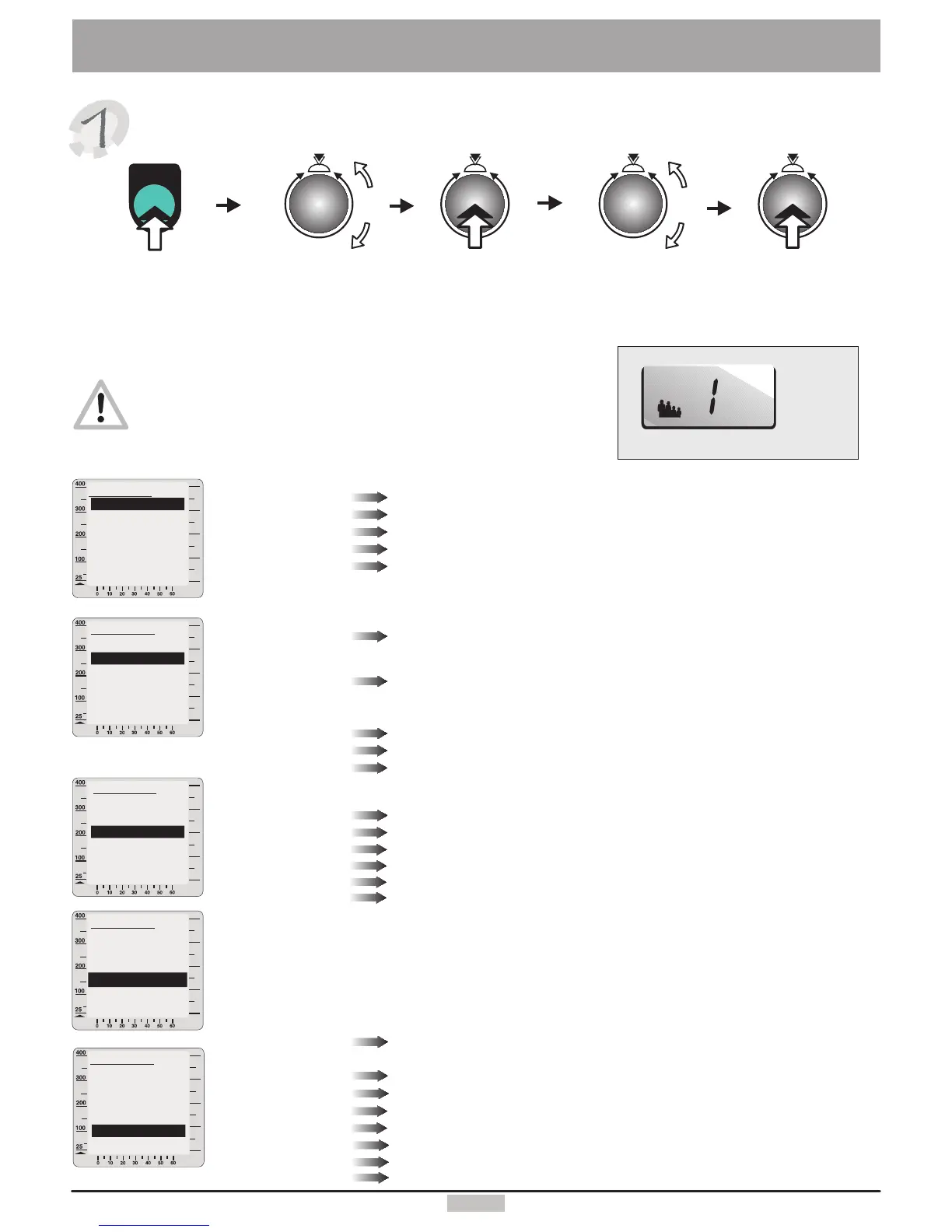
User'sdata
SystemSettings
Ifyouwanttochangetheuser'sdatayoushouldalwaysnotethe
presentlyselecteduser.Thisinformationwillalwaysbeshownin
theuserwindow(16).(SeeChoosingtheUserp.4)
Youcanalsoenteryourownlimitvalues.Youwouldthenbeinformedifoneofthese
valuesisexceeded.
Watt
Heartrate
Trainingtime
Distance
Phys.kJoule
Youcanselectherethemaximalload(between25and800watts).If
youchoosee.g.180Wtheloadwillnotexceedthisvalue,andthewatt
displaywillblink.
Whentheactualheartrateexceedstheenteredlimitvaluethesystemreduces
automaticallytheappliedload,andanaudiblealarmsounds.“OFF”meansnoheart
ratelimitactive,“Auto”meansheartratecorrespondingtotheageoftheuserapplied.
A signalmelodyplayswhenthetimelimitisexceeded.
A signalmelodyplayswhenthedistancelimitisexceeded.
A signalmelodyplayswhenthedissipatedkJoulevaluesreachesthelimitvalue.
5
watt
Userdata
Back
Bodydata
Limitvalues
Coaching
Delete
Miscellaneous
watt
watt
Turnandpressthecontrolbuttontoenterandstoreyourphysicaldata.
Evaluation
Startpoint
Enteryourbirthdate
chooseM(male)orF(female)toenteryourgender.
enteryouheightincm.
enteryourweightinkg.
enteryourbodyfatcontent(ifknown).
Enteryouractualperformancecapacity.
Choosepoint“One”atwhichthetrainingwiththeprogramstartsifyouwanttostartthe
programatthepointofyourchoice.
Frequency
Trainingtype
Min.heartrate
Max.heartrate
Max.Perfo-
rmance
Cooldown
Start-up
Window2
Window4
Wattincrease
Wattdecrease
enterthenumberoftimesyouwanttotrainperweek.
Chooseyourtarget.
TheminimumheartrateachievedduringthelastCoachingperformancetest.
ThemaximumheartrateachievedduringthelastCoachingperformancetest.
TheperformanceachievedduringthelastCoachingperformancetest.
Chooseaprogramtorunattheendofatrainingsession(seepage13)
Choosetheprogramthatyouwishtorunafterswitchingthedeviceon.
ChoosethedatatodisplayinWindow2.
ChoosethedatatodisplayinWindow4.
Setthewattincreaserate(inseconds)forheartratecontrolledprograms.
Setthewattdecreaserate(inseconds)forheartratecontrolledprograms.
Adaptthefixedheartrateprogramstoyourownheartraterange.
menu
menu
Pressthe
menukey
Turntoselect
“User'sdata”
Pressthe
controlbutton
Turntoselect
“Settings”
watt
YoucanalsoenterandsavetheCoachingdatabyturningandpressingthecontrolbutton.
Thedeletefunctionwillresetallthedataoftheselectedusertotheinitialstate
watt
User
16.
Pressthe
controlbutton
Birthdate
Gender
Height
Weight
Fatcontent%
Heartrateadapting
Userdata
Back
Bodydata
Coaching
Delete
Miscellaneous
Limitvalues
Userdata
Back
Bodydata
Limitvalues
Delete
Miscellaneous
Coaching
Userdata
Back
Bodydata
Limitvalues
Coaching
Miscellaneous
Delete
Userdata
Back
Bodydata
Limitvalues
Coaching
Delete
ous
Miscellane


 To Next Page