11
Operation Instructions
WHILE SELECTING TIME
• Right and left arrow will increase and decrease the weight respectively.
WHILE SELECTING WEIGHT
• Up and down arrow will increase and decrease the temperature respectively.
WHILE SELECTING TEMPERATURE
• Up and down arrow will increase and decrease the recipe number respectively in steps of 10.
• Right and left arrow will increase and decrease the temperature respectively in steps of 1.
WHILE SELECTING SUBMENU RECIPES
ARROW INSTRUCTIONS DURING DIFFERENT OPERATIONS
• Press the Microwave option several times to select the desired power levels.
• Press Confirm/Start to confirm desired level.
• Use arrow keys to set the cooking time and press Confirm/Start to start the operation.
SELECTION OF MICROWAVE MODE
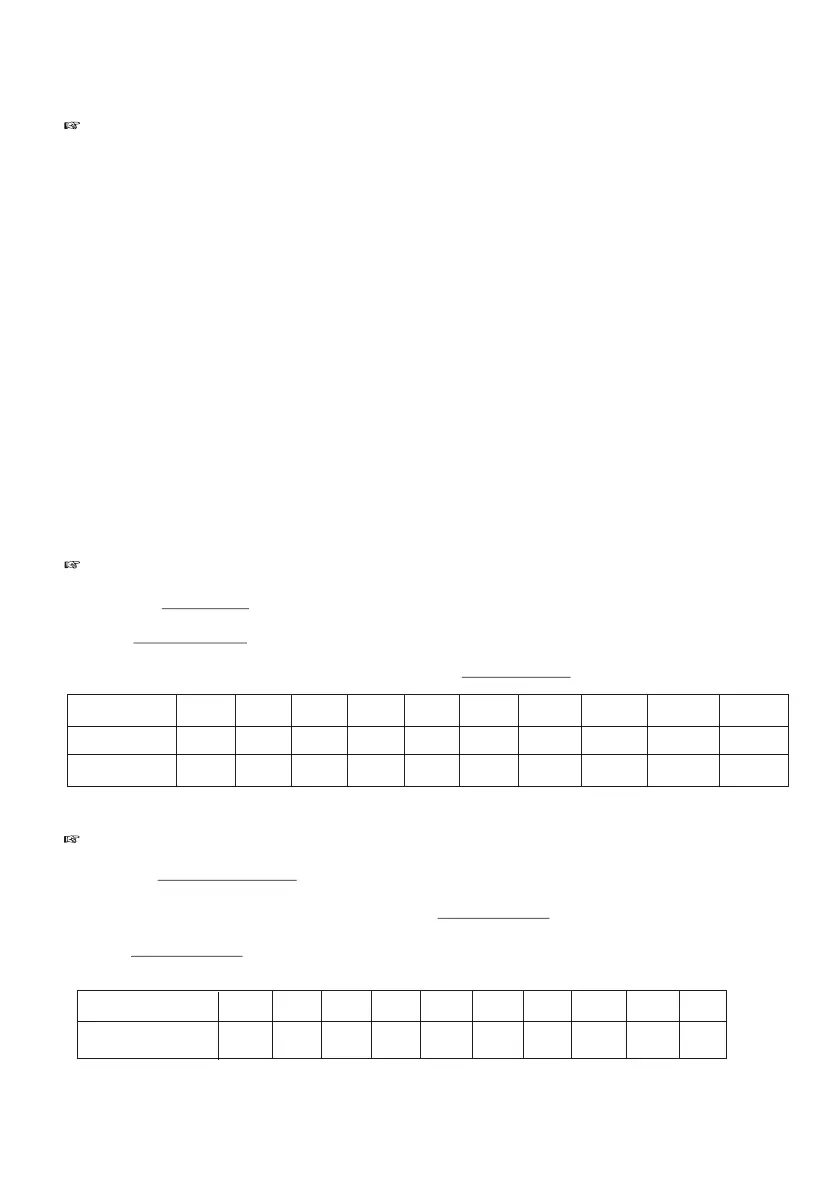
No. of Press 1 2 3 4 5 6 7 8 9 10
Display P-90 P-80 P-70 P-60 P-50 P-40 P-30 P-20 P-10
Output Power 100% 90% 80% 70% 60% 50% 40% 30% 20% 10%
• Press the Conv/Grill/Combi option once to select the convection preheat mode .
• Use arrows to select the desired temp and press Confirm /Start to confirm the temperature.
• Press Confirm /Start again to start the operation.
CONVECTION PREHEAT
• Up and down arrow will increase and decrease time respectively by 1 minute.
• Right and left arrow will increase and decrease time respectively by 10 seconds.
P HI-
Set Temperature
150 160 170 180 190 200 210 220 230 240
Display
C150 C160 C170 C180 C190 C200 C210 C220 C230 C240


 To Next Page