EasyManua.ls Logo

dbx 128 - Playing Back dbx-Encoded Tapes; Playing dbx-Encoded Discs

dbx 128
42 pages
Print Icon
To Next Page IconTo Next Page
To Previous Page IconTo Previous Page
Loading...
14
OPERATION
~
(/f
a
rotary
control
setting
is
not
indicated,
the
setting
does
not
affect
that
operation.)
Kev
viod
them?
mot
Jb»
-Codverant
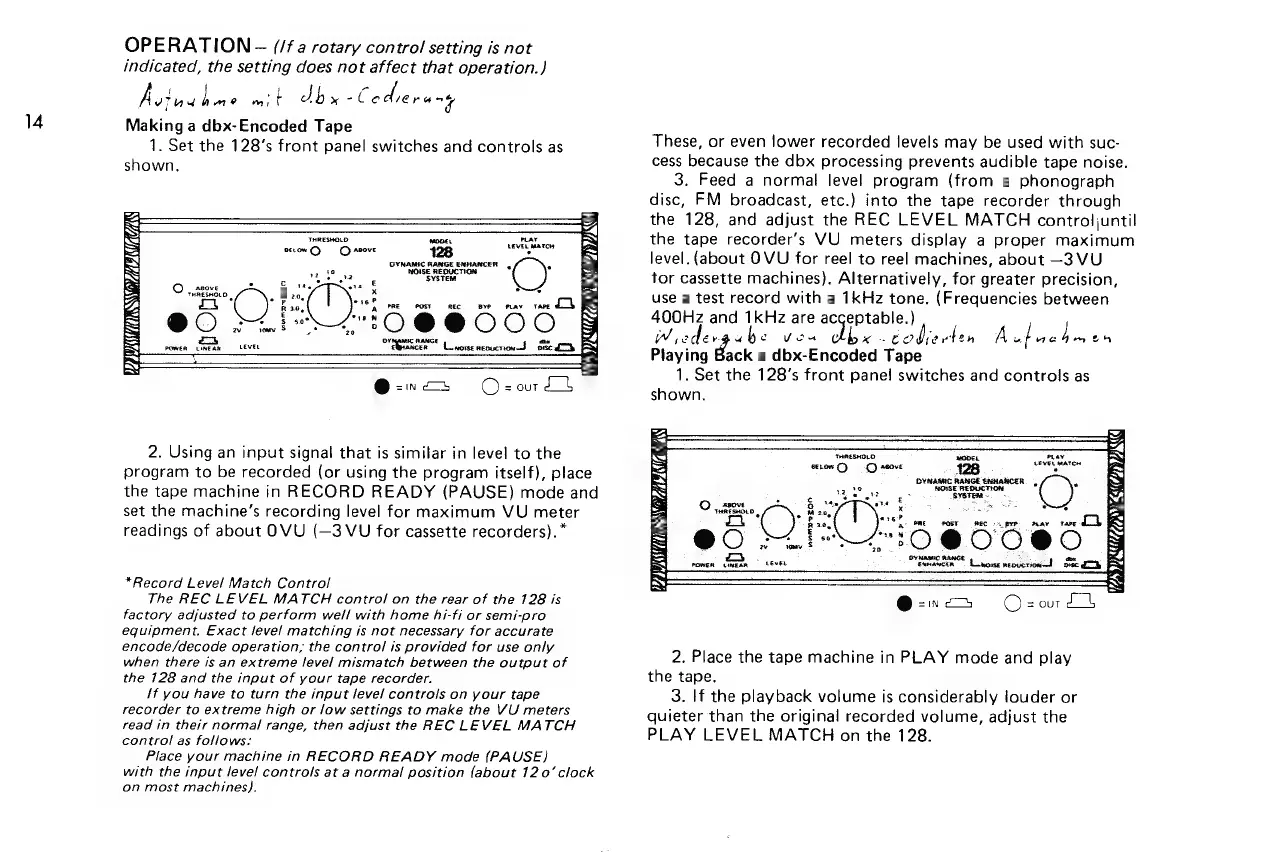
Making
a
dbx-Encoded
Tape
1.
Set the
128’s front
panel
switches
and
controls
as
shown.
=,
=
THRESHOLD
mone.
at
tae
=
ts
>
ve
y
sow
C)
Caso
128
MI
a
GYNAMIC
RANGE
ENHANCER
e
=
a2 t8
NOISE
REDUCTION
S.
Oe
‘SYSTEM
ns
a
on
ae
x
4
a’
,
3
:
*
.
*
ere?
C)
haat
ee
ee
.
Py
"tO
@9@BWOOO
ones
S
zo
A
LG
2.
Using
an
input
signal
that
is
similar
in
level
to
the
program
to
be
recorded
(or
using
the
program
itself),
place
the
tape
machine
in
RECORD
READY
(PAUSE)
mode
and
set
the
machine’s
recording
level
for
maximum
VU
meter
readings
of
about
OVU
(—3
VU
for
cassette
recorders).*
*Record
Level
Match
Control
The
REC
LEVEL
MATCH
control
on
the
rear
of
the
128
is
factory
adjusted
to
perform
well
with
home
hi-fi
or
semi-pro
equipment,
Exact
level
matching
is
not
necessary
for
accurate
encode/decode
operation;
the
control
is
provided
for
use
only
when
there
is
an
extreme
level
mismatch
between
the
output
of
the
128
and
the
input
of
your
tape
recorder.
if
you
have
to
turn
the
input
level
controls
on
your
tape
recorder
to
extreme
high
or
low
settings
to
make
the
VU
meters
read
in
their
normal
range,
then
adjust
the
REC
LEVEL
MATCH
control
as
follows:
Place
your
machine
in
RECORD
READY
mode
(PAUSE}
with
the
input
level
controls
at
a
normal
position
(about
120’
clock
on
most
machines).
These,
or
even
lower
recorded
levels
may
be
used
with
suc-
cess
because
the
dbx
processing
prevents
audible
tape
noise.
3.
Feed
a
normal
level
program
(from
a
phonograph
disc,
FM
broadcast,
etc.)
into
the
tape
recorder
through
the
128,
and
adjust
the
REC
LEVEL
MATCH
controljuntil
the
tape
recorder’s
VU
meters
display
a
proper
maximum
level.
(about
OVU
for
reel
to
reel
machines,
about
—3
VU
tor
cassette
machines).
Alternatively,
for
greater
precision,
use
a
test
record
with
a
1kHz
tone.
(Frequencies
between
400Hz
and
1kHz
are
acceptable.)
w
edev
abe
Vd
dhe
todixelen
A
uf
gains
oh
Playing
Back
a
dbx-Encoded
Tape
1.
Set
the
128’s
front
pane!
switches
and
controls
as
shown.
move
puny
.
LEVEL
mATEN
.
DYNAMIC
RANGE
EANANCER.
|
%
NOISE
REDUCTION
.
SYSTER
es
7
ee
a
er
RANGE
=
%
Eenanctn
Liwowse
neoycticd
ft
orec
CNG
4
Ss
aN
ket
a,
S
SS
==
BA
Fad
BS
=
ke
=
=
=
aN
BY
2.
Place
the
tape
machine
in
PLAY
mode
and
play
the
tape.
3.
If
the
playback
volume
is
considerably
louder
or
quieter
than
the
original
recorded
volume,
adjust
the
PLAY
LEVEL
MATCH
on
the
128.

Related product manuals