EasyManua.ls Logo

dbx 128 - Dubbing;Copying

dbx 128
42 pages
Print Icon
To Next Page IconTo Next Page
To Previous Page IconTo Previous Page
Loading...
Playing
a
dbx-Encoded
Disc
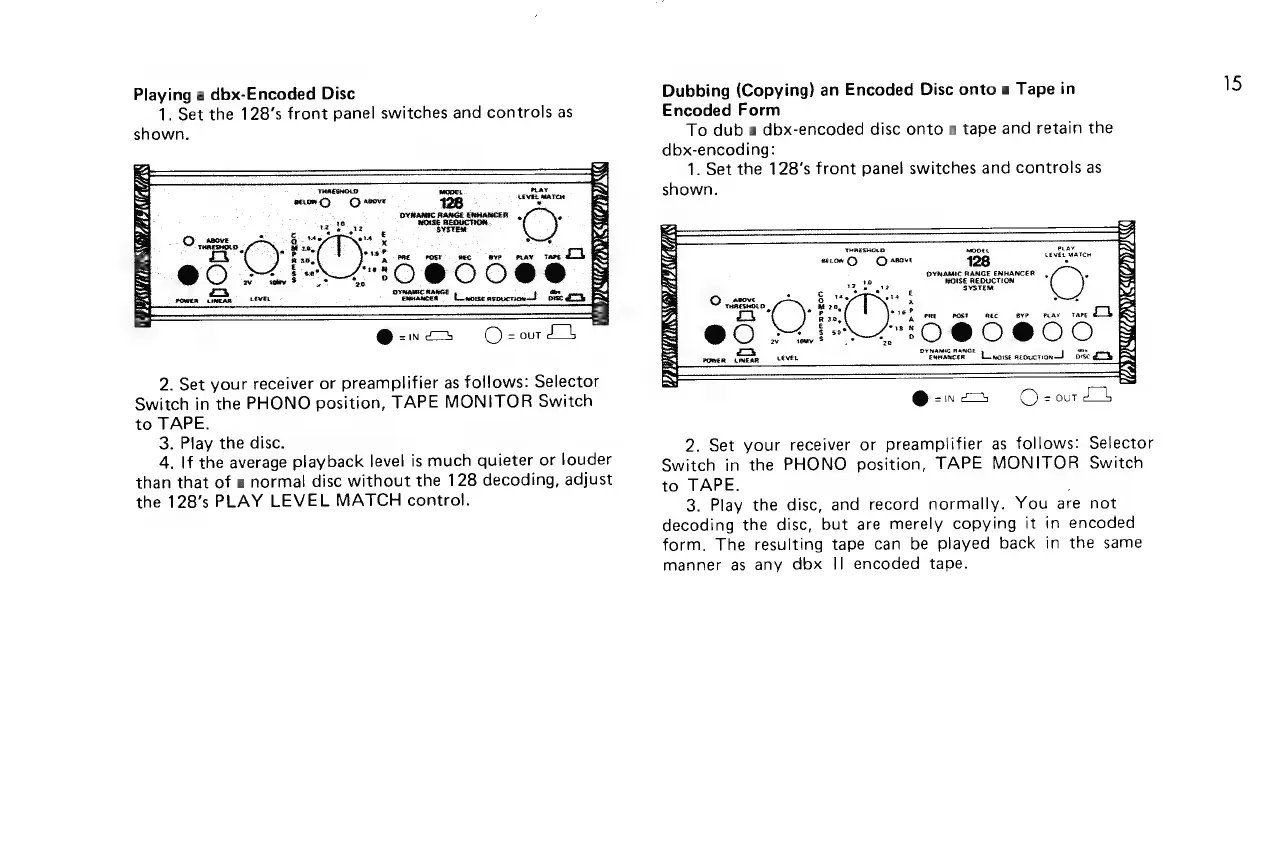
1.
Set the
128’s front
panel
switches
and
controls
as
shown.
THRESHOLD:
ope.
secomC>
©)
aove
fay
128
=
DYNAMIC
RANGE
ENHANCER.
,
=
aie
MOISE
REDUCTION.
ale.
SYSTEM
&
tts
os
x
35,
ene
sve
oav
tare
Loh
L410
@
0088
~
*
cea”
Lenonesepucrone!
ose
ae
a
hs
SS
ba
=
ees
bad
ie
=
Eo
oe
f
e
7
PB
PLEA
ECR
VAG
Y
2.
Set
your
receiver
or
preamplifier
as
follows:
Selector
Switch
in
the
PHONO
position,
TAPE
MONITOR
Switch
to
TAPE.
3.
Play
the
disc.
4.
|f
the
average
playback
level
is
much
quieter
or
louder
than
that
of
a
normal
disc
without
the
128
decoding,
adjust
the
128’s
PLAY
LEVEL
MATCH
control.
Dubbing
(Copying)
an
Encoded
Disc
onto
a
Tape
in
Encoded
Form
To
dub
a
dbx-encoded
disc
onto
a
tape
and
retain
the
dbx-encoding:
1.
Set
the
128’s front
panel
switches
and
controls
as
shown.
THRESHOLD
M0064
wt
LeveL
Mari
eecow
>
©
sfove
1
Eater
DYNAMIC
RANGE
ENHANCER,
.
10
NGISE
REDUCTION
LE
ie
eve
SYSTEM
ba
ota
2
rd
*
c
©
.5EB.0
Ba
2
mi"
se
viet
Oo
Ra,
PRE
ost
mee
BYP
PLAY
TAPE
@O
SOE
0
@O@O0O0
ay
remy
&
pay
oryamic
mance
Linoise
aeouction
tote
€S
POWER
LPNEAR
LEVER
@-»a
Ozortt
2.
Set
your
receiver
or
preamplifier
as
follows:
Selector
Switch
in
the
PHONO
position,
TAPE
MONITOR
Switch
to
TAPE.
3.
Play
the
disc,
and
record
normally.
You
are
not
decoding
the
disc,
but
are
merely
copying
it
in
encoded
form.
The
resulting
tape
can
be
played
back
in
the
same
manner
as
any
dbx
||
encoded
tape.
15

Related product manuals