EasyManua.ls Logo

dbx 128 - Page 17

dbx 128
42 pages
Print Icon
To Next Page IconTo Next Page
To Previous Page IconTo Previous Page
Loading...
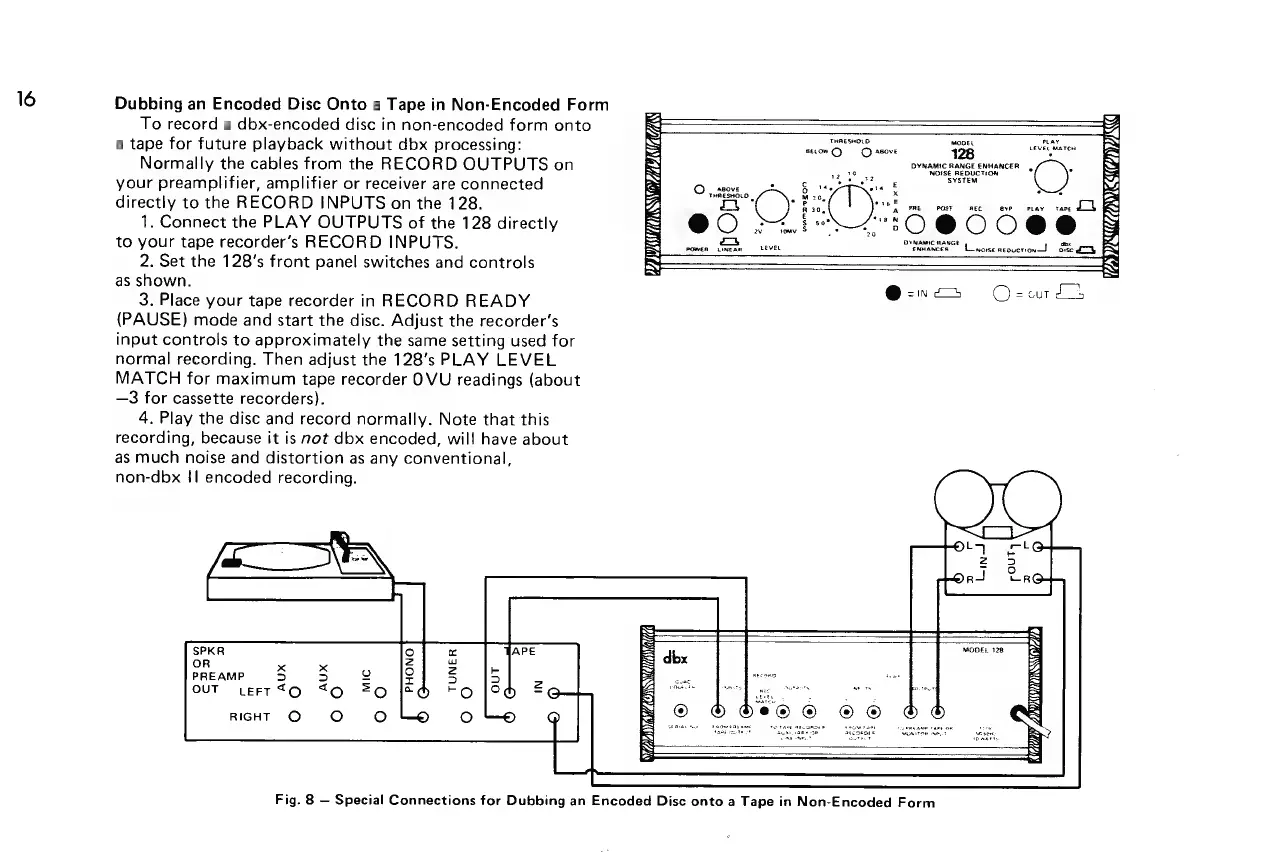
Dubbing
an
Encoded
Disc
Onto
a
Tape
in
Non-Encoded
Form
To
record
a
dbx-encoded
disc
in
non-encoded
form
onto
a
tape
for
future
playback
without
dbx
processing:
Normally
the
cables
from
the
RECORD
OUTPUTS
on
your
preamplifier,
amplifier
or
receiver
are
connected
directly
to
the
RECORD
INPUTS
on
the
128.
1.
Connect
the
PLAY
OUTPUTS
of
the
128
directly
to
your
tape
recorder’s
RECORD
INPUTS.
2.
Set
the
128's
front
panel
switches
and
controls
as
shown.
3.
Place
your
tape
recorder
in
RECORD
READY
(PAUSE)
mode
and
start
the
disc.
Adjust
the
recorder’s
input
controls
to
approximately
the
same
setting
used
for
normal
recording.
Then
adjust
the
128’s
PLAY
LEVEL
MATCH
for
maximum
tape
recorder
OVU
readings
(about
—3
for
cassette
recorders).
4.
Play
the
disc
and
record
normally.
Note
that
this
recording,
because
it is
not
dbx
encoded,
will
have
about
as
much
noise
and
distortion
as
any
conventional,
non-dbx
{|
encoded
recording.
THRESHOLD.
ibis.
may
BELOW
C}
©
asove
128
EEVEGMATCH
DYNAMIC
RANGE
ENHANCER
| -
ve
38
NOISE
REDUCTION
+
SYSTEM
:
E
Oo
oa
eta
\
x
@
;
ABOVE
4
THRESHOLD
|
z
30,
a
PRE
POST
REC
8
8¥P
PLAY
«TAPE
5
Et
@0
ow
ZO
BOC
DYNAMIC
RANGE
aon
wuancen
Linosenroucront
ose
dk
POWER
NEAR
LEVEL
MODEL
128
BS
dbx
x
PREAMP
5
LEFT
TO
Out
®
b
bee
©
©®
@
DY
LR
27)
SE
RIEL
te
Ne
se
sen
Fig.
8
Special
Connections
for
Dubbing
an
Encoded
Disc
onto
a
Tape
in
Non-Encoded
Form

Related product manuals