EasyManua.ls Logo

dbx 128 - USING THE DYNAMIC RANGE ENHANCER SYSTEM; Independent Expander Use

dbx 128
42 pages
Print Icon
To Next Page IconTo Next Page
To Previous Page IconTo Previous Page
Loading...
Subsonics
and
Interference
The
dbx
128
incorporates
very
effective
bandpass
filters
that
maintain
full
frequency
response
throughout
the
audi-
ble
spectrum
(-3
dB
at
27
Hz
and
27kHz).
Their
purpose
is
to
reduce
sub
and
supersonic
(bias)
frequencies
to
prevent
them
from
introducing
errors
into
the
encode
or
decode
process.
However,
in
some
extreme
instances,
rumbles
from
passing
trains,
trucks,
aircraft,
or
even
air
conditioning
may
be
picked
up
by
your
microphones
and
fed
to
the
128’s
compression
circuitry.
These
subsonics
can
cause
the
RMS
level
sense
detector
to
modulate
the
program,
even
though
the
low
frequencies
themselves
are
not
audible
and
are
not
passed
onto
the
tape
(a
tape
machine
usually
cannot
record
frequencies
below
30
Hz).
As
a
result,
the
low
frequency
information
is
missing
upon
playback,
and
the
decoder
is
“fooled”,
causing
a
mys-
terious
and
unwanted
deviation
in
program
level.
Should
you
encounter
this
rare
problem,
it
can
be
elimi-
nated
by
using
a
high
pass
filter
between
the
microphone
preamplifier
and
the
128
record
input;
the
“rumble”
filter
on
your
amplifier
or
receiver
is
suitable.
If
unexplained
play-
back
level
deviations
occur
after
copying
a
conventional
phonograph
disc
onto
a
tape
(using
dbx
II
tape
noise
reduc-
tion
encoding),
use
of
the
“rumble”
filter
during
recording
will
solve
the
problem
by
cutting
subsonic
frequencies.
USING
THE
DYNAMIC
RANGE
ENHANCER
SYSTEM
Z
ie
i”
9
¢
Be
nia
brung
ehage
Dp
/
pu
fhe
i
Y
How
to
Use
the
Expander
Alone,
Without
dbx
11
Tape
21
Noise
Reduction*
(Linear
Expansion)
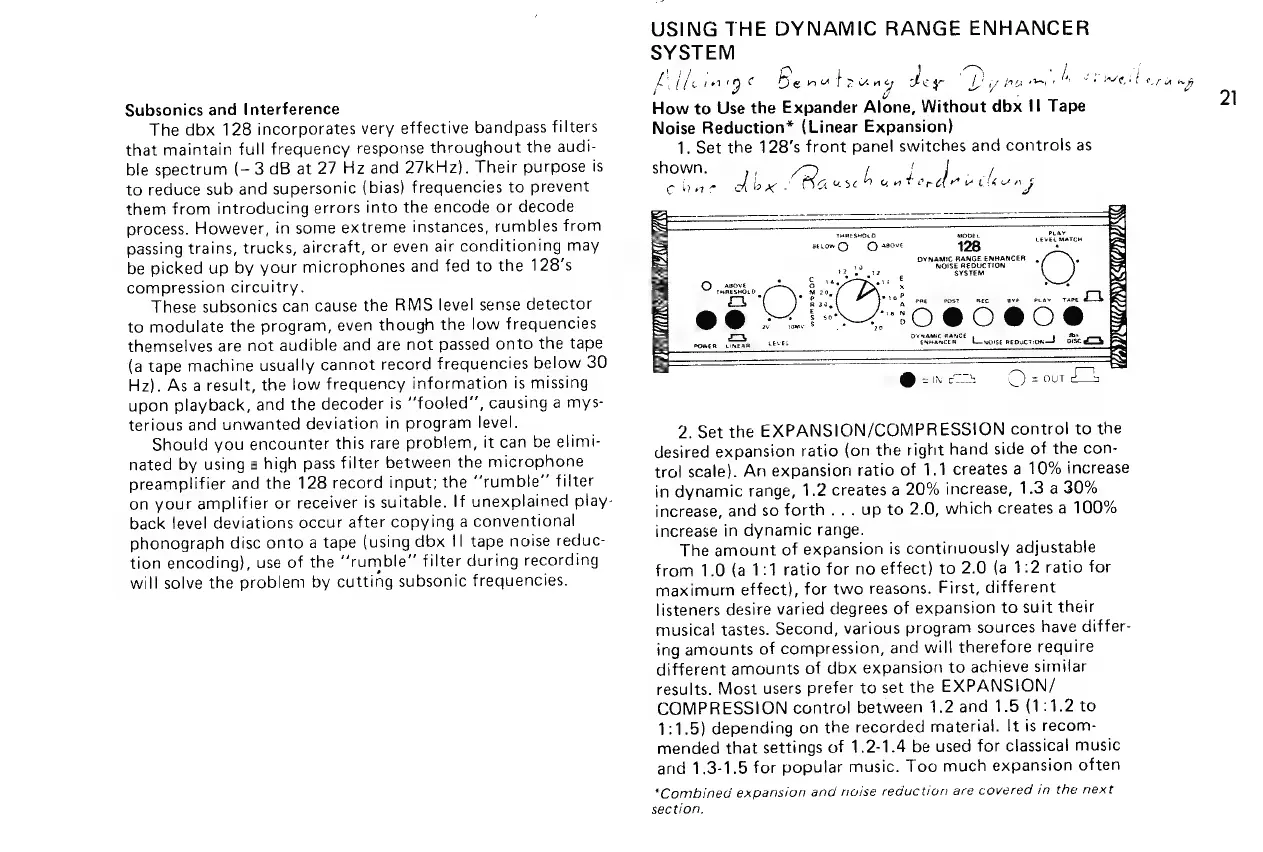
1.
Set the
128’s
front
panel
switches
and
controls
as
shown.
f
t
Om
- 8
Chas
dng
Ba
eeeis
eaatbovdd
a
tral
ng
Seat!
ere
“p
<a
-—-
-———-
=
RS
RSI
PLAY
SS
THRESHOLD.
aODEL
deuce
=
EC
MATCH
secon)
©
asove
128
te
BN
DYNAMIC
RANGE
ENHANCER,
*
ES
19
NOISE
REDUCTION
aS
<
Me
as
gh?
¢
SYSTEM
Koa
OQ
|
asove
:
§
4,
ee
&
Ww
7
oad
THRESHOLD
M20,
%
aC
Oe
niet
mt
Zz
faa
ene
a
ee
=
E
188
=e
@
SEN
=
way
§
3
=
m7
DTRAMIC
RANE
ES
BX
owen
cinean
tEVEE
exmancer
Loneise
nepucton—$
ose
Lob
=
EY
say
CTR
Cc)
2
@enc
©)
=
out
4
2.
Set
the
EXPANSION/COMPRESSION
control
to
the
desired
expansion
ratio
(on
the
right
hand
side
of
the
con-
trol
scale).
An
expansion
ratio
of
1.1
creates
a
10%
increase
in
dynamic
range,
1.2
creates
a
20%
increase,
1.3
a
30%
increase,
and
so
forth...
up
to
2.0,
which
creates
a
100%
increase
in
dynamic
range.
The
amount
of
expansion
is
continuously
adjustable
from
1.0
(a
1:1
ratio
for
no
effect)
to
2.0
(a
1:2
ratio
for
maximum
effect),
for
two
reasons.
First,
different
listeners
desire
varied
degrees
of
expansion
to
suit
their
musical
tastes.
Second,
various
program
sources
have
differ-
ing
amounts
of
compression,
and
will
therefore
require
different
amounts
of
dbx
expansion
to
achieve
similar
results.
Most
users
prefer
to
set
the
EXPANSION/
COMPRESSION
control
between
1.2
and
1.5
(1:1.2
to
1:1.5)
depending
on
the
recorded
material.
It
is
recom-
mended
that
settings
of
1.2-1.4
be
used
for
classical
music
anid
1.3-1.5
for
popular
music.
Too
much
expansion
often
*Combined
expansion
and
noise
reduction
are
covered
in
the
next
section.

Related product manuals