EasyManua.ls Logo

dbx 128 - Playback with Noise Reduction and Expansion

dbx 128
42 pages
Print Icon
To Next Page IconTo Next Page
To Previous Page IconTo Previous Page
Loading...
22
results
in
the
audible
variation
of
background
noise
that
is
usually
described
as
‘‘breathing”
or
‘“‘pumping.”’
One
way
to
adjust
the
control
is
to
increase
the
amount
of
expansion
until
it
sounds
extreme,
then
back
off
a
little.
3.
Set
the
LEVEL
control
to
a
point
where
the
BELOW
THRESHOLD
and
ABOVE
THRESHOLD
indicators
are
amber
during
quiet
passages
and
red
during
loud
passages.
The
numbers
around
the
LEVEL
control
refer
to
the
actual
input
voltage
(the
‘‘threshold”’)
at
which
the
128
decides
whether
to
expand
upward
(increase
the
volume)
or
expand
downward
(decrease
the
volume
and
the
noise).
When
the
BELOW
THRESHOLD
LED
is
on,
the
128
is
decreasing
the
program
level,
and
when
the
ABOVE
THRESHOLD
LED
is
on,
the
128
is
increasing
the
program
level.
How
to
Playback
Using
dbx
II
Tape
Noise
Reduction
Plus
Expansion
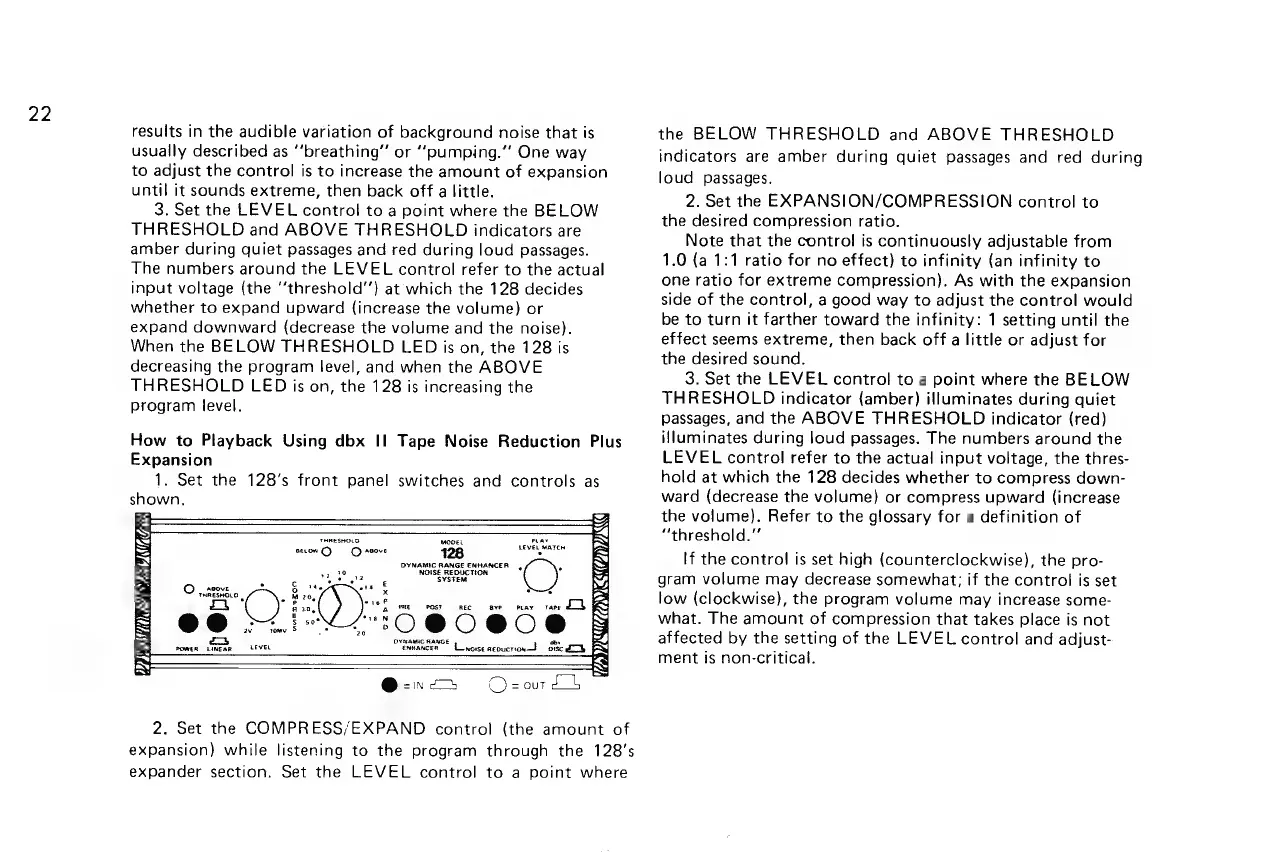
1.
Set
the
128’s
front
panel
switches
and
controls
as
shown,
HANS
iN
I
THRESHOLO
ase
ray
Sy
scion)
C)
sore
128
Level
Maren
BN
DYNAMIC
RANGE
ENHANCER,
RS
v2
3e
NOISE
REDUCTION
NS
é
Boe
Toe
SYSTEM
S
ABOVE
Pe
te
ots
|S
OBS
Rods,
x
“st
Ze
Pe
abe
a
Zi
Raa,
PRE
nec ave
omar
rare
Db
i
3
=
@@
>.
P30
@0C0e0C®
=
w
omy
§
=
ca
evaasnieanst
BS
owen
1imear
LEVEL
enmancer
Linose
aepucron—}
oisc
Lob
R
ae:
iY
@-.—
OQ)
=
our
E14
2.
Set
the
COMPRESS/EXPAND
control
(the
amount
of
expansion)
while
listening
to
the
program
through
the
128’s
expander
section.
Set
the
LEVEL
control
to
a
point
where
the
BELOW
THRESHOLD
and
ABOVE
THRESHOLD
indicators
are
amber
during
quiet
passages
and
red
during
loud
passages.
2.
Set
the
EXPANSION/COMPRESSION
control
to
the
desired
compression
ratio.
Note
that
the
control
is
continuously
adjustable
from
1.0
(a
1:1
ratio
for
no
effect)
to
infinity
(an
infinity
to
one
ratio
for
extreme
compression),
As
with
the
expansion
side
of
the
control,
a
good
way
to
adjust
the
control
would
be
to
turn
it
farther
toward
the
infinity:
1
setting
until
the
effect
seems
extreme,
then
back
off
a
little
or
adjust
for
the
desired
sound.
3.
Set
the
LEVEL
control
to
a
point
where
the
BELOW
THRESHOLD
indicator
(amber)
illuminates
during
quiet
passages,
and
the
ABOVE
THRESHOLD
indicator
(red)
illuminates
during
loud
passages.
The
numbers
around
the
LEVEL
control
refer
to
the
actual
input
voltage,
the
thres-
hold
at
which
the
128
decides
whether
to
compress
down-
ward
(decrease
the
volume)
or
compress
upward
(increase
the
volume).
Refer
to
the
glossary
for
a
definition
of
“threshold.”
If
the
contro!
is
set
high
(counterclockwise),
the
pro-
gram
volume
may
decrease
somewhat;
if
the
control
is
set
low
(clockwise),
the
program
volume
may
increase
some-
what.
The
amount
of
compression
that
takes
place
is
not
affected
by
the
setting
of
the
LEVEL
control
and
adjust-
ment
is
non-critical.

Related product manuals