EasyManua.ls Logo

dbx 128 - How to Use the Peak Unlimiter;Peak Limiter; Quadraphonic Operation

dbx 128
42 pages
Print Icon
To Next Page IconTo Next Page
To Previous Page IconTo Previous Page
Loading...
How
to
Use
the
Peak
Unlimiter/Peak
Limiter
1.
Set
the
128’s
front
panel
switches
and
controls
as
shown.
THRESHOLD
ODE.
szLon
©)
©
snove
1
DYNAMIC
RANGE
ENHANCER,
ie
py
be
NOISE
REDUCTION
Zo
gt?
SYSTEM
Pay
Levey
Mare
Pouxm
re)
ve
*
§
ws
HBSS.
|
Bo,
8
aise
mo
Bia
ee
ee
oe
3
.
@o
1"
“sOOe0eO
~
rom
5
S
OG
Senaaite
wane
oe
sosigh,
Geet
wb
tenancts
Liwostrcoucnosl
oe
Lh
Ona
Osordt
2.
Adjust
the
COMPRESSION/EXPANSION
control
to
the
desired
expansion
or
compression
ratio.
For
peak
unlimiting,
set
expansion
between
1.4
and
1.6.
For
peak
limiting,
set
compression
at
a
relatively
high
ratio
(10.0
or
higher).
3.
Adjust
the
LEVEL
control
so
that
the
ABOVE
THRESHOLD
indicator
(red)
illuminates
only
on
musical
peaks.
When
peak
limiting,
compress
only
the
highest
peaks
of
the
program
and
the
effect
will
be
less
noticeable.
Quad
Operation
With
two
128’s
you
can
expand
a
quad
recording
or
FM
broadcast
and
gain
the
same
benefits
you
would
in
stereo
with
a
single
128.
Connecting
the
two
128’s
together
at
their
QUAD
CONNECTORS
allows
the
circuits
of
the
two
units
to
“‘track’’
each
other
so
that
the
‘‘quad
image”
will
not
shift
unnaturally.
1.
Set
up
the
two
128’s
‘normally,
using
one
for
the
front
two
channels,
and
the
other
for
the
rear
two
channels.
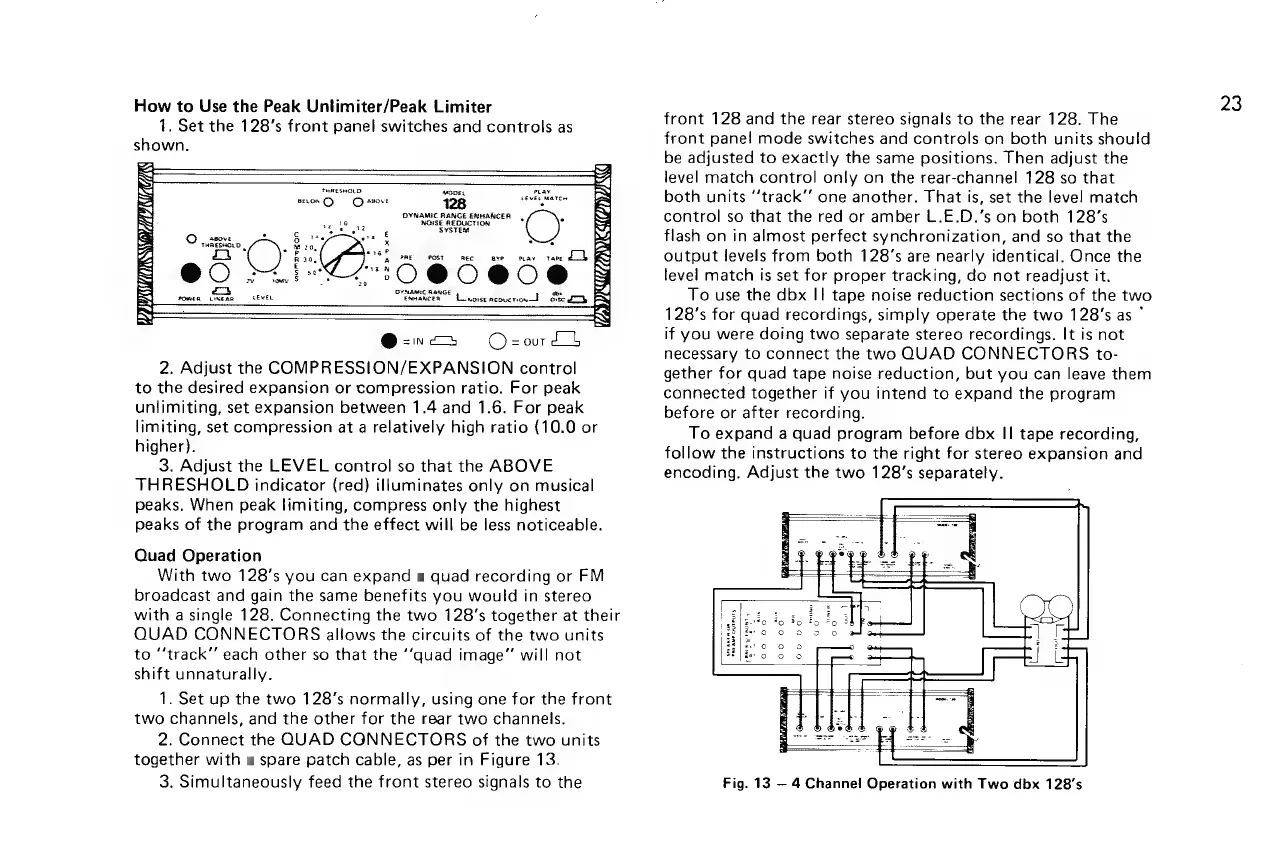
2.
Connect
the
QUAD
CGNNECTORS
of
the
two
units
together
with
a
spare
patch
cable,
as
per
in
Figure
13.
3.
Simultaneously
feed
the
front
stereo
signals
to
the
23
front
128
and
the
rear
stereo
signals
to
the
rear
128.
The
front
panel
mode
switches
and
controls
on
both
units
should
be
adjusted
to
exactly
the
same
positions.
Then
adjust
the
level
match
control
only
on
the
rear-channel
128
so
that
both
units
“‘track’’
one
another.
That
is,
set
the
level
match
control
so
that
the
red
or
amber
L.E.D.’s
on
both
128's
flash
on
in
almost
perfect
synchronization,
and
so
that
the
output
levels
from
both
128’s
are
nearly
identical.
Once
the
level
match
is
set
for
proper
tracking,
do
not
readjust
it.
To
use
the
dbx
I!
tape
noise
reduction
sections
of
the
two
128’s
for
quad
recordings,
simply
operate
the
two
128’s
as
°
if
you
were
doing
two
separate
stereo
recordings.
It
is
not
necessary
to
connect
the
two
QUAD
CONNECTORS
to-
gether
for
quad
tape
noise
reduction,
but
you
can
leave
them
connected
together
if
you
intend
to
expand
the
program
before
or
after
recording.
To
expand
a
quad
program
before
dbx
II
tape
recording,
follow
the
instructions
to
the
right
for
stereo
expansion
and
encoding.
Adjust
the
two
128’s
separately.
Fig.
13
4
Channel
Operation
with
Two
dbx
128’s

Related product manuals