EasyManua.ls Logo

dbx 128 - HOW TO SET UP COMBINATION APPLICATIONS; Recording with Noise Reduction and Expansion; Peak Limiting During dbx Decoding

dbx 128
42 pages
Print Icon
To Next Page IconTo Next Page
To Previous Page IconTo Previous Page
Loading...
24
HOW
TO
SET
UP
COMBINATION
APPLICATIONS
:
‘a
epee
wernt
Aiea
«
bedicrany
haw
a
Tape
Noise
Reduction
plus
any
one
of
the
following:
expansion,
peak
expansion
(unlimiting),
compression
or
peak
compression
ape.
t
f
uf
tich
ery
tiger
ghow
et
PR
28
bP
owed
cw
to
Record
Using
adios
I!
Tape
Noise
Reduction
Plus
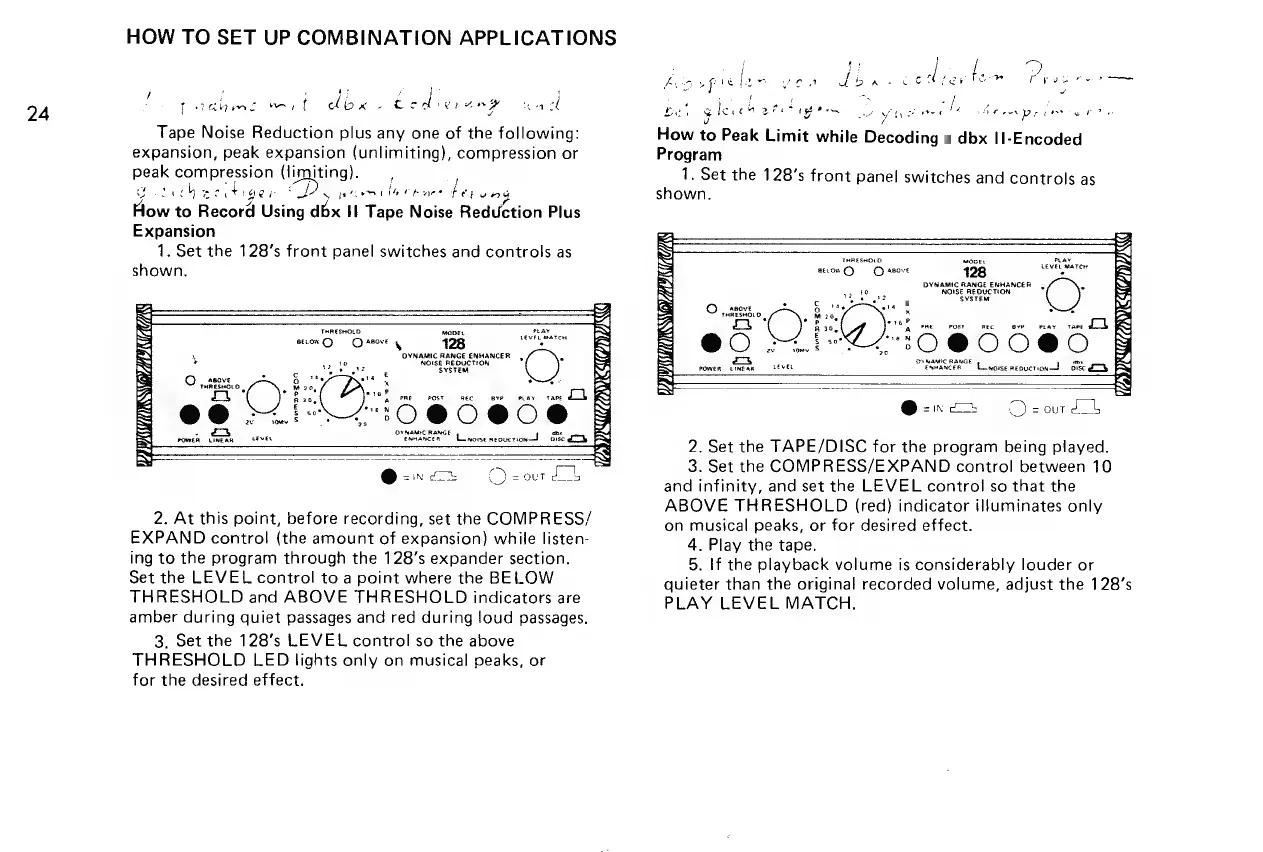
Expansion
1.
Set
the
128’s
front
panel
switches
and
controls
as
shown.
THRESHOLD
pa
pLay
=
LEVEL
MATCH
arrow
QQ
asove
-
jess
DYNAMIC
RANGE
fF
romen
CINEAn
TRUAkEE
RL
woisemeogonon:
2.
At
this
point,
before
recording,
set
the
COMPRESS/
EXPAND
control
(the
amount
of
expansion)
while
listen-
ing
to
the
program
through
the
128’s
expander
section.
Set
the
LEVEL
control
to
a
point
where
the
BELOW
THRESHOLD
and
ABOVE
THRESHOLD
indicators
are
amber
during
quiet
passages
and
red
during
loud
passages.
3.
Set
the
128’s
LEVEL
control
so
the
above
THRESHOLD
LED
lights
only
on
musical
peaks,
or
for
the
desired
effect.
!
7
,
7
Act
ape
l
ee
or!
dings
vet
ize
tom
rae
'
bet
glerehetetiges
ne
hte
Piteg
RE,
nol
Dig
getting
ae
i
ft
How
to
Peak
Limit
while
Decoding
a
dbx
Il-Encoded
Program
1,
Set
the
128’s
front
panel
switches
and
controls
as
shown.
)
7
THRESHOLD
mooe:
Play
LEVEL
MaToH
ation)
©
asove
1
ale
DYNAMIC
RANGE
ENHANCER
i
NOISE
REDUCTION
SYSTEM
ate
\
x
*
ove?
A
PRE
POST
RE
BYP
PLAY
«TAPE
Mastex
Torey
Yom
Dynamic
RANGE
owen
oe
LeveL
Ena!
Linoise
reouction—d
osc
ELS
323;
aie
BC
;
*
som
noma
vgn
@-.—
OQ
sour
Z4
2.
Set the
TAPE/DISC
for
the
program
being
played.
3.
Set
the
COMPRESS/EXPAND
control
between
10
and
infinity,
and
set
the
LEVEL
control
so
that
the
ABOVE
THRESHOLD
(req)
indicator
illuminates
only
on
musical
peaks,
or
for
desired
effect.
4.
Play
the
tape.
5.
tf
the
playback
volume
is
considerably
louder
or
quieter
than
the
original
recorded
volume,
adjust
the
128’s
PLAY
LEVEL
MATCH.

Related product manuals