EasyManua.ls Logo

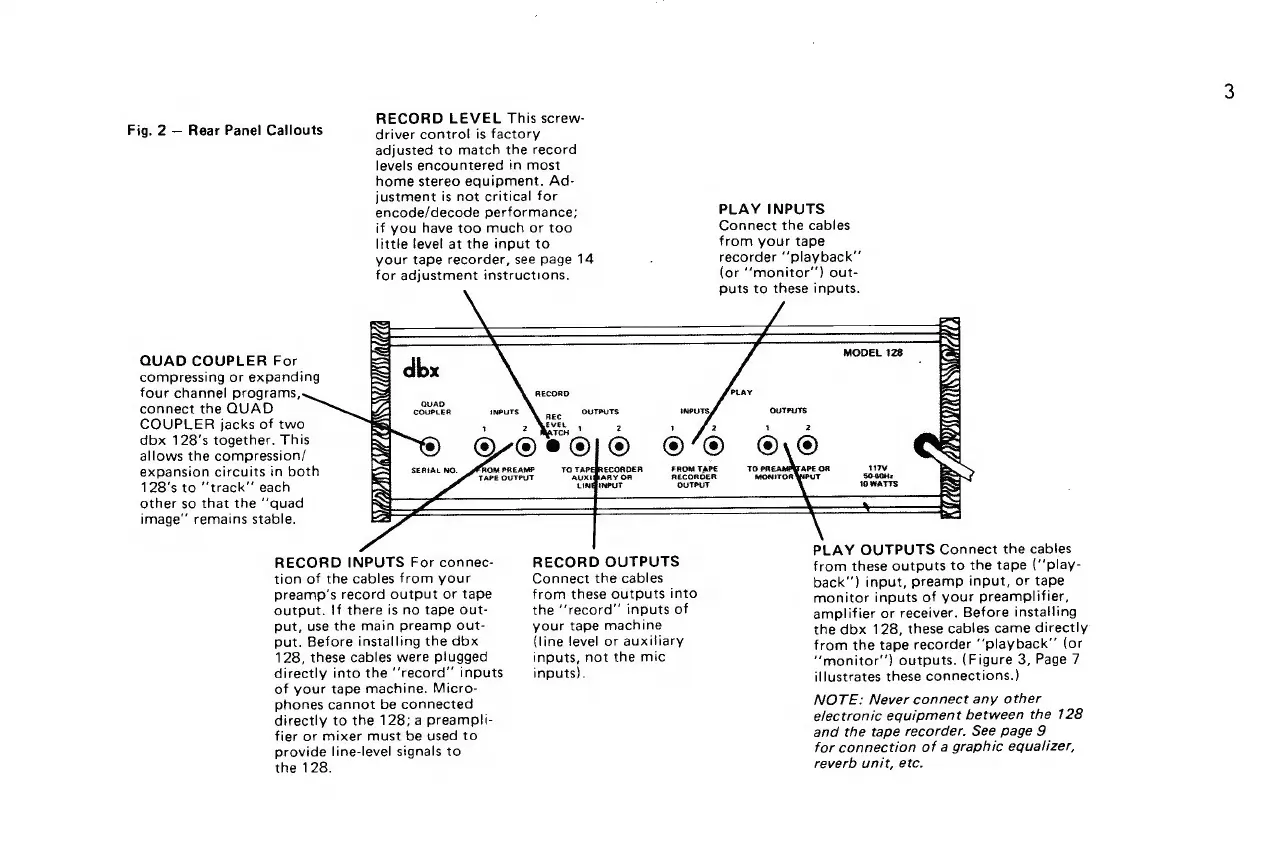
dbx 128 - Rear Panel Connections and Controls

dbx 128
42 pages
Print Icon
To Next Page IconTo Next Page
To Previous Page IconTo Previous Page
Loading...
.
RECORD
LEVEL
This
screw-
Fig.
2
Rear
Panel
Callouts
driver
control
is
factory
adjusted
to
match
the
record
levels
encountered
in
most
home
stereo
equipment.
Ad-
justment
is
not
critical
for
encode/decode
performance;
PLAY
INPUTS
if
you
have
too
much
or
too
Connect
the
cables
little
level
at
the
input
to
from
your
tape
your
tape
recorder,
see
page
14
:
recorder
“playback”
for
adjustment
instructions.
(or
‘‘“monitor’’)
out-
puts
to
these
inputs.
q
4
WH
QUAD
COUPLER
For
compressing
or
expanding
four
channel
programs,
connect
the
QUAD
COUPLER
jacks
of
two
dbx
128’s
together.
This
allows
the
compression/
expansion
circuits
in
both
128’s
to
track”
each
other
so
that
the
‘‘quad
image”
remains
stable.
if
}
RECORD
HOSS
LEANING
i
ROM
PREAMP
TO
TAPEBRECORDER
FROM
TAPE
TAPE
OUTPUT
AUXEBARY
OR
RECORDER
LINGINPUT
OUTPUT
SERIAL
NO.
A
f
py
WY
PLAY
OUTPUTS
Connect
the
cables
RECORD
INPUTS
For
connec-
RECORD
OUTPUTS
from
these
outputs
to
the
tape
(‘’play-
tion
of
the
cables
from
your
Connect
the
cables
back"’)
input,
preamp
input,
or
tape
preamp’s
record
output
or
tape
from
these
outputs
into
monitor
inputs
of
your
preamplifier
output.
If
there
is
no
tape
out-
the
“record”
inputs
of
amplifier
or
receiver.
Before
installing
put,
use
the
main
preamp
out-
your
tape
machine
the
dbx
128,
these
cables
came
directly
put.
Before
installing
the
dbx
(line
level
or
auxiliary
from
the
tape
recorder
“playback”
(or
128,
these
cables
were
plugged
inputs,
not
the
mic
“monitor’’)
outputs.
(Figure
3,
Page
7
directly
into
the
‘‘record’’
inputs
inputs).
illustrates
these
connections.)
of
your
tape
machine.
Micro-
7
phones
cannot
be
connected
NOTE:
Never
connect
any
other
directly
to
the
128;
a
preampli-
electronic
equipment
between
the
128
fier
or
mixer
must
be
used
to
and
the
tape
recorder.
See
page
9
provide
line-level
signals
to
for
connection
of
a
graphic
equalizer,
the
128.
reverb
unit,
etc.

Related product manuals