EasyManua.ls Logo

dbx 128 - BRIEF OPERATING INSTRUCTIONS; Playing dbx-Encoded Discs; Making dbx-Encoded Tapes; Playing dbx-Encoded Tapes

dbx 128
42 pages
Print Icon
To Next Page IconTo Next Page
To Previous Page IconTo Previous Page
Loading...
BRIEF
OPERATING
INSTRUCTIONS
To
Play
a
dbx-Encoded
Phonograph
Disc
1.
Set
your
preamplifier’s
INPUT
SELECTOR
Switch
to
PHONO,
and
the
TAPE
MONITOR
Switch
to
TAPE.
2.
Press
the
128’s
DISC,
PLAY
and
POST
Switches,
and
set
the
COMPRESS/EXPAND
Control
to
the
‘’1.0’
Position.
3.
Play
the
disc
and
adjust
the
preamplifier’s
VOLUME
Control
for
the
desired
listening
volume.
If
the
volume
is
considerably
louder
or
quieter
than
normal,
adjust
the
128’s
PLAY
LEVEL
MATCH
Control.
To
Make
a
dbx-Encoded
Tape
1.
Set
your
preamplifier’s
INPUT
SELECTOR
Switch
to
the
appropriate
source
(i.e.
PHONO,
TUNER
or
AUX),
and
the
TAPE
MONITOR
Switch
to
TAPE.
2.
Press
the
128’s
TAPE,
REC
and
POST
Switches,
and
set
the
COMPRESS/E
XPAND
Control
to
the
‘1.0’
Position,
Do
not
switch
the
128
while
recording.
3.
With
your
tape
machine
in
the
Record
Ready
(Pause)
mode,
set
recording
levels
for
peaks
typically
3
to
6
VU
lower
than
the
levels
normally
used.
(With
dbx
processing,
significantly
lower
recording
levels
are
often
required
to
avoid
tape
saturation,
particularly
in
cassette
recording.
Experiment
during
the
initial
setup
to
find
the
appropriate
levels.)
To
Play
a
dbx-Encoded
Tape
1.
Set
your
preamplifier’s
TAPE
MONITOR
Switch
to
TAPE.
2.
Press
the
128’s
TAPE,
PLAY
and
PRE
Switches,
and
set
the
COMPRESS/EXPAND
Control
to
the
‘1.0’
position.
3.
Play
the
tape.
If
the
volume
is
considerably
louder
or
quieter
than
normal,
adjust
the
128’s
PLAY
LEVEL
MATCHControl.
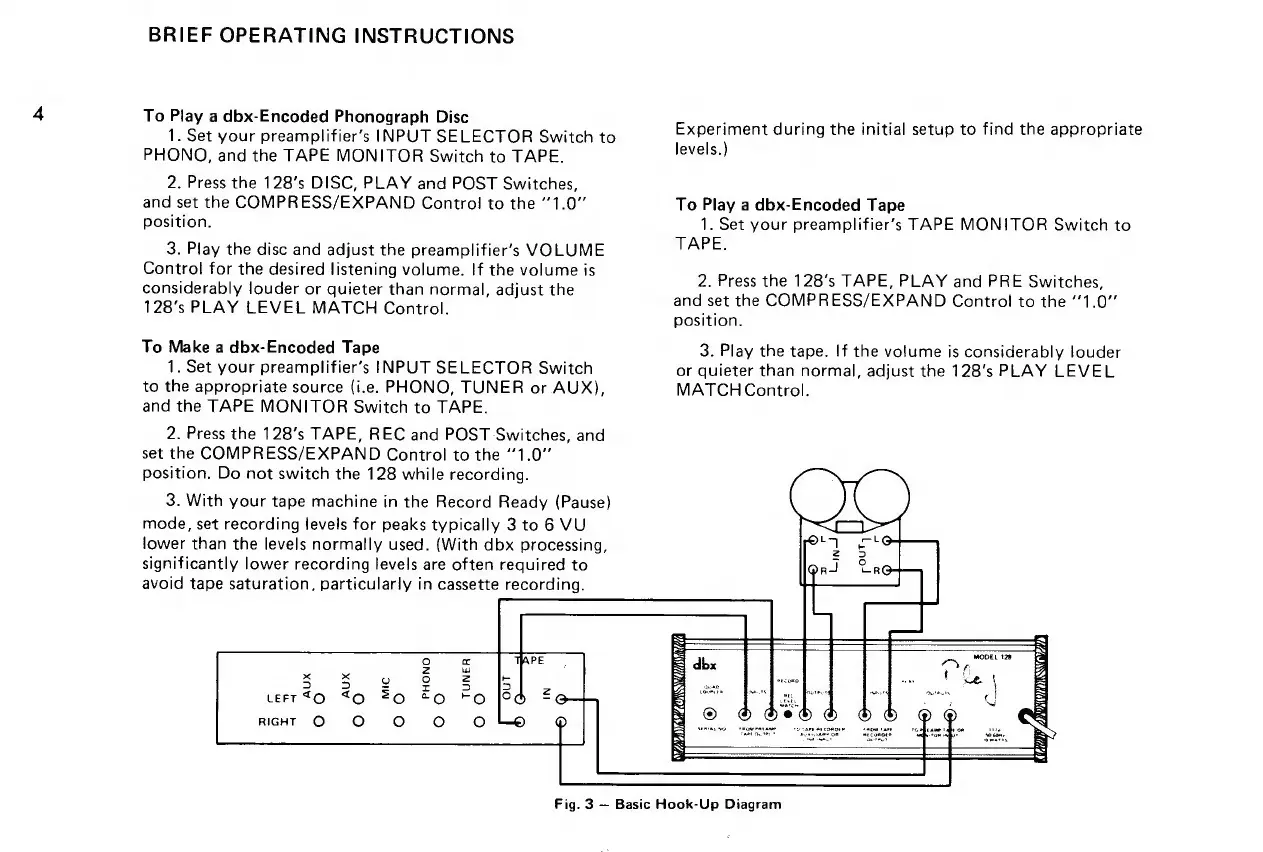
Fig.
3
Basic
Hook-Up
Diagram

Related product manuals