EasyManua.ls Logo

dbx 363X - Page 13

dbx 363X
34 pages
Print Icon
To Next Page IconTo Next Page
To Previous Page IconTo Previous Page
Loading...
Connecting
The
363X
To
Your
System
Studio
Applications
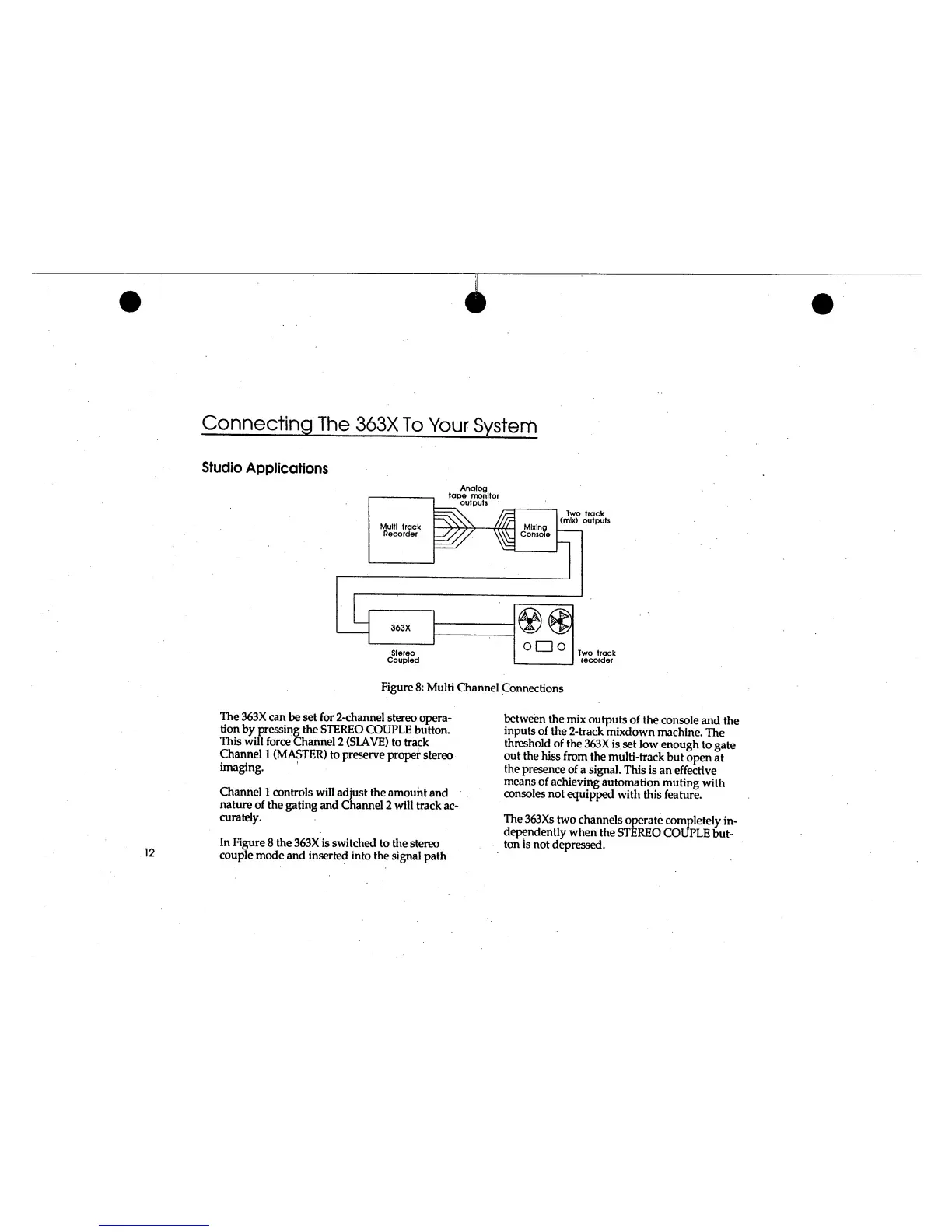
Figure
8: Multi
Channel
Connections
The
363X can
be set for
2-channel
stereo
opera-
tion
by pressing
the
STEREO
COUPLE
button.
This
will
force Channel
2
(SLAVE)
to track
Channel
1
(MASTER)
to
preserve
proper
stereo
imaging.
Channel
1
controls will
adjust
the
amount
and
nature
of the
gating
and
Channel
2
will
track
ac-
curately.
In
Figure
8
the
363X
is switched
to the
stereo
couple
mode
and
inserted into the
signal
path
between
the
mix
outputs
of
the console
and
the
inputs
of
the
2-track
mixdown
machine.
The
threshold
of
the
363X
is
set low enough
to
gate
out
the
hiss
from
the
multi-track
but
open
at
the
presence
of
a
signal.
This
is an effective
means
of
achieving
automation
muting
with
consoles
not
equipped
with
this
feature.
The
363Xs
two
channels
operate
completely
in-
dependently
when
the
STEREO
COUPLE
but-
ton
is
not
depressed.

Related product manuals