EasyManua.ls Logo

dbx 363X - Special Connections; Using the Key Input for Gating Control

dbx 363X
34 pages
Print Icon
To Next Page IconTo Next Page
To Previous Page IconTo Previous Page
Loading...
Special
Connections
(OPTIONAL)
dbx
363X
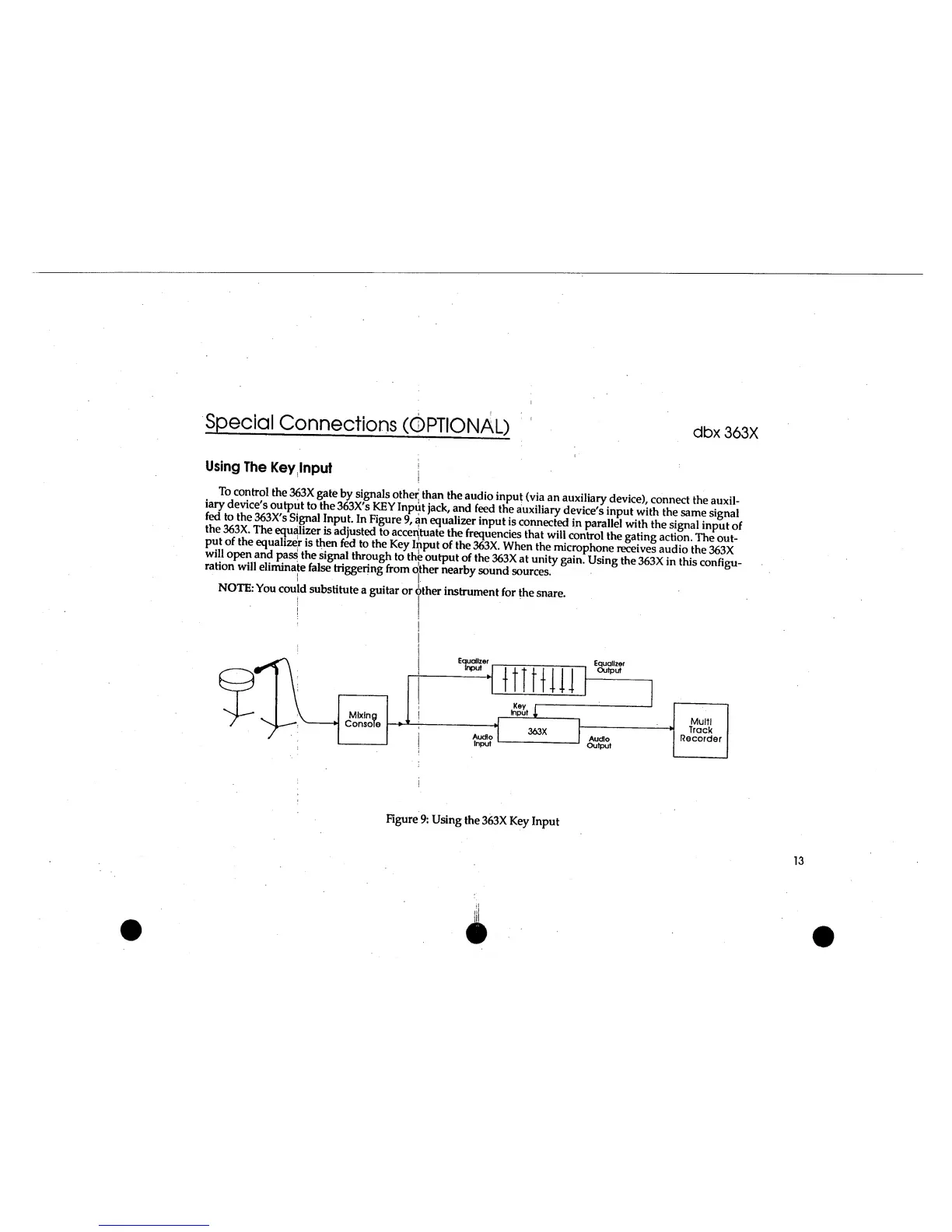
Using
The
Key
Input
|
iarv^e^c^^ouhwf^fh*^S^Y^f^p
S
v
,
T^
e
^
ft"]**
®u
.
di
°
in
P
u
»
<via
an
auxiliary
device),
connect
the
auxil-
fJ7.
,
to
.
t
J*
e
363
*
s
KEY
Ir
y
ut
J
ack
'
and
feed
the
auxiliary
device's
input
with
the
same
signal
tS SlYTh
3X
Sl
r"
a
np
!J
t
nP,gUre
9
'
an
e<
l
ualizer
in
P
ut
is
connected
in
parallel
with
the
signal
input
of
™fi^
3
»h‘
Th
B
adjusted
to
accentuate
the
frequencies
that
will
control
the
gating
action.
The
P
out-
put
of
the
equalizer
is
then
fed
to
the
Key
Input
of
the
363X.
When
the
microphone
receives
audio
the
363X
wiU
open
and
pass
the
signal
through
to
the
output
of
the
363X
at
unity
gaining
the
363X in
thisconfieu-
rahon
will
eliminate
false
triggering
from
other
nearby
sound
sources.
'
.
I-
NOTE:
You
could
substitute
a
guitar
or
other
instrument
for
the
snare.
Equalizer
Input
-
Equalizer
Output
Audio
Input
Key
Input
,,
:
1
Multi
Track
Recorder
363X
Audio
Output
Figure
9:
Using
the
363X
Key
Input

Related product manuals