EasyManua.ls Logo

dbx 363X - Single Unit Rack Installation

dbx 363X
34 pages
Print Icon
To Next Page IconTo Next Page
To Previous Page IconTo Previous Page
Loading...
Installation
Considerations
dbx
363X
You
will
need:
1
1
1
1
1
4
2
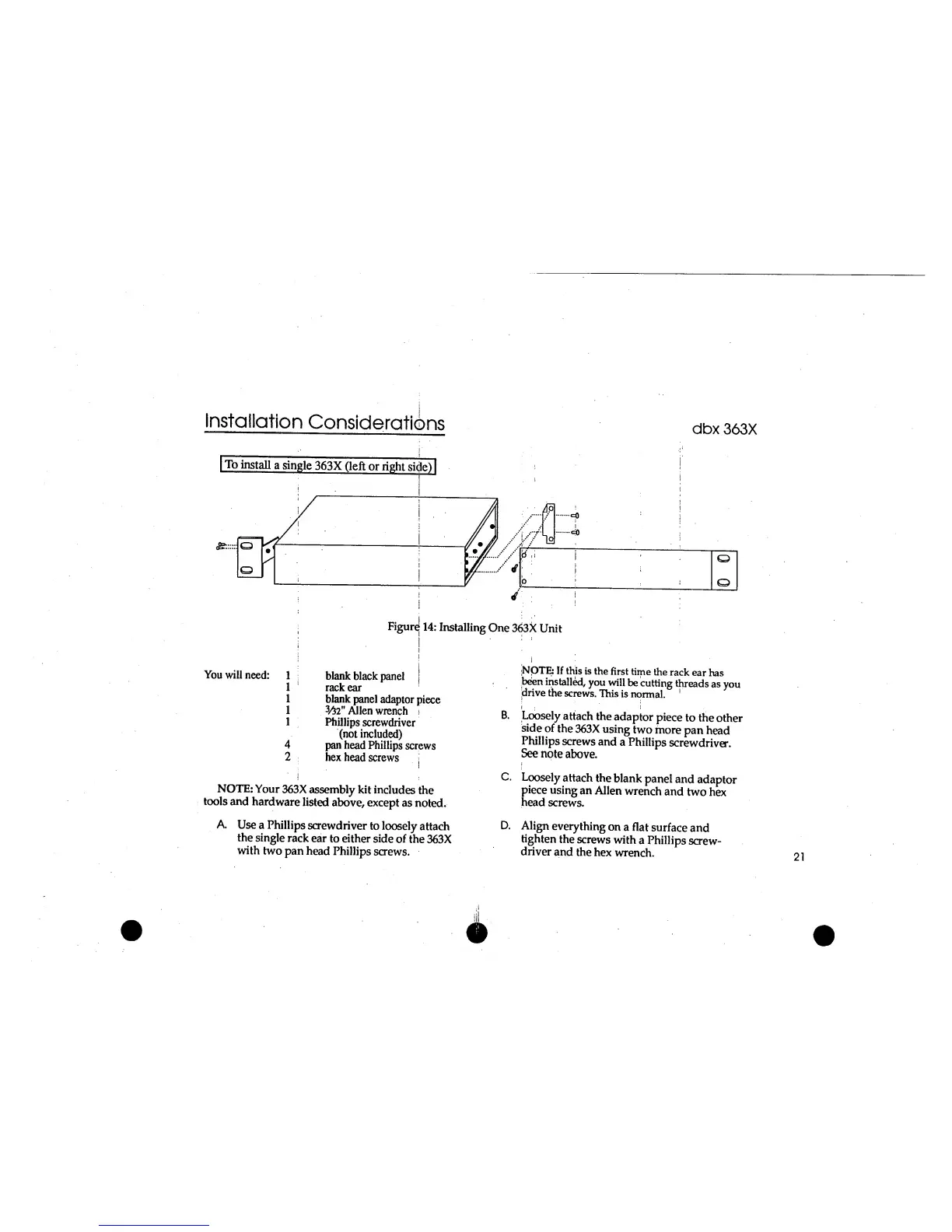
Figure
14:
Installing
One
363X
Unit
blank
black
panel
;
rack ear
blank
panel
adaptor
piece
3
/52
"
Allen
wrench
j
Phillips
screwdriver
(not
included)
pan head Phillips
screws
hex
head
screws
;NQTE:
If
this
is
the
first
time
the
rack
ear
has
been
installed,
you
will
be
cutting
threads
as
you
drive
the
screws.
This
is
normal.
1
i
:
;
;
B.
Loosely
attach
the
adaptor
piece
to
the
other
side
of
the
363X
using
two
more
pan
head
Phillips
screws
and
a Phillips
screwdriver.
See
note
above.
NOTE:
Your
363X
assembly kit
includes
the
tools
and
hardware
listed
above, except
as
noted.
C.
Loosely
attach the
blank
panel
and
adaptor
piece
using
an
Allen
wrench
and
two
hex
head
screws.
A.
Use
a Phillips
screwdriver
to loosely
attach
the
single
rack
ear
to either
side
of
the
363X
with
two
pan
head Phillips
screws.
D.
Align
everything
on a
flat
surface
and
tighten
the
screws
with
a Phillips
screw-
driver
and
the
hex
wrench.

Related product manuals