8
5. QUICK SETUP GUIDE
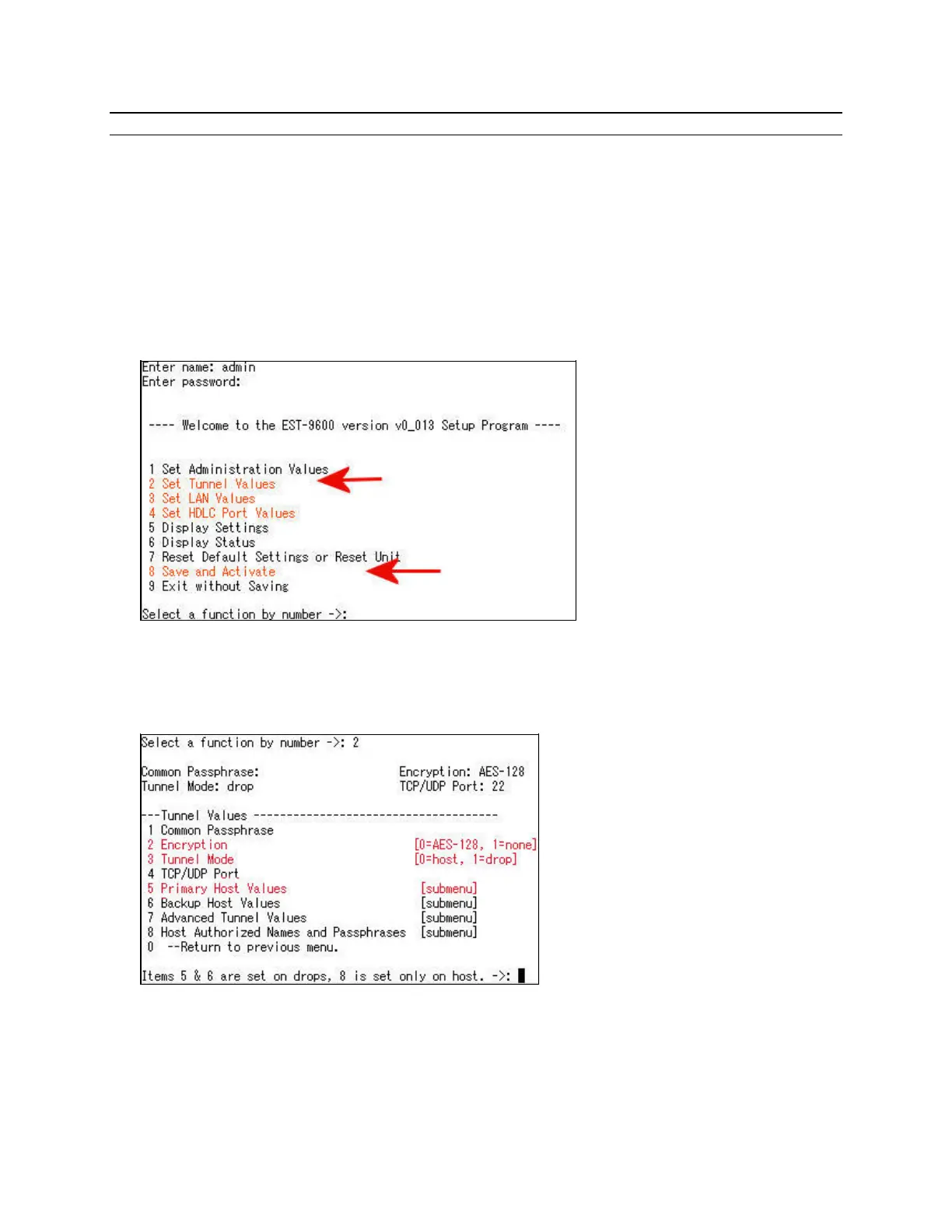
For serial or telnet quick setup, the default user NAME is “admin”. The default PASSWORD is
blank, so enter nothing at the prompt. Just press the “Enter” key to continue. If using telnet, the
default IP address is 192.168.0.96, port number 8000 rather than port 23. For serial connections,
use 9600 bps, 8 data bits, no parity, no flow control. For a quick setup, select the following 4
highlighted menu items. The menus are shown in detail below:
2 Set HDLC Tunnel Values
3 Set Ethernet LAN Values
4 Set HDLC Port Values
8 Save and Activate
The EST-9600 can tunnel in encrypted mode or with no encryption. Menu selection 2 is used if you
wish to change from the default of Encryption ON to NONE. For Tunnel Mode, menu selection 3,
set the Tunnel Mode to either Host or Drop. Drop is the default since most units will be drops in
multi-drop applications. When configuring drops, select “5. Primary Host Values”.
At drops it is necessary to enter the IP address of the host by selecting “5. Primary Host Values”.
Drops “find” the host via the IP address. At the Host unit no address is entered for the drops. The
Host discovers the address of the drop from the drop’s connection request to the host. Menu
selection 5 gives you the menu below where the Primary Host Values are entered.



 To Next Page