
EasyManua.ls Logo

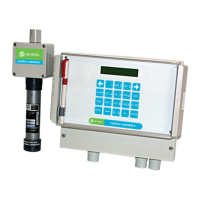
De Nora Capital Controls CHLORALERT 17CA3000 Series - User Manual

De Nora Capital Controls CHLORALERT 17CA3000 Series
84 pages
Print Icon
To Next Page IconTo Next Page
Loading...
- 1 - 325.6610.17
Instruction Manual
Series 17CA3000
Chloralert
TM
Plus Multi-Gas Detector
CAPITAL CONTROLS
®

Table of Contents

Questions and Answers

  • J
    John PhillipsAug 9, 2025
    What to do if De Nora Capital Controls CHLORALERT 17CA3000 Gas Detectors show calibration-related events?
    • R
      robertsbrianAug 9, 2025
      If your De Nora Gas Detectors are showing calibration-related events like 'Fail Zero Cal' or 'Fail Span Cal', you can: 1. Check the sensor housing for dust or contaminants that might be blocking the gas flow. 2. Replace the sensor.
  • J
    James PorterAug 15, 2025
    How to fix moisture in De Nora Gas Detectors sensor housing?
    • A
      Andrea FarrellAug 15, 2025
      To address moisture inside the sensor housing of your De Nora Gas Detectors, ensure the sensor housing cover is correctly oriented.
  • E
    Elizabeth WilcoxAug 21, 2025
    What to do if keypad inactive on De Nora Capital Controls CHLORALERT 17CA3000 Gas Detectors?
    • A
      Amanda NorrisAug 21, 2025
      If the keypad on your De Nora Gas Detectors is inactive, remove the receiver and make sure the keypad ribbon cable is securely attached to the PCB header.
  • T
    Thomas GarnerAug 27, 2025
    Why is there no power or LCD display on De Nora Capital Controls CHLORALERT 17CA3000 Gas Detectors?
    • G
      gomezstaceyAug 27, 2025
      If your De Nora Gas Detectors have no power or the LCD display is not working, check for AC power at the receiver. If there's no power, check for AC power at TB1. If power is present at TB1, inspect the power fuses.
  • B
    Brooke JonesNov 2, 2025
    What to do if De Nora Capital Controls CHLORALERT 17CA3000 show sensor-related events?
    • J
      James MayNov 2, 2025
      If your De Nora Gas Detectors display sensor-related events such as 'Bad sensor id', 'Bad sensor', 'Bad k-value', 'Fail sensor check', 'Bad gen schk', 'Bad id schk', or 'Over range', here’s what you can do: 1. Inspect the sensor housing for any dust or contaminants that might be obstructing gas flow. 2. Verify all interconnection wiring for loose or missing connections. 3. Measure the voltage between terminals 3 and 4. It should be between 12 and 15 VDC. If there's no voltage at the sensor, inspect the corresponding terminals at the Receiver Sensor Interface terminal block TB3. 4. Check the voltage polarity at the Sensor. Terminal 4 should be positive relative to terminal 3. 5. Within 40 seconds after initiating the Sensor Check, measure the voltage across the gas generator. If it ex...

Summary

Safety Summary

General Warnings

Covers general warnings including instruction manuals and electrical hazards.

Specific Warnings

Details specific warnings related to electrical shock hazards and proper installation.

1.0 Introduction

1.3 Specifications

Lists detailed technical specifications for the receiver and sensor/transmitter.

2.0 Installation

3.0 Functional Description

4.0 Start-Up Operation

4.3 Quick Start

Outlines the initial phases of receiver start-up: ID check and warm-up.

5.0 Calibration

5.1 Sensor Calibration

Covers the setup, sources, and procedure for sensor calibration.

5.2 Analog Output Calibration

Details the procedure for calibrating the analog output accuracy using GAIN and OFFSET values.

7.0 Maintenance

7.3 Sensor;Transmitter Replacement

Guides on replacing the gas sensor/transmitter due to drift or malfunction.

7.4 Troubleshooting

Provides guidance on diagnosing and resolving common problems with the gas detection system.

De Nora Capital Controls CHLORALERT 17CA3000 Series Specifications

General IconGeneral
Target GasChlorine (Cl2)
Detection Range0-10 ppm
Measurement Range0-10 ppm
Sensor TypeElectrochemical
Power Supply24 VDC ±10%
Output Signal4-20 mA
EnclosurePolycarbonate
Resolution0.1 ppm
Accuracy± 5% of reading
Operating Temperature-20°C to +50°C (-4°F to +122°F)
Operating Humidity15 to 90% RH (non-condensing)
Enclosure RatingNEMA 4X (IP66)
Sensor Life2 years
Response Time< 60 seconds
Alarm Relays2 SPDT relays

Related product manuals