HOW TO
USE
9
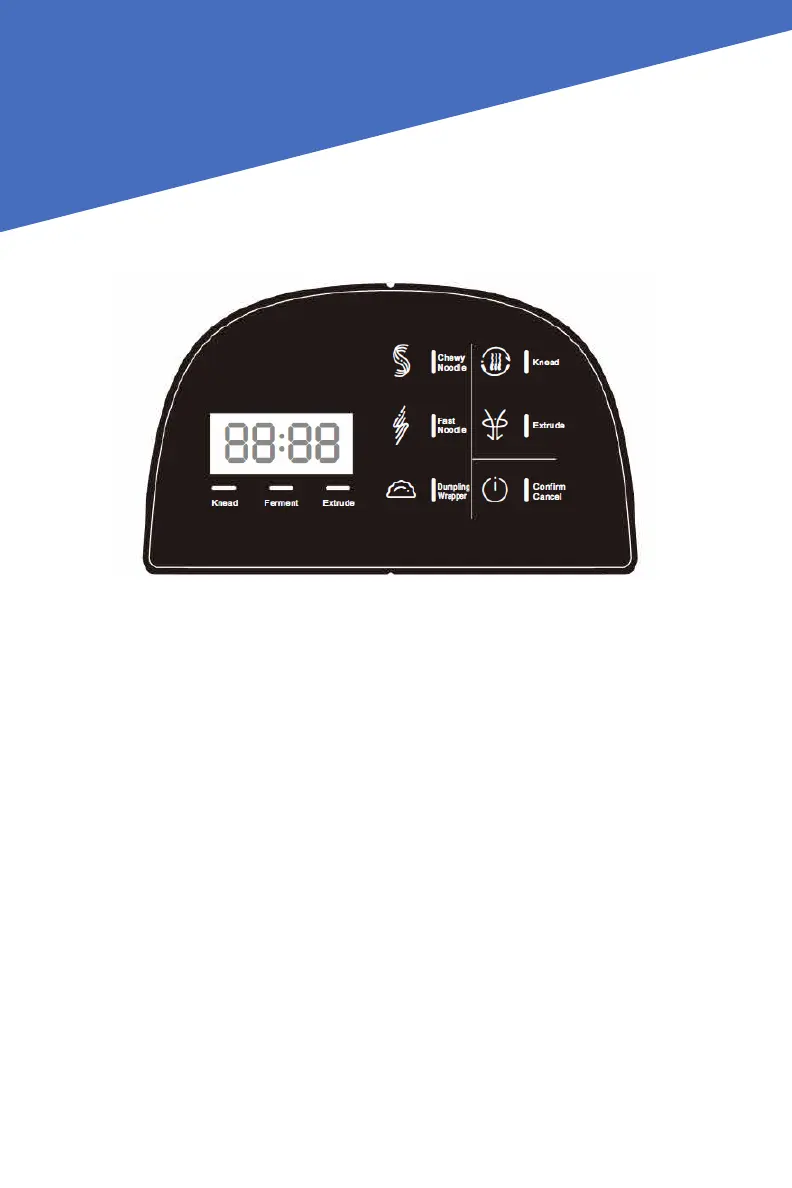
THE CONTROL PANEL AND PROGRAMS
Confirm/Cancel
When connected to the power supply, the machine will beep and display “----“.
The Pasta Maker will enter standby mode in the following situations:
• If any function buttons are pressed, it will display “ON” and enter standby mode
if the Pasta Maker is not operated within 60 seconds.
• The Pasta Maker will stop working and go into standby mode if “Confirm/Can-
cel” is pressed during operation.
Chewy Pasta/Fast Pasta/Dumpling Wrapper
• Select the desired function. The display light will blink. The Pasta Maker is now
on standby mode.
• The Pasta Maker starts operating when “Confirm/Cancel” is pressed.
• After the extrusion process is completed, the Pasta Maker will stop automatical-
ly, and the control panel will display “OFF” and emit a beeping sound to signal
the completion of this process. The extrusion process takes about 15 minutes.


 To Next Page