Connecting to the Gateway Management Pages
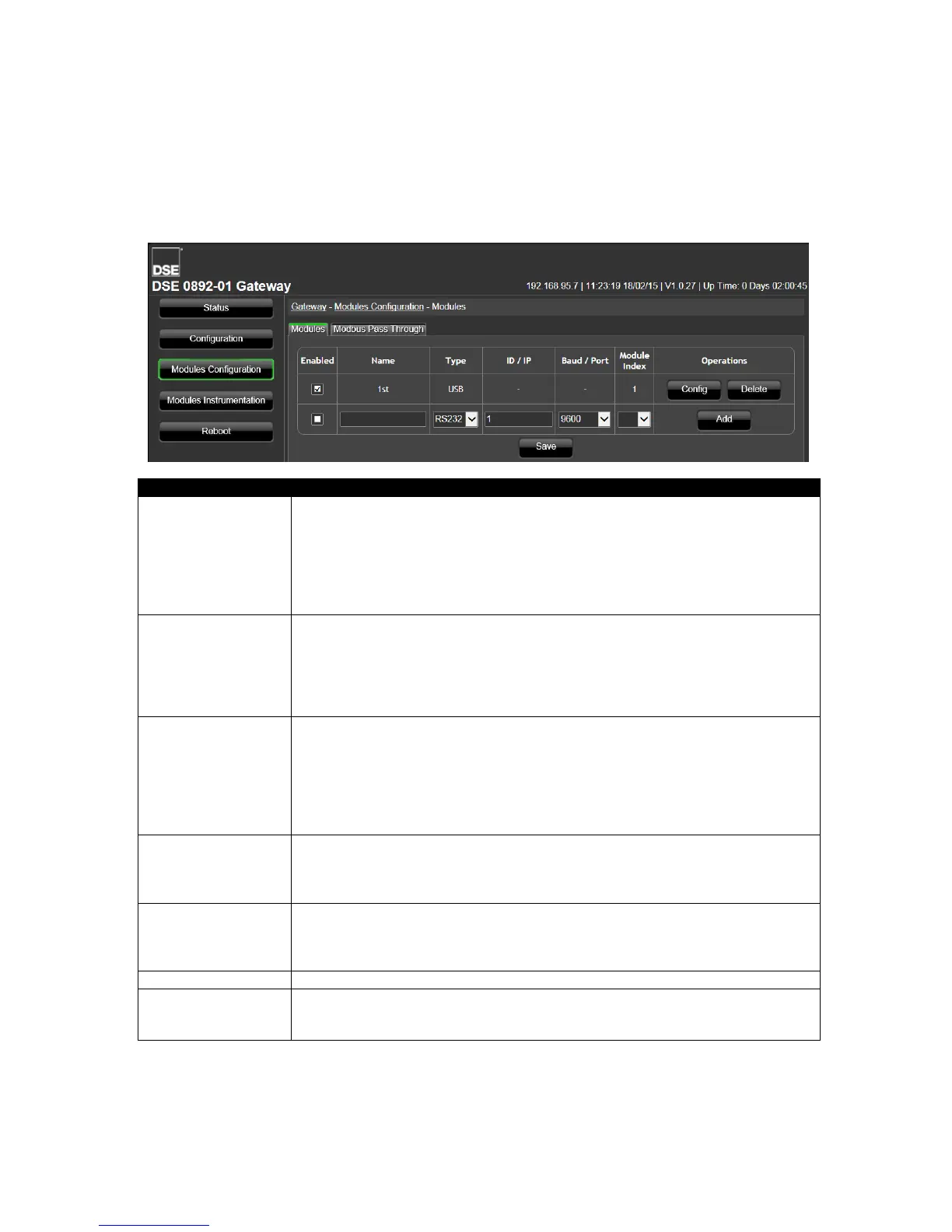
7.3 MODULES CONFIGURATION
This page is used to configure the DSE892 Gateway’s connections to DSE controllers.
Each connected controller has an entry in the table to configure which of the Gateway’s ports are
used for connection to that specific module.
Multiple ports are able to be used at the same for complete flexibility of connection.
Allows the user to activate or deactivate a connection. Ensure any unused
entries in the table are de-activate.
Additionally any controllers no longer communicating with the Gateway must
be de-activated for correct operation of the remaining connections.
= Connection is active.
= Connection is disabled.
Use a meaningful name for each connected controller. For example you could
use the generator name.
Example : Volvo TAD9 Genset2
Once entered, this name is used to create a new page to configure what the
Gateway is to monitor in this application.
Used to select which of the Gateway’s ports are used for connection to this
controller.
RS232
RS485
Ethernet
USB
When Port is set to Ethernet – IP address of the connected controller.
When Port is set to RS232/RS485 – Modbus Slave ID (Address) of the
connected controller.
When Port is set to USB, this item is not available.
When Port is set to Ethernet – TCP port to use for Modbus (usually 502 where
a single controller is connected to the Ethernet port of the Gateway)
When Port is set to RS232/RS485 – Baud rate of the selected port.
When Port is set to USB, this item is not available.
Reference number of the connection.
Config: Click to access the configuration pages for this connection.
Delete: Click to delete this connection.
Add: Click to add a new connection.


 To Next Page