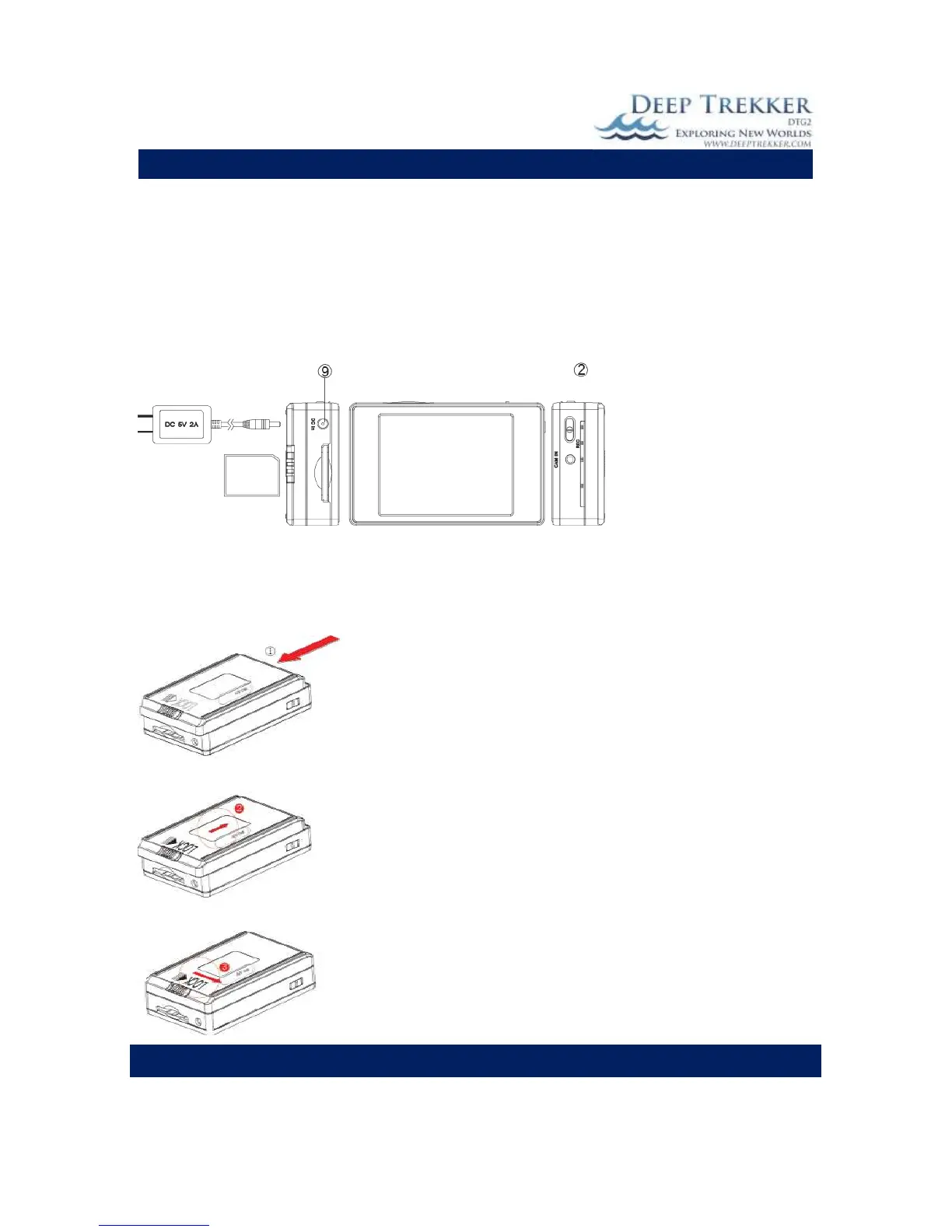
Charging the Battery
1. Connect the charger plug to the DC In Jack (9).
2. Plug the power cord of the charger to an AC wall outlet. The charging starts automatically.
3. The LED Bar (2) will illuminate red to show the device is in charging mode. Charging time
requires about 3 to 4 hours.
4. When charging is complete, the red LED indicator will turn off.
NOTE: You can also connect the DVR to your computer using the USB Cable to charge.
Installing and Removing the Battery
NOTE: This DVR has a removable battery. You can purchase extra batteries depending on your
application. Follow these instructions to remove or replace a battery.
1. To remove the battery, gently push the LOCK switch to the
right side and push the battery pack in the direction of the red
arrow.
2. To install a battery, attach the battery to the DVR and gently
push the battery back in the direction of the red arrow, then
slide the LOCK switch to the left.


 To Next Page