12
BACK TO INDEX
COSMIQ
+
’s battery has an estimated continuous run time of 6 to 7 hours per charge, but given the
various factors that affect battery usage, it is best to exercise caution and charge COSMIQ
+
as often
as possible. The battery will last for 500 full-cycle charges of use before gradually diminishing in
capacity.
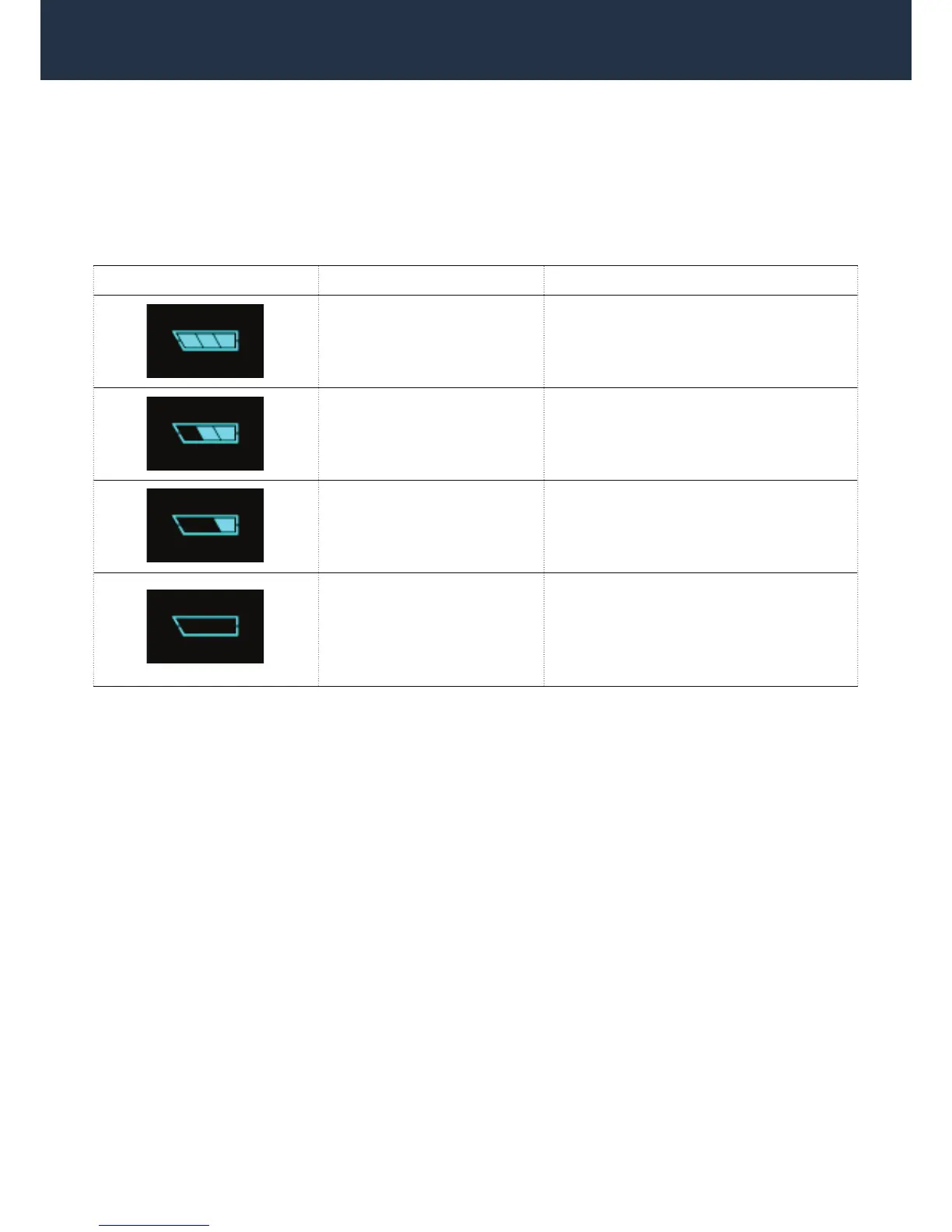
Please see the following table for the technical details related to COSMIQ
+
’s battery status:
Battery Indicator Battery Power Status/Instruction
60% – 100% Battery power is at high level.
30% – 60% Battery power is at medium level.
10% – 30% Battery is at low level.
Charge COSMIQ
+
when possible.
battery indicator ashing
0% – 5% Battery is about to expire. Maximum
15 minutes of dive time remain.
Charge COSMIQ
+
immediately. Do not
attempt to dive.
Please note that when COSMIQ
+
’s battery is extremely low and showing 0 segments, it will beep
once every minute as a reminder that you should charge COSMIQ
+
immediately. It will also beep
once right before it shuts down due to lack of battery power.
WARNING: DO NOT DIVE WITH COSMIQ
+
IF THE BATTERY LEVEL INDICATOR IS DISPLAYING 0
SEGMENTS. Doing so may cause COSMIQ
+
to fail during a dive, and may lead to serious injury or
death.
WARNING: THE ACTUAL STATUS OF THE BATTERY DEPENDS ON THE OVERALL HEALTH OF
THE BATTERY. A number of different factors affect the quality of the battery and therefore the actual
battery power may be lower than indicated by the battery indicator.
4.3 BUTTONS AND NAVIGATION
COSMIQ
+
has two buttons used for navigation and setting selection. The buttons are used in the
same way across all screens.
The left button is the MODE button. Press MODE to cycle through the operating modes and to
conrm setting selections.
The right button is the ADJUST button. Press ADJUST to navigate within modes and to change
settings.
SECTION 4 – OVERVIEW



 To Next Page