87
Cleaning in power-on state
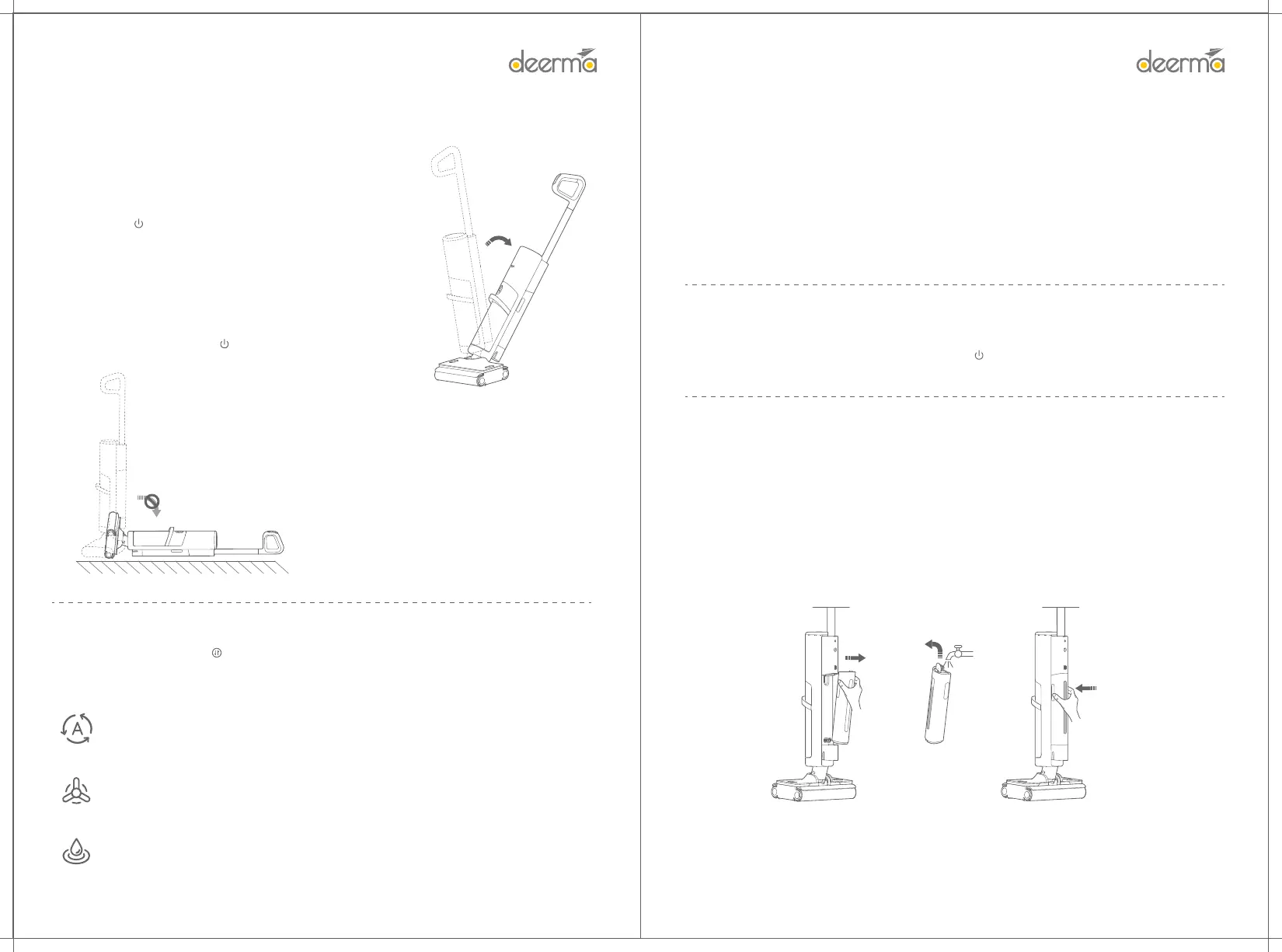
Remove main unit from the base, bend the device body, and
then press the " " key to sta the device.
Caution:
• The product is suitable for hard oors such as oor, ceramic tile
and marble.
• Do not use on the suace of carpets, blankets and other fabrics.
• In case of a fault during use, the main unit will pause for standby
or shut down if the fault is not removed within a ceain period.
After the fault is removed, press " " key to power on again.
Note:
• When the rolling brush is used for the rst time or the
rolling brush is d, it is recommended to rst wet the
rolling brush and then wipe the ground, which can achieve
better cleaning eect.
• Clean the sewage tank in time to avoid odor.
• Do not soak or wash the product.
• To prevent sewage from owing out, do not lay at or
shake the main unit violently! Remove the clean water tank
and sewage tank before cleaning the oor brush.
• Do not suck foam liquid, otherwise it is easy to trigger
the false alarm that sewage tank is full.
Water lling halfway
During the cleaning, when the voice or display screen shows that the water tank is sho of water, you can
manually ll water to the water tank, or you can put the main unit back to the base to automatically ll water.
Manual water filling
1. Hold the two sides of the upper half of the water tank and pull it outward to remove it.
2. Open the cover on the top of the clean water tank, directly fill the clean tap water, and cover the water tank after it
is filled with water.
3. Put the bottom of the clean water tank into the installation slot, and then powerfully press the top of clean water
tank against the body. The tank is installed in place if there is a "click".
During the cleaning, press the " " key to change the cleaning mode: automatic, sterilization and water
absorption.
Change of modes
Automatic mode (daily stain cleaning)
The automatic mode is activated by default in the power-on state. In this mode, the suction
will be adjusted according to the di condition of the ground.
Power mode (stubborn stain cleaning)
In this mode, there is large water output of oor brush and high suction of main unit, which is
suitable for cleaning stubborn stains
Water absorption mode (water stain cleaning)
This mode is suitable for cleaning water stains because the water output of the oor brush is
ve low.
Pause cleaning
During the cleaning, if the device body is upright, the main unit will pause cleaning. Bend the device body
again within 3 minutes to continue the cleaning. Press the " " key again to sta the device after more than 3
minutes.
Di indicator ring
The color of ring will change with the di condition of the substances inhaled
Green: No di
Yellow: Slight di
Orange: Severe di


 To Next Page