4. Clean the interior of sewage tank with a
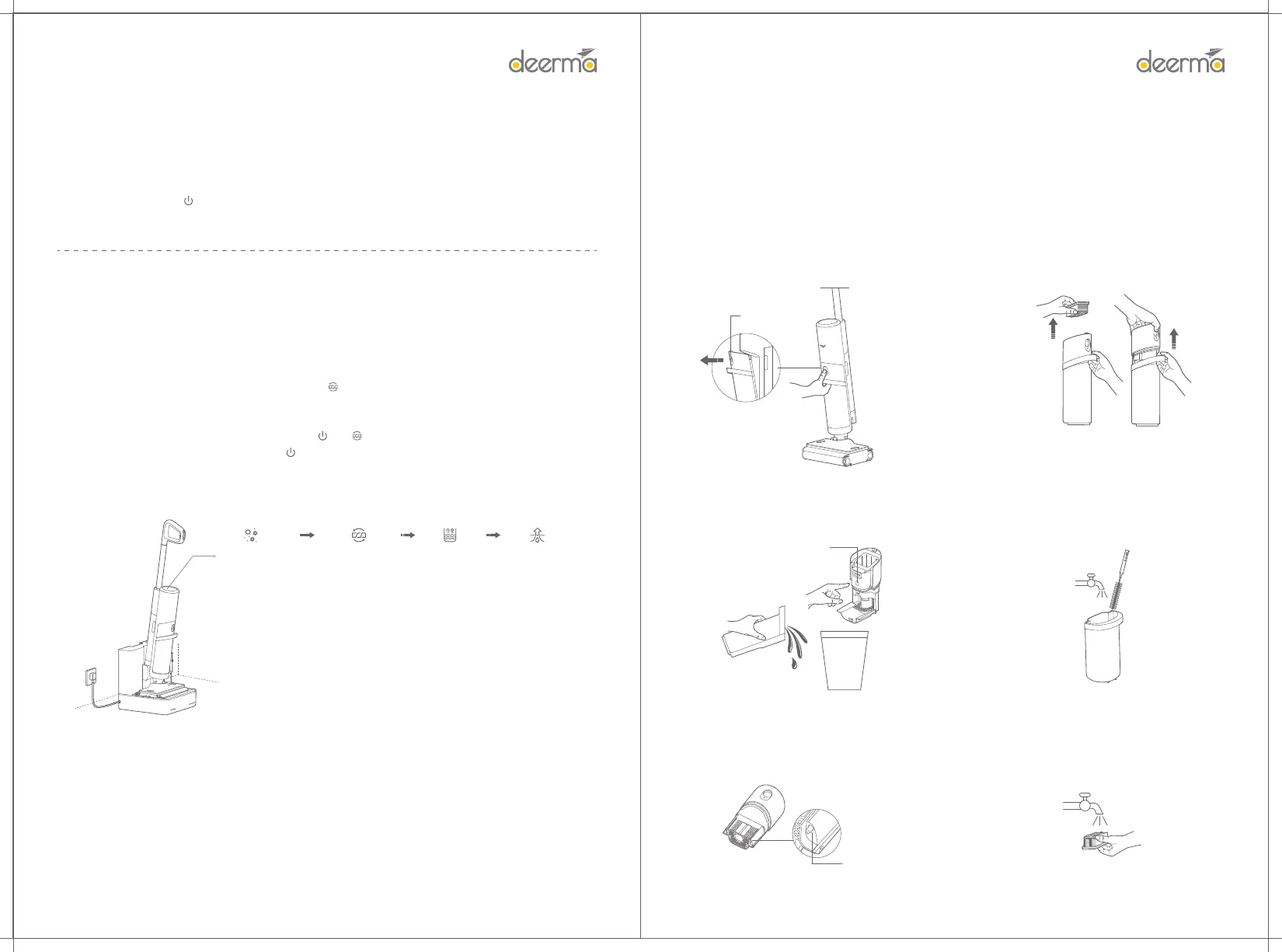
cleaning brush, and directly ush the sewage tank
with clean tap water.
3. Pour out the sewage in the sewage tank, press the
Cover Opening key of solid waste storage box as
shown in the gure, open the cover of the solid waste
storage box, and pour out the solid waste.
5. Clean the water full sensor with a clean damp cloth.
Note: The water full sensor should be cleaned
frequently to avoid adhering stains that aect the
detection accuracy.
6. If the lter element is diy and needs to be
cleaned, it can be washed with clean tap water.
After cleaning, put it in a ventilated place, and
then put it back for use after ding.
Water full sensor
Cover Opening key
10
Maintenance
Warning: Shut down the device and unplug the power plug before cleaning and maintaining the product.
Note: The self-cleaning function is mainly used to clean the rolling brush and waterway. If necessa, refer to
the maintenance instructions to disassemble and clean the device.
Cleaning of sewage tank
1. Press and hold the Sewage Tank Removal key, and
pull the sewage tank outward at the same time.
2. Lift up and take out the lter element and solid
waste storage box.
①Sterilizing liquid
preparation
②Self-cleaning ③Self-cleaning ④Ding and
rolling brush
9
Self-cleaning and ding of rolling brush
1. Place main unit on the base correctly, and press the " " key to activate the self-cleaning of rolling brush.
2. After the self-cleaning of the rolling brush, the water will be lled automatically.
3. After water is lled, the rolling brush will be dried automatically
To complete the self-cleaning of rolling brush: Press " " or " " to complete the self-cleaning of rolling brush.
To complete the ding of rolling brush: Press " " to complete the ding of rolling brush.
After ding, it will automatically be charged.
4.Independent ding: Double-click the self-cleaning to sta ding, and press the power button or
self-cleaning key to end ding.
Completion of cleaning
After cleaning, press the " " key to turn o the device, then stand the device upright and return it to the base
for self-cleaning.
Note: Shut down the main unit after 3 seconds in order to prevent sewage residue.
Note:
• After use, put main unit into the base to prevent the wet bristles from touching the oor for a long time and
damaging the oor.
• After use, it is recommended to self-clean and d the rolling brush in time, or manually clean the rolling
brush and place it in a cool and d place to avoid moldy bristles and odor.
Caution:
• The self-cleaning function can only be used when the product is charging and the power indicator shows
one bar of green and above.
• During the self-cleaning, the device body will shake slightly, which is normal.
• During the ding, do not touch the rolling brush with your hands or other objects to avoid being involved,
which may cause danger.
• In case of a fault during the self-cleaning or ding, the self-cleaning or ding can be continued if the fault
is removed within 15 minutes. If not, the main unit will be charged automatically.
Sewage Tank
Removal key


 To Next Page