Change from green to
orange based on the
condition of di inhaled
Note: When the product fails to work normally, a fault prompt will be shown on the display. For solutions, please refer to
[Troubleshooting].
6
最高水位
Tank cover
Water inlet
Highest water level
最高水位
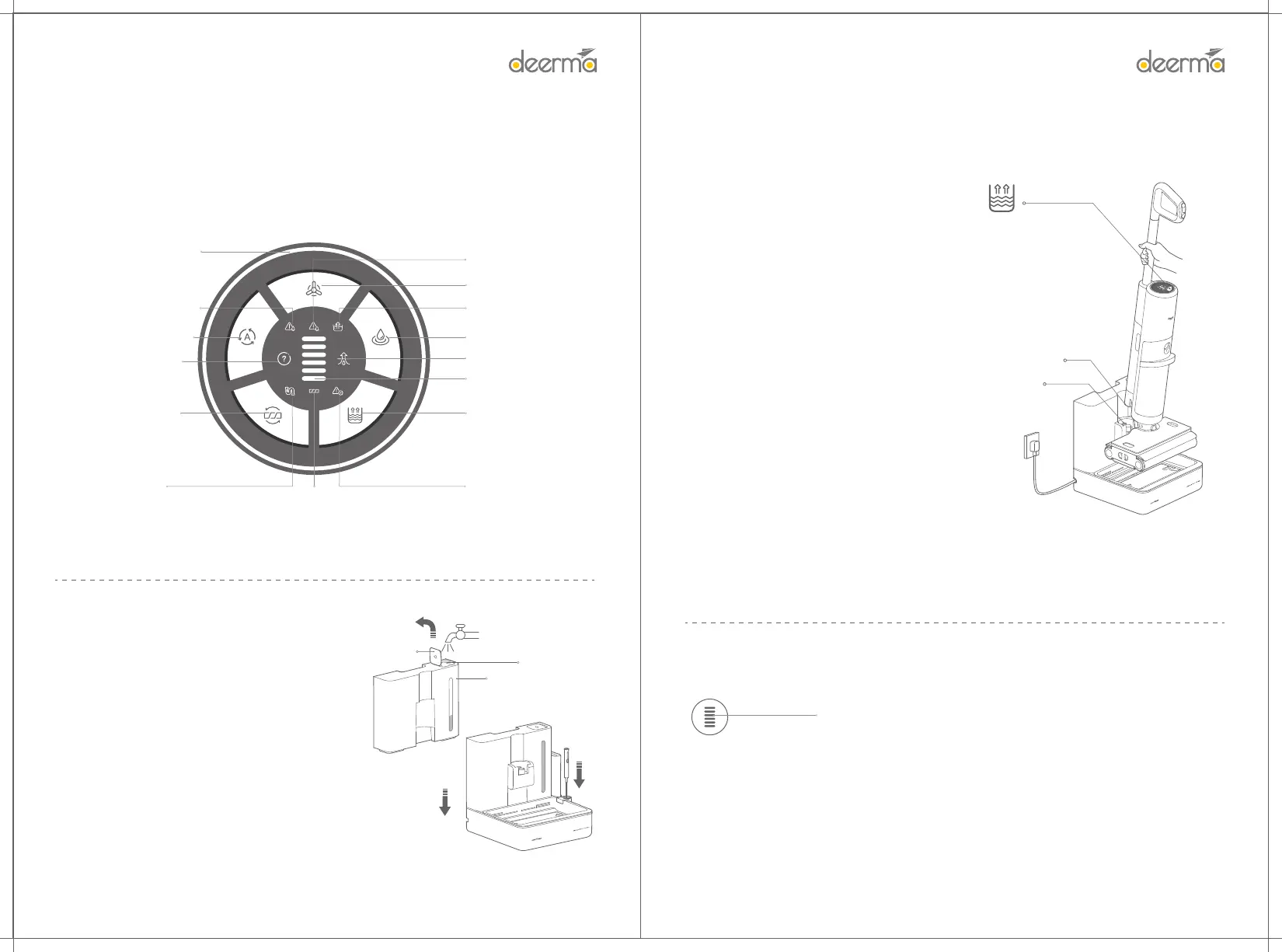
Water lling in base tank
1. Open the base tank cover in the direction shown in the
gure. It will open completely if there is a "click".
2. Fill the clean tap water from the water inlet of the base tank.
3. Put the base tank lled with clean tap water back to the
base in the direction shown in the gure.
•Do not ll liquids other than tap water and special
detergent to avoid danger.
•Do not exceed the highest water level when lling water.
Caution:
Di indicator ring
Power status indication
5
How to Use
LED Display
Device failure
Strong mode
Water absorption mode
Clean water tank /
sewage tank /
base tank extraction
Automatic water lling
Automatic mode
Clean water tank/
Shoage of water
in the base tank
Water full in sewage tank
Self-cleaning
Pipe di
Neglected installation of rolling brush / winding of rolling brush
Ding
Note:
• It is recommended to use the product after full charge.
• The main unit cannot be charged in case of automatic water lling, self-cleaning and ding.
• It is recommended to charge the product for 12 hours each time for the rst three times. Later, in daily use,
the product can be charged at any time. Self-cleaning, ding and automatic water lling are not allowed
during charging.
• After main unit is used continuously, the batte temperature is high and the charging is slow, which is
normal.
Charging
The main unit will be automatically charged after automatic water lling, until it is fully charged and the display
goes out.
Low batte: One-bar red is ashing
Fully charged: Six-bar green is always on
Power display
Automatic water lling in main unit
After the base is powered on normally and the base
tank is lled with water, the main unit can be placed
on the base as shown in the gure. After main unit is
placed properly, the water will be lled automatically
until the clean water tank is full. There will be
relevant prompts on the display in the process of
lling water.
Note: If water is not replenished automatically,
please check whether main unit is placed properly or
whether there is water in the base tank.
Note:
• Do not remove main unit when water is lled
automatically.
• If main unit is not fully lled with water and there
is water in the base tank, the main unit will activate
the automatic water lling again.
• In case of a fault during the automatic water
lling, the main unit will stop water lling and will be
charged if the fault is not removed within a sho
time.
• When the base tank is sho of water, the
automatic water lling will fail if you open the base
tank cover directly to ll water. You need to take and
place the base tank again or press the Power key to
sta automatic water lling.
Main unit charging po
Base charging po
Automatic water lling
Abnormal
placement of
main unit /
abnormal
power-on of base


 To Next Page