Page 14
If no operation is performed within
20 seconds, the hob will
automatically return to Standby
mode.
Setting the temperature level
Touch " " or " " keys to set the
temperature level between "1" and "9" or
"9" and "1".
Turning off the cooking zones:
A cooking zone can be turned off in 3
different ways:
1. By dropping the temperature level to
"0"
You can turn the cooking zone off by
dropping the temperature adjustment to
"0" level.
2. By touching the relevant cooking zone
symbol " " for a certain time
Turn on the cooking zone by pressing
relevant symbol " " for a certain time to
drop temperature value to "0".
3. By using the turn-off on the timer
option for the desired cooking zone
When the time is over, the timer will turn
off the cooking zone assigned to it. "0" or
"00" will appear on related display.
When the time is over, an audible alarm
will sound. Touch any key on the control
panel to silence the audible alarm.
High Power (Booster)
For rapid heating, you can use booster
function “P”. However, this function is not
recommended for cooking a long time.
Booster function may not be available in all
cooking zones.
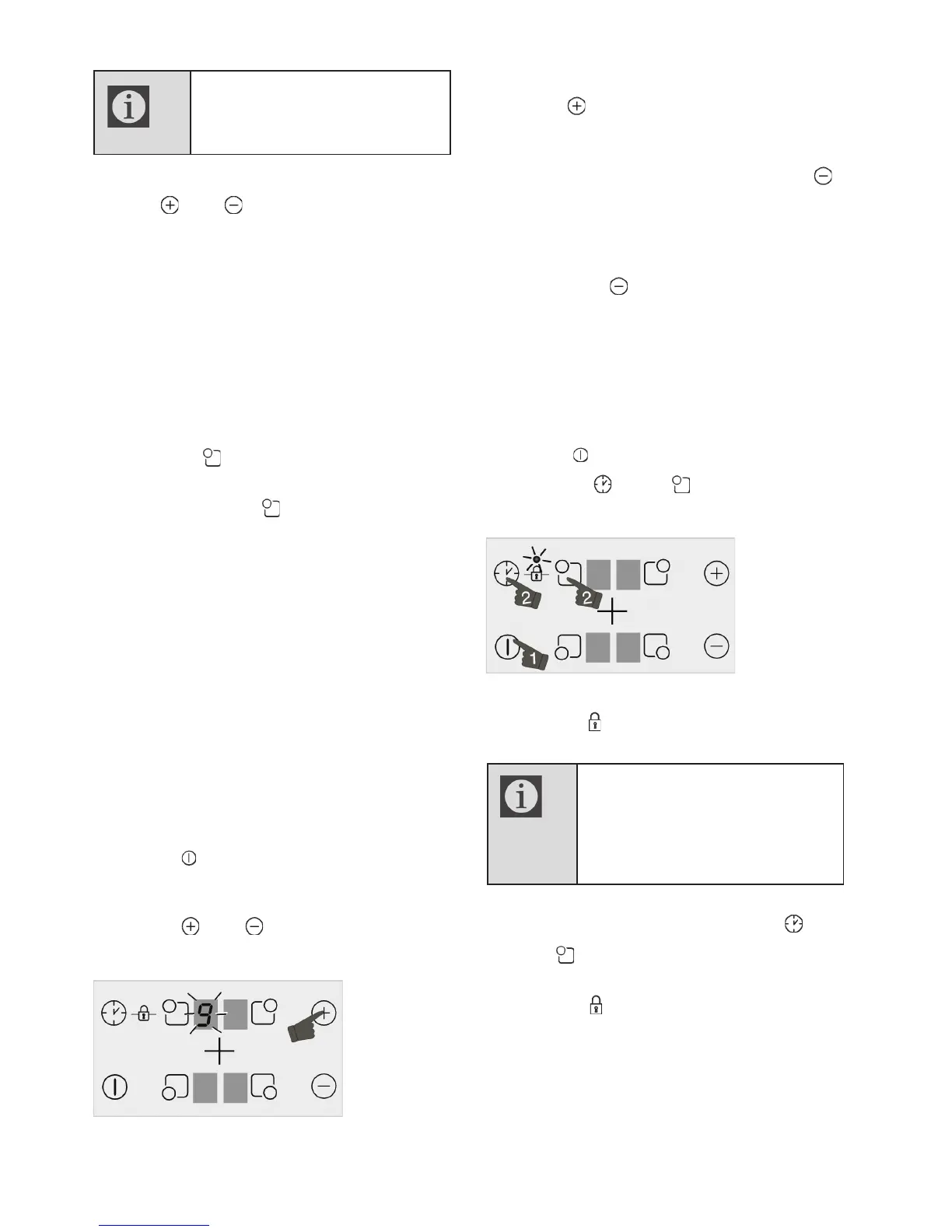
Turning on High Power (Booster) :
1. Touch " " key to turn on the hob.
2. Select the desired cooking zone by
touching the cooking zone selection keys.
3. Touch " " or " " key firstly to reach
the level "9".
4. When the cooking zone is at level "9",
touch " " key once to set cooking zone
temperature to "P".
Turning off High Power (Booster) :
x To disable the Booster function, touch "
" and set the temperature to level "9".
Cooking zone goes out of booster and
continues to operate at level "9".
x You can decrease the temperature level
by touching " " or you can switch off the
cooking zone completely by decreasing
the temperature level to "0".
Keylock
You can activate the keylock to avoid
changing the functions by mistake when the
hob is operating.
Activating the keylock
1. Touch " " key to turn on the hob.
2. Touch " " and " " keys
simultaneously to activate the keylock.
» Keylock will be activated and the dot on
the symbol " " will light up.
If you turn the hob off when the
keys are locked, the keylock will
be activated next time you turn the
hob on again. The Key lock must
be deactivated in order to be able
to operate the hob.
Deactivating the keylock
1. When the keylock is active, touch " "
and " " keys simultaneously.
» Keylock will be de activated and the dot on
the symbol " " will disappear.
Childlock
You can protect the hob against being
operated unintentionally in order to prevent
children from turning on the cooking zone.
Child Lock can only be activated and
deactivated in Standby mode.


 To Next Page