SECTION 6 MAINTENANCE AND CALIBRATION
HTEK 2_UM Eng_R4.0_Feb. 2016 Page 27 of 28
The
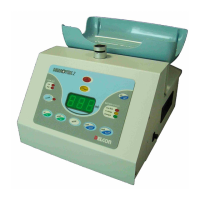
maintenance of Hemotek 2 is very limited and it simply consists to keep the frame and the
tray clean and periodically to verify the weighing system.
Before any cleaning or maintenance, switch off the unit and disconnect the power
source.
6.1 Weekly Maintenance
6.1.1 Clean
Remove the tray and clean carefully with a detergent or disinfectant solution, both the frame
and the tray paying attention of not spills any liquid into the holes of the tray support.
Clean the clamp with a humid gauze or cloth and remove all particles eventually present inside.
Avoid to use pure alcohol, acetone or any other solvent potentially harmful for plastic or
paint.
6.1.2 Decontamination
NOTE: decontamination is an emergency procedure that must be done only in case of real
needing. Too strong or aggressive solution such as bleach for example, may damage the
material of the mixer, so it’s recommendable to use them as less then possible.
Remove and clean the tray as well the chassis of the Hemotek 2 with a disinfectant solution,
paying attention of not spill any liquid into the holes of the tray support. With a wet and clean
cloth with water, rinse carefully all the surfaces and then dry the same. Avoid to use pure
alcohol, acetone or any other solvent potentially harmful for plastic or paint.
6.2 Calibration
About every three months is useful to perform a calibration of the balance system to avoid
improper weigh measurements that may compromise the further preparation of the bags. This
operation is very simple and can be done directly by the Operator. However, to run a calibration
is necessary a calibration weight with known mass within the range of 200 – 800 g (better is 500
g). As optional is available a 500 g calibration weigh (see Section 7). If you don’t have any safe
calibration weight is better to avoid any calibration: in this case is recommended to call the
closest to you Authorised Service Centre.
How to proceed for the calibration:
- Switch on the Hemotek 2 as usual with the tray installed.
- Press the MODE key and with the arrows keys move to read P5, then press ENTER.
- The display will show now the memorised reference mass (for example 300 g): if the
sample you have has any different mass (for example 500 g) please move with the arrows
key up to read same value (in this case you must read 500) and then press ENTER to
memorise the new value. At the contrary if the value is correct, just press ENTER without
any modification.
- At this point the display should show 0. Check if the tray is properly in place and that the
support pins of the same do not touch the chassis: when done press ENTER.
- Now the display should show the memorised reference weight that of course must has
same mass of yours. Gently lay down the calibration weight on the tray and press ENTER.
- Wait a couple of seconds and press STOP/PAUSE to quit program mode.
The mixer is now perfectly calibrated.


 To Next Page
 Loading...