Unità a stato solido (a lunghezza intera)
Removing the M.2280 solid-state drive
Prerequisites
1. Follow the procedure in Before working inside your computer.
2. Remove the side cover.
3. Remove the front bezel.
4. Remove the 2.5-inch hard drive if applicable.
5. Remove the 3.5-inch hard drive if applicable.
6. Remove the disk-drive cage.
About this task
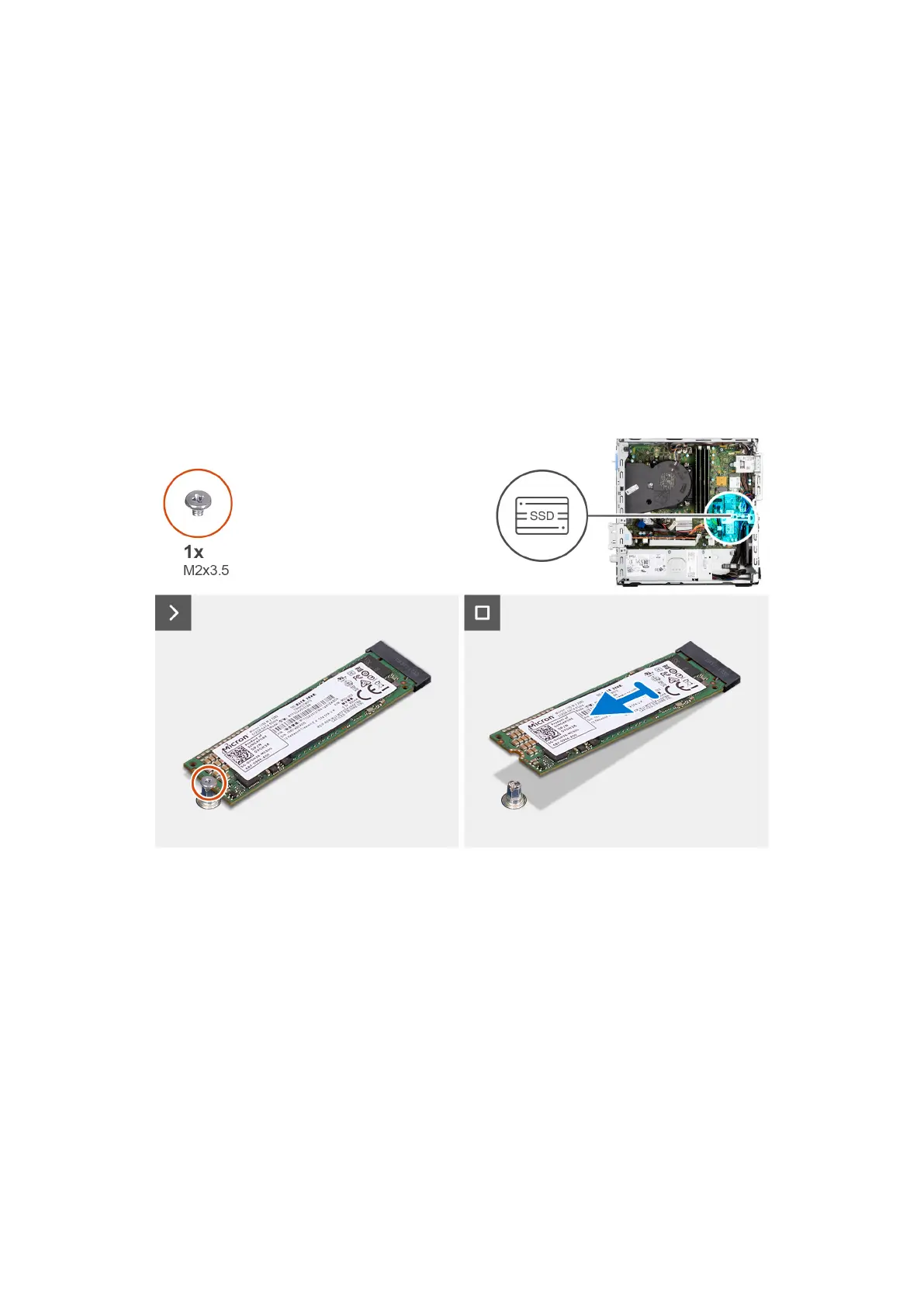
The following image indicates the location of the M.2280 solid-state drive and provides a visual representation of the removal
procedure.
Steps
1. Remove the screw (M2x3.5) that secures the M.2280 solid-state drive to the system board.
2. Slide and lift the M.2280 solid-state drive from the M.2 card slot on the system board.
Installing the M.2280 solid-state drive
Prerequisites
If you are replacing a component, remove the existing component before performing the installation procedure.
About this task
The following image indicates the location of the M.2280 solid-state drive and provides a visual representation of the installation
procedure.
Rimozione e installazione delle unità sostituibili dal cliente (CRU)
59











 To Next Page