Operating your monitor │ 55
Icon Menu and
submenus
Description
Dell Power
Button Sync
Allow you to control PC system power state from the monitor
power button.
NOTE: This feature is only supported with Dell platform which
has built-in DPBS function, and is only supported over USB-C
interface.
Reset Display Resets all display settings to the factory preset values.
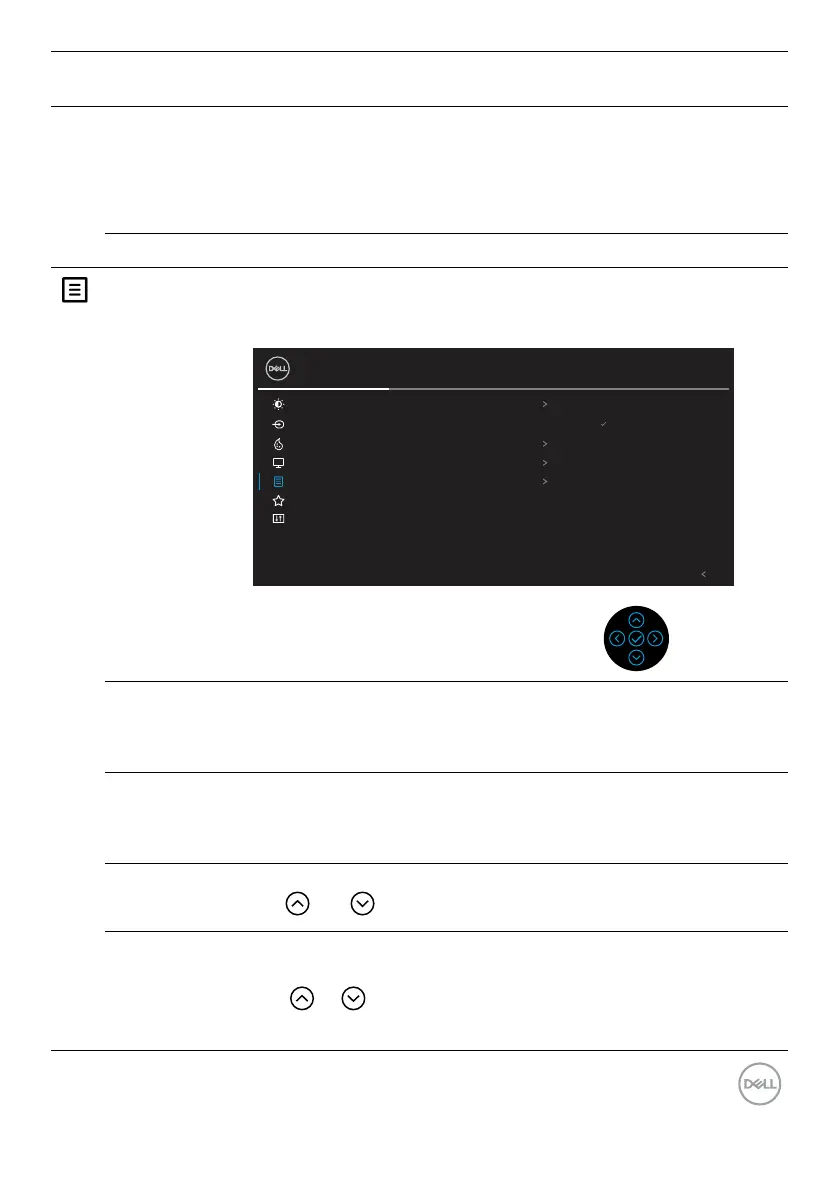
Menu Select this option to adjust the settings of the OSD, such as the
languages of the OSD, the amount of time the menu remains on
screen, and so on.
Brightness/Contrast Language English
Select
Input Source Rotation
27 Monitor
Color Transparency 20
Display Timer 20 s
Menu Lock Disable
Personalize Reset Menu
Others
Exit
Language Sets the OSD display to one of the eight languages:
English, Spanish, French, German, Brazilian Portuguese,
Russian, Simplified Chinese, or Japanese.
Rotation Rotates the OSD by 90 degrees counter-clockwise and
anticounter-clockwise. You can adjust the menu according to
your Display Rotation.
Transparency Select this option to change the menu transparency by pressing
the and buttons (min. 0 / max. 100).
Timer Sets the length of time the OSD will remain active after the last
time you pressed a button.
Use or to adjust the slider in 1 second increments, from 5
to 60 seconds.


 To Next Page