30 Basic Operations
www.dell.com | support.dell.com
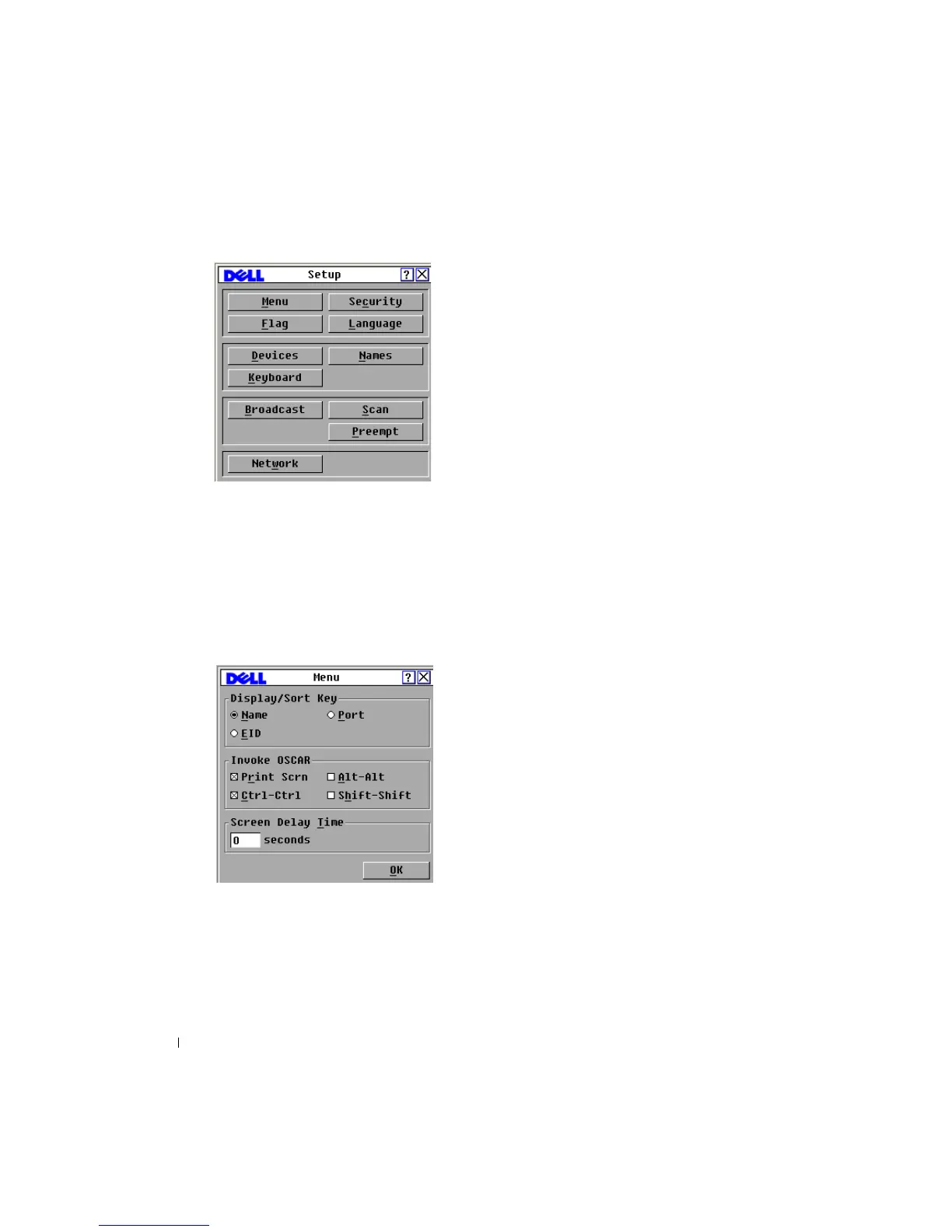
Figure 3-2. Setup Dialog Box
Changing the Display Behavior
Use the Menu dialog box to change the display order of devices, set a Screen Delay Time for the
OSCAR
®
interface, and change the OSCAR
®
launch sequence. The display order setting alters
how devices display in several screens including the Main, Devices and Broadcast dialog boxes.
To access the Menu dialog box:
1 Click Setup - Menu in the Main dialog box. The Menu dialog box displays.
Figure 3-3. Menu Dialog Box
2
<Print Screen>, Ctrl-Ctrl, Alt-Alt, and Shift-Shift are selectable to launch the OSCAR
®
interface. One or all of the above keyboard combinations can be selected at a time. If only
one keyboard combination is selected, it cannot be de-selected until a second one is
chosen.







 To Next Page