ResetallOSDsettingstothefactorypresetvalues.
Push to exit the OSD main menu.
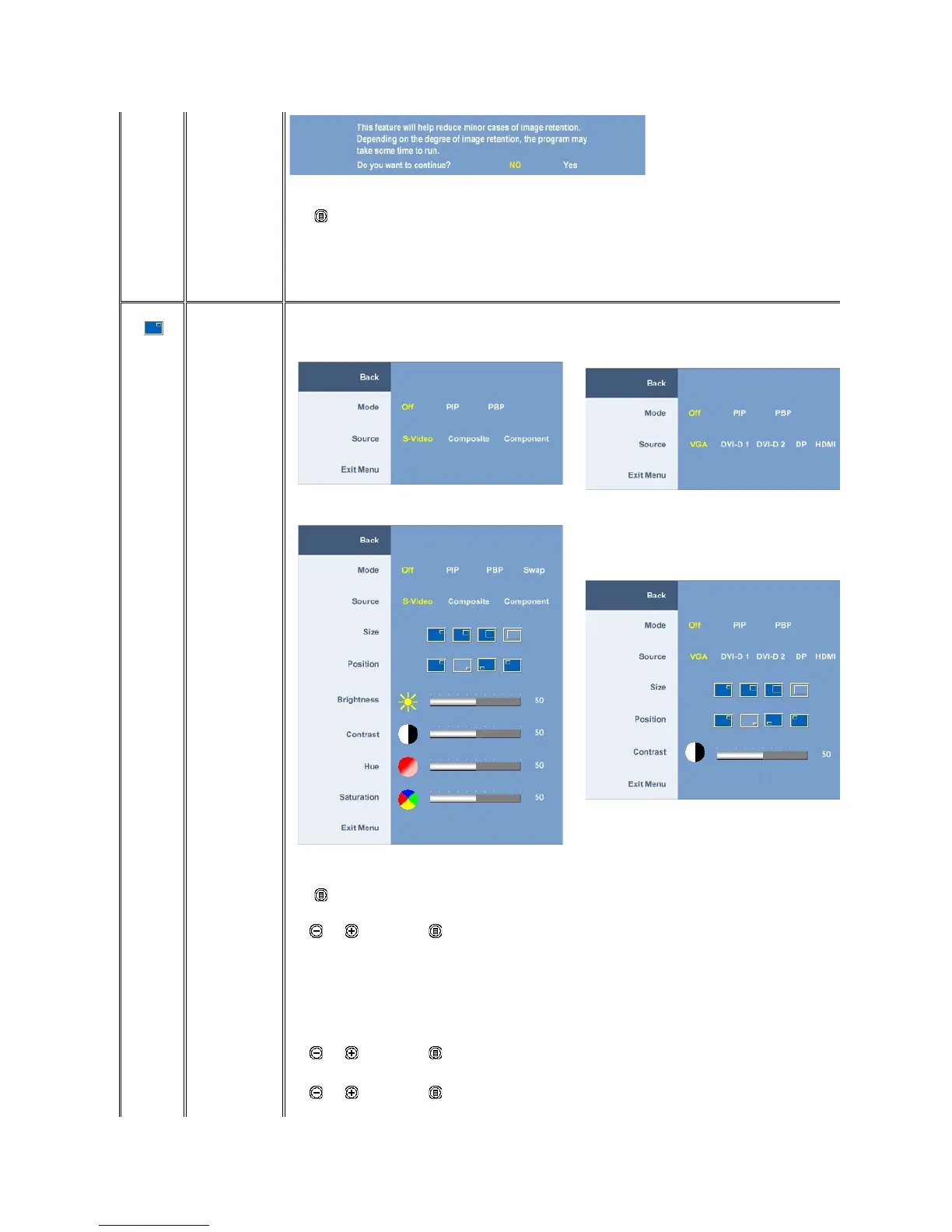
This function brings up a window displaying image from another input source.
PIP/PBP submenu when PIP/PBP OFF(mainsourceis
VGA/DVI-Dinput)
PIP/PBP submenu when PIP/PBP OFF
PIP/PBP submenu when PIP/PBP ON(mainsourceis
VGA/DVI-Dinput)
PIP/PBP submenu when PIP/PBP ON
(mainsourceisVideoinput)
NOTE: When using DVI source, the contrast adjustment is not available.
Push to go back to the main menu.
There is two modes: PIP (Picture in Picture) and PBP (Picture By Picture)
Use and tobrowseand to select "Off", "PIP" or "PBP".
When PIP/PBP is activated, select "Swap" to exchange the input source for the main screen and PIP/PBP window.
Select an input signal for PIP/PBP. (VGA/DVI-D 1/DVI-D 2/DP (DisplayPort)/HDMI/S-Video/Composite/Component)
Use and tobrowseand to select.
Select PIP window size.
Use and tobrowseand to select.











 To Next Page