Back to Contents Page
Operating the Monitor
Dell™2709WFlatPanelMonitorUser'sGuide
Using the Front Panel Controls
Using the On-Scree Display (OSD) Menu
Setting the Optimal Resolution
Using the Dell Soundbar (Optional)
Using the Tilt, Swivel and Vertical Extension
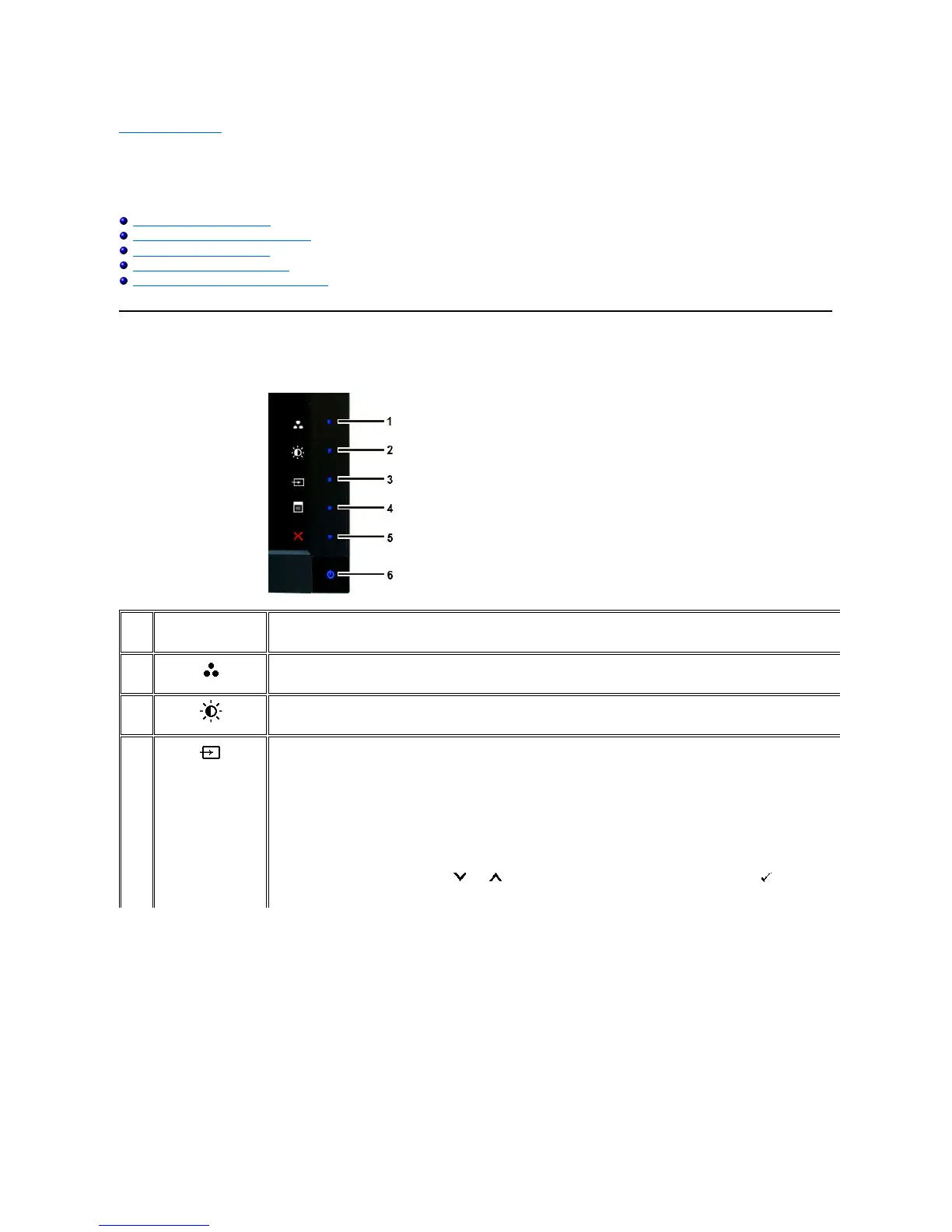
Using the Front Panel
Usethebuttonsonthefrontofthemonitortoadjusttheimagesettings.
Use this key for direct access to the control menu that you define in the personalize menu.
*The default settings are Preset Modes Select, Brightness/Contrast Select and Input Source Select.
Use this button for different displays on your monitor.
Use this button for direct access to the "Brightness/Contrast" control menu.
Use Input Source Select button to select between different video signals that may be connected to your monitor.
l VGA input
l DVI-D 1 input
l DVI-D 2 input
l DisplayPort input
l HDMI input
l Component video input
l Composite video input
Displays the source selection bar. Press and buttons to move between the setting options and press
to select the input source










 To Next Page