Back to Contents Page
AboutYourMonitor
Dell™2709WFlatPanelMonitorUser'sGuide
Product Features
Identifying Parts and Controls
Monitor Specifications
Universal Serial Bus (USB) Interface
Card Reader Specifications
Plug and Play Capability
Maintenance Guidelines
Product Features
The 2709Wflatpaneldisplayhasanactivematrix,thin-film transistor (TFT), liquid crystal display (LCD). The monitor features include:
■ 27-inch (583.7*365.5 mm) viewable area display.
■ 1920 x 1200 resolution, plus full-screen support for lower resolutions.
■ Wide viewing angle to allow viewing from a sitting or standing position, or moving side-to-side.
■ Tilt, swivel and vertical extension capabilities.
■ Removable pedestal and Video Electronics Standards Association (VESA) 100 mm mounting holes for flexible mounting solutions.
■ Plug and play capability if supported by your system.
■ On-Screen Display (OSD) adjustments for ease of set-up and screen optimization.
■ Software and documentation CD includes an information file (INF), Image color Matching File (ICM), and product documentation.
■ Energy Saver feature for Energy Star compliance.
■ Security lock slot.
Identifying Parts and Features
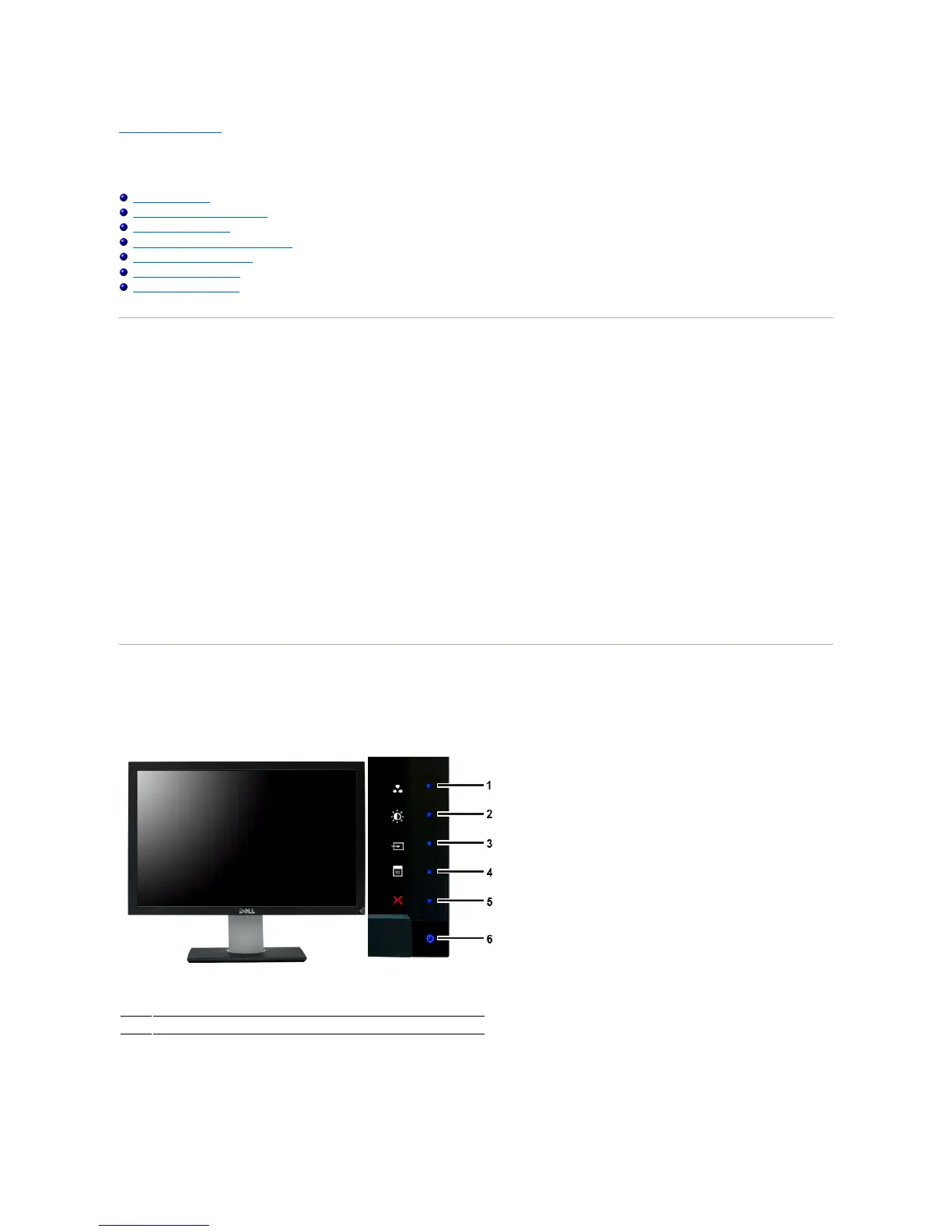
Front View
Shortcut keys
*The default settings are Preset Modes Select, Brightness/Contrast
Select and Input Source Select.










 To Next Page