Removing the full-length graphics cards
NOTE: Before working inside your computer, read the safety information that shipped with your computer and follow the
steps in Before working inside your computer. After working inside your computer, follow the instructions in After working
inside your computer. For more safety best practices, see the Regulatory Compliance home page at www.dell.com/
regulatory_compliance.
Prerequisites
1. Remove the
stability foot.
2. Remove the left and right side-panels. See “Removing the side panels”.
Procedure
1. Lay the chassis on the right side.
2. Locate the graphics card (PCI-Express card connector) on the system board. For more information on the graphics connector, see
“system-board components”.
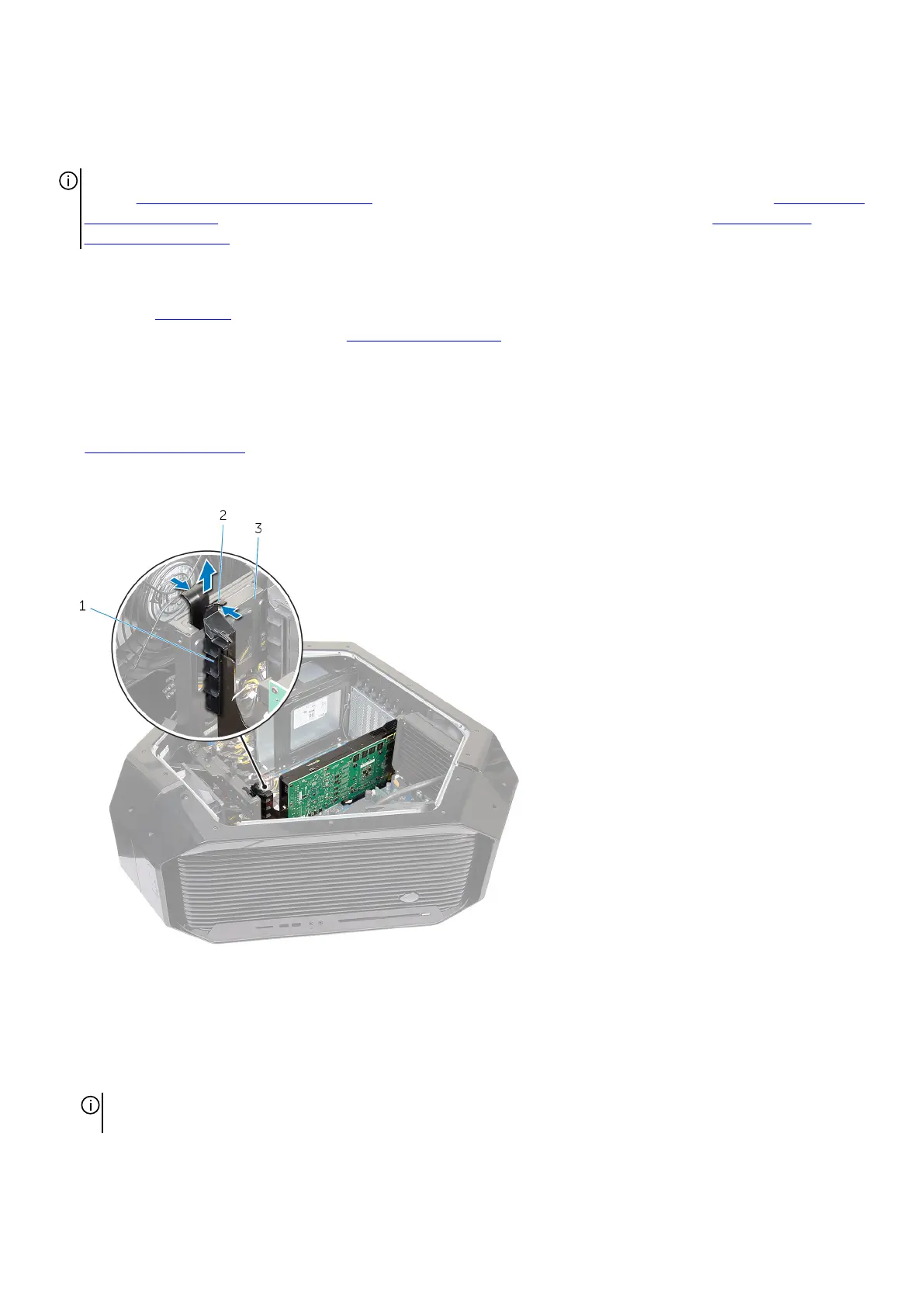
3. Press and hold the securing tab on the clamp.
4. Pull the clamp away from the bracket.
a. clamp
b. securing tab
c. bracket
5. Press and push the screw covers covering the screws that secure the graphics card to the chassis.
6. Remove the two screws (#6-32x6) that secure the graphics card to the chassis.
7. Press the release tabs on the power-cable connectors to disconnect the power cables from the graphics card.
NOTE: The location of the power supply connector (PCIE1, PCIE2 and PCIE3) varies depending on the video card
installed.
55










 To Next Page