Back to Contents Page
Operating the Monitor
Dell™CrystalFlatPanelMonitorUser'sGuide
Using the Front Panel Controls
Using the On-Screen Display (OSD) Menu
Setting the Optimal Resolution
Using the Speakers
Tilting your monitor
Using the Camera
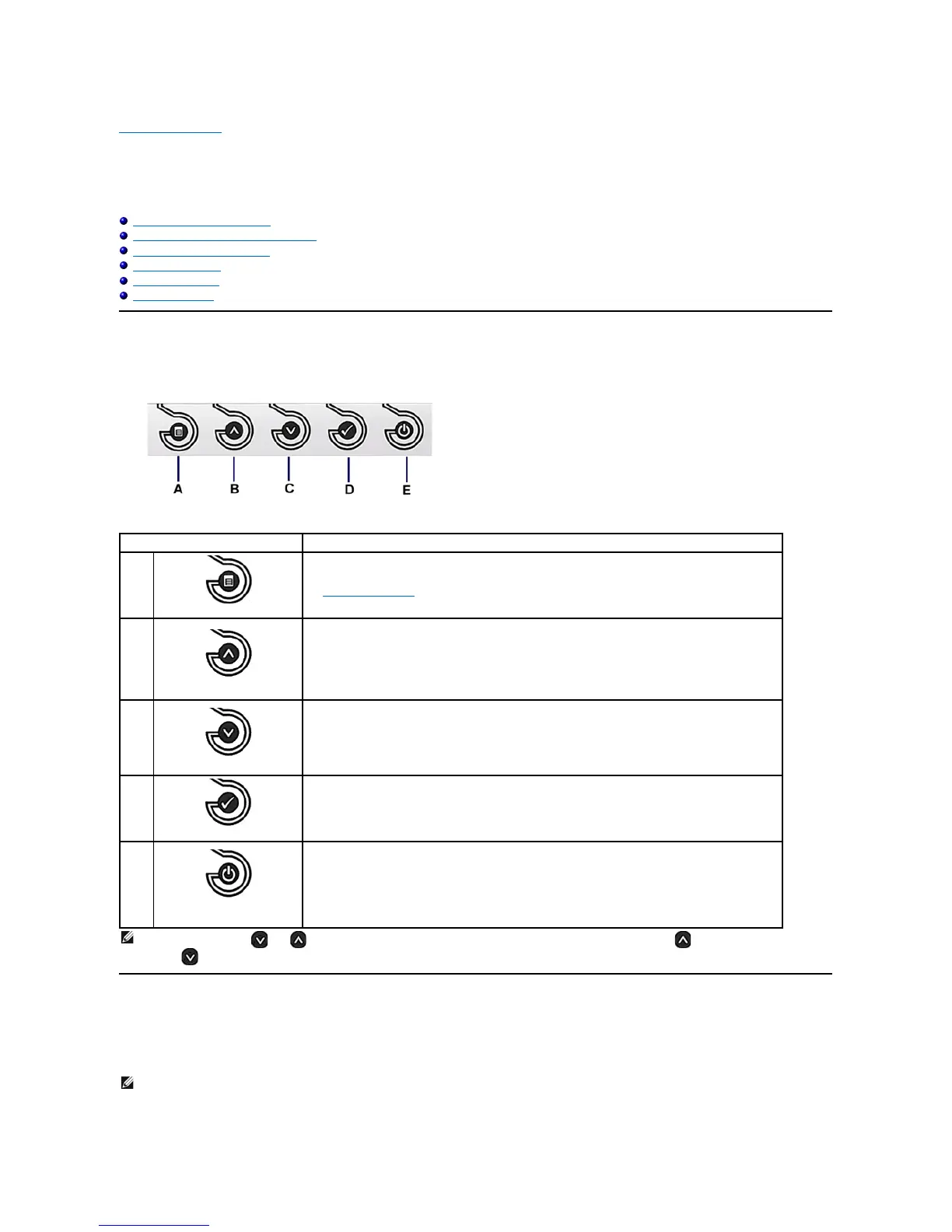
Using the Front Panel
Usethebuttonsonthefrontofthemonitortoadjusttheimagesettings.
Using the On-Screen Display (OSD) Menu
Accessing the Menu System
Use the Menu button to open and exit the on-screen display (OSD), and exit from menus and sub-menus.
See Using the OSD Menu.
Use the UP button to adjust (increase ranges) items in the OSD menu.
Use the Down button to adjust (decrease ranges) items in the OSD menu.
Use the OK button to confirm your selection.
Power
(withDELLlogoindicator)
Use the Power button to turn the monitor on and off.
TheblueDELLlogoindicatesthemonitorisonandfullyfunctional.AnamberDELLlogoindicatespower
save mode.
NOTE: You can use the and buttons as shortcuts to access the speaker volume slider bar and then press the buttontoincreasethevolume
and the button to decrease the volume.
NOTE: IfyouchangethesettingsandtheneitherproceedtoanothermenuorexittheOSDmenu,themonitorautomaticallysavesthechanges.The
changes are also saved if you change the settings and then wait for the OSD menu to disappear.












 To Next Page