EasyManua.ls Logo

Dell E157FP - Soundbar Attachment to the Monitor

Dell E157FP
28 pages
Print Icon
To Next Page IconTo Next Page
To Previous Page IconTo Previous Page
Loading...
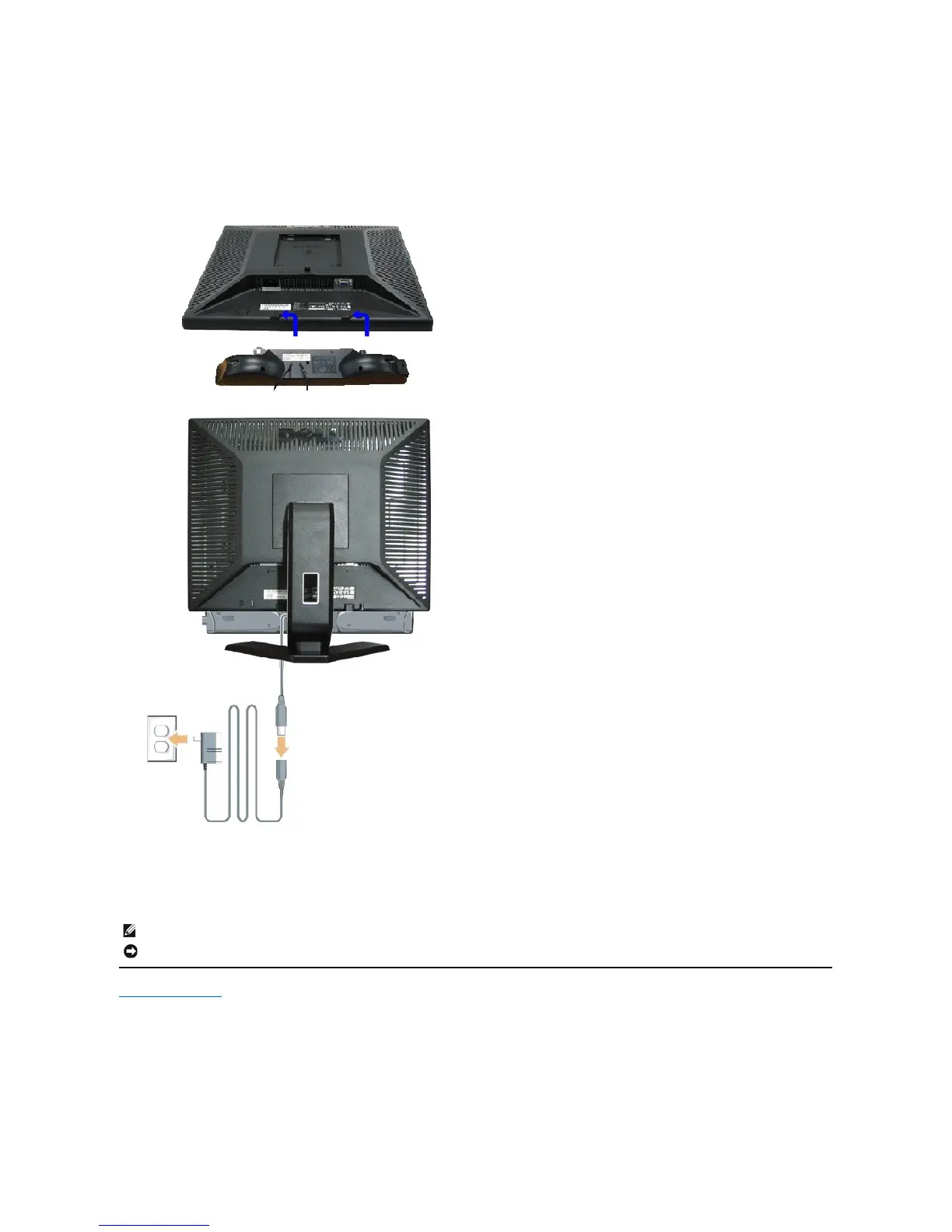
Soundbar Attachment to the Monitor
Back to Contents Page
1.
Headphone connectors
2.
Power indicator
3.
Power/Volume control
1.
Working from the rear of the monitor, attach the Soundbar aligning the two slots with the two tabs along the bottom rear of the monitor.
2.
Slide the Soundbar to the left until it snaps into place.
3.
Connect the Soundbar with the power brick.
4.
Plug the power cables of the power brick into a nearby outlet.
5.
Insert the lime-green mini stereo plug from the rear of the Soundbar into the computer's audio output jack.
NOTE:SoundbarPowerConnector- 12V DC output is for optional Dell Soundbar only.
NOTICE: DonotusewithanydeviceotherthanDellSoundbar.

Other manuals for Dell E157FP

Related product manuals