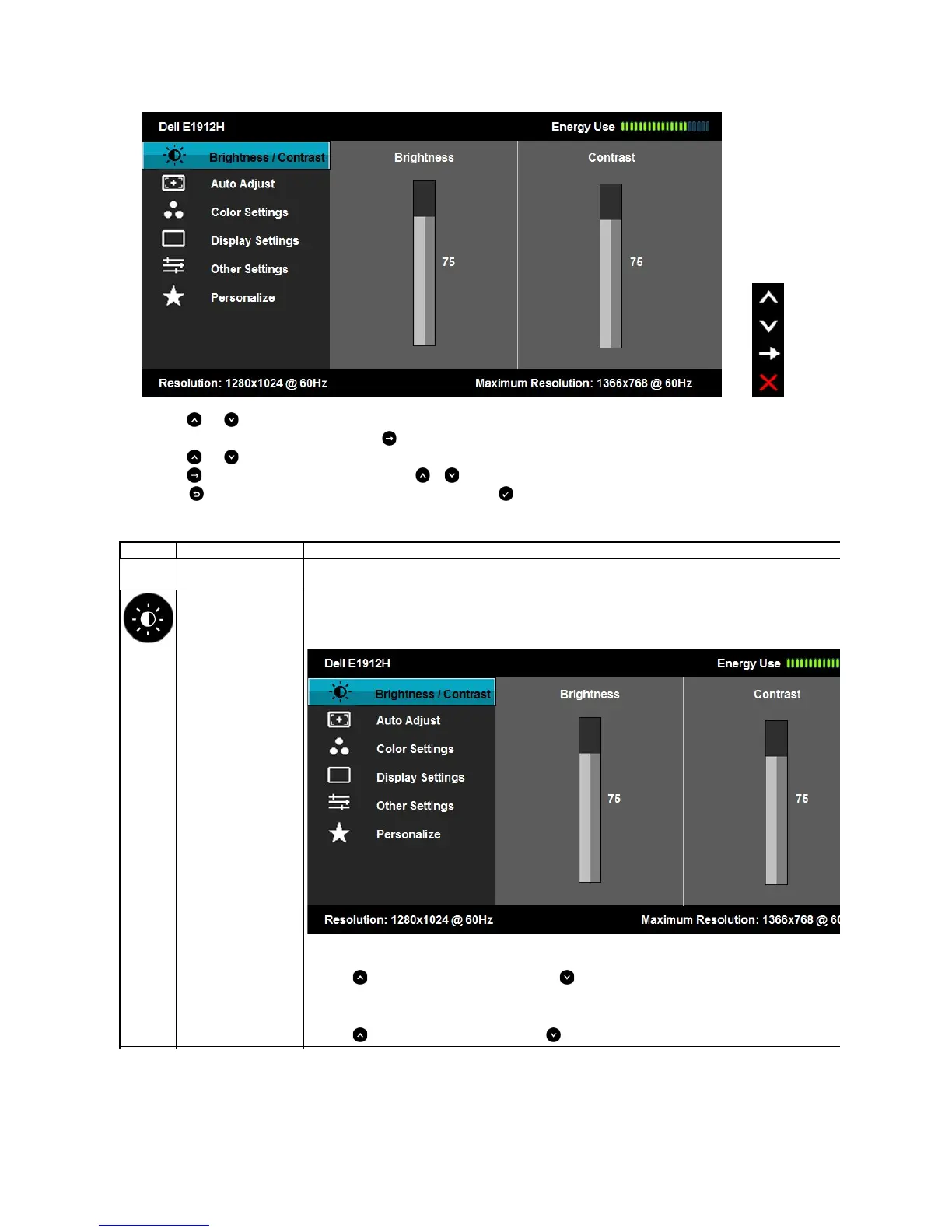
The table below provides a list of all the OSD menu options and their functions.
Press the and buttons to toggle between options in the Menu. As you move from one icon to another, the option name is highlighted.
To select the highlighted item on the menu press the button again.
Press the and buttons to select the desired parameter.
Press the buttontoentertheslidebarandthenusethe or buttons, according to the indicators on the menu, to make your changes.
Select the to return to previous menu without accepting current settings or to accept and return to previous menu.
This meter shows the energy level being consumed by the monitor in real time.
Use the Brightness and Contrast menu to adjust the Brightness/Contrast.
Allows you to adjust the brightness or luminance of the backlight.
Press the keytoincreasebrightnessandpressthe key to decrease brightness (min 0 ~ max 100).
Allows you to adjust the contrast or the degree of difference between darkness and lightness on the monitor screen. Adjust brightness first,
and adjust contrast only if you need further adjustment.
Press the key to increase contrast and press the key to decrease contrast (min 0 ~ max 100).



 To Next Page