56 │ Operating your monitor
Icon DescriptionMenu and
Submenus
Shortcut
Key 1
Shortcut
Key 2
Reset
Personalization
Power
Button
LED
Others
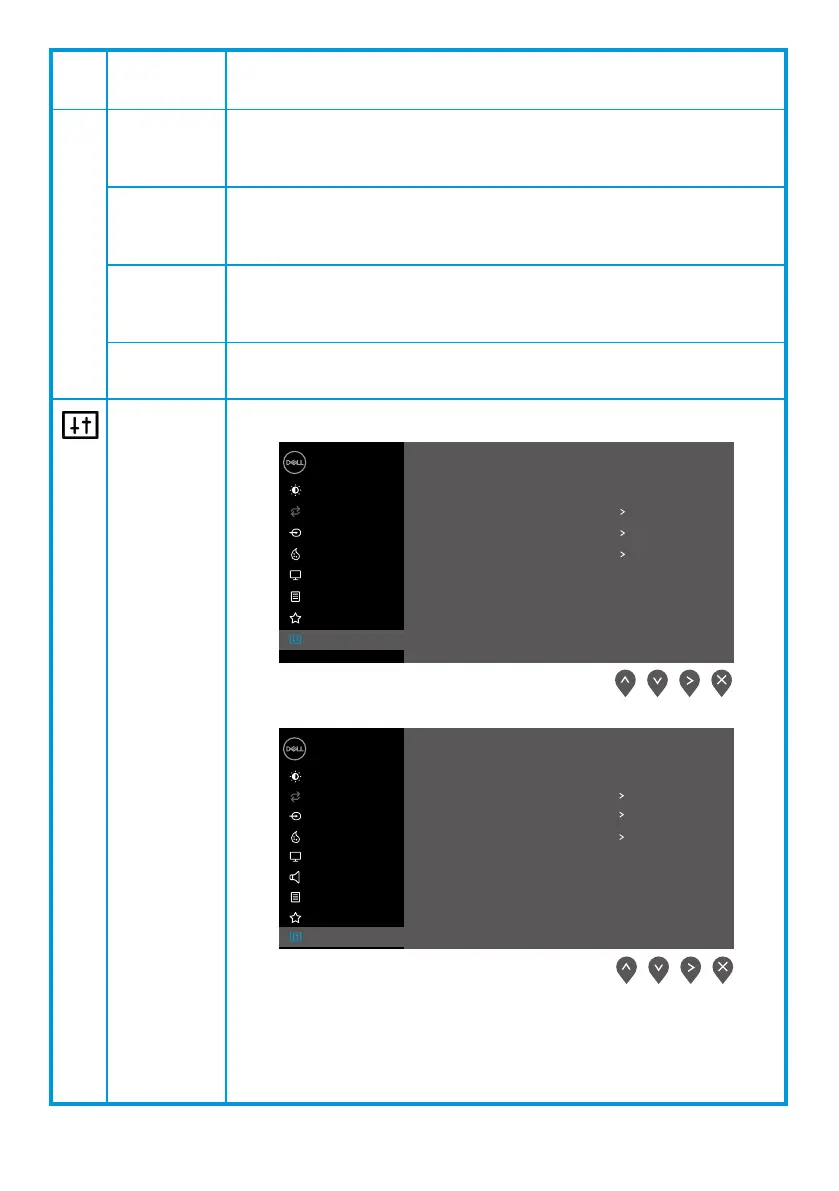
Allow you to select one of the following: Preset Modes,
Brightness/Contrast, Auto Adjust, Input Source, Aspect Ratio,
Volume (E2X20HS only) , to set the shortcut key 1.
Allow you to select one of the following: Preset Modes,
Brightness/Contrast, Auto Adjust, Input Source, Aspect
Ratio, Volume(E2X20HS only) , to set the shortcut key 2.
Allow you to restore shortcut key to the default setting.
Allow you to set the power LED indicator On During Active
or O During Active to save energy.
EXX20H
E2X20HS
Dell XX Monitor
Brightness / Contrast
Auto Adjust
Input Source
Color
Display
Menu
Personalize
Others
Display Info
DDC/CI
LCD Conditioning
Service Tag
Reset Others
Factory Reset
On
O
ABCDEFG
ENERGY STAR
®
Dell 2X Monitor
Brightness / Contrast
Auto Adjust
Input Source
Color
Display
Menu
Audio
Personalize
Others
Display Info
DDC/CI
LCD Conditioning
Service Tag
Reset Others
Factory Reset
On
O
ABCDEFG
ENERGY STAR
®



 To Next Page