Operating your monitor │ 57
Icon DescriptionMenu and
Submenus
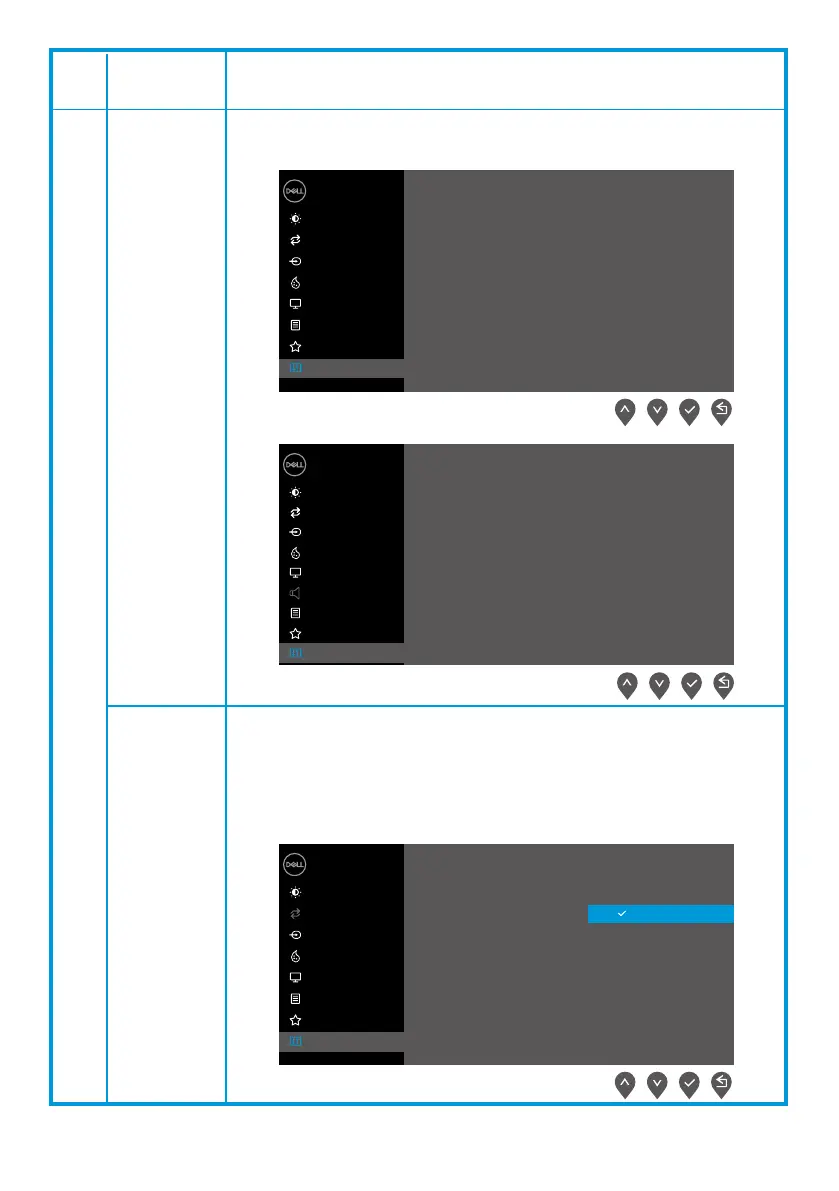
Display Info
DDC/CI
Press to display the information about the display.
EXX20H
E2X20HS
EXX20H
DDC/CI (Display Data Channel/Command Interface) allows you
to adjust the monitor settings using software on your computer.
Select o to turn o this feature.
Enable this feature for best user experience and optimum
performance of your monitor.
Dell XX Monitor
Brightness / Contrast
Auto Adjust
Input Source
Color
Display
Menu
Personalize
Others
Display Info
DDC/CI
LCD Conditioning
Service Tag
Reset Others
Factory Reset
Model: Dell EXX20H
Input Source: VGA
Current: 1920x1080, 60Hz
Dell XX Monitor
Brightness / Contrast
Auto Adjust
Input Source
Color
Display Info
DDC/CI
LCD Conditioning
Service Tag
Reset Others
Factory Reset
Display
Menu
Personalize
Others
On
O
Dell 2X Monitor
Brightness / Contrast
Auto Adjust
Input Source
Color
Display
Menu
Audio
Personalize
Others
Display Info
DDC/CI
LCD Conditioning
Service Tag
Reset Others
Factory Reset
Model: Dell E2X20HS
Input Source: VGA
Current: 1920x1080, 60Hz



 To Next Page