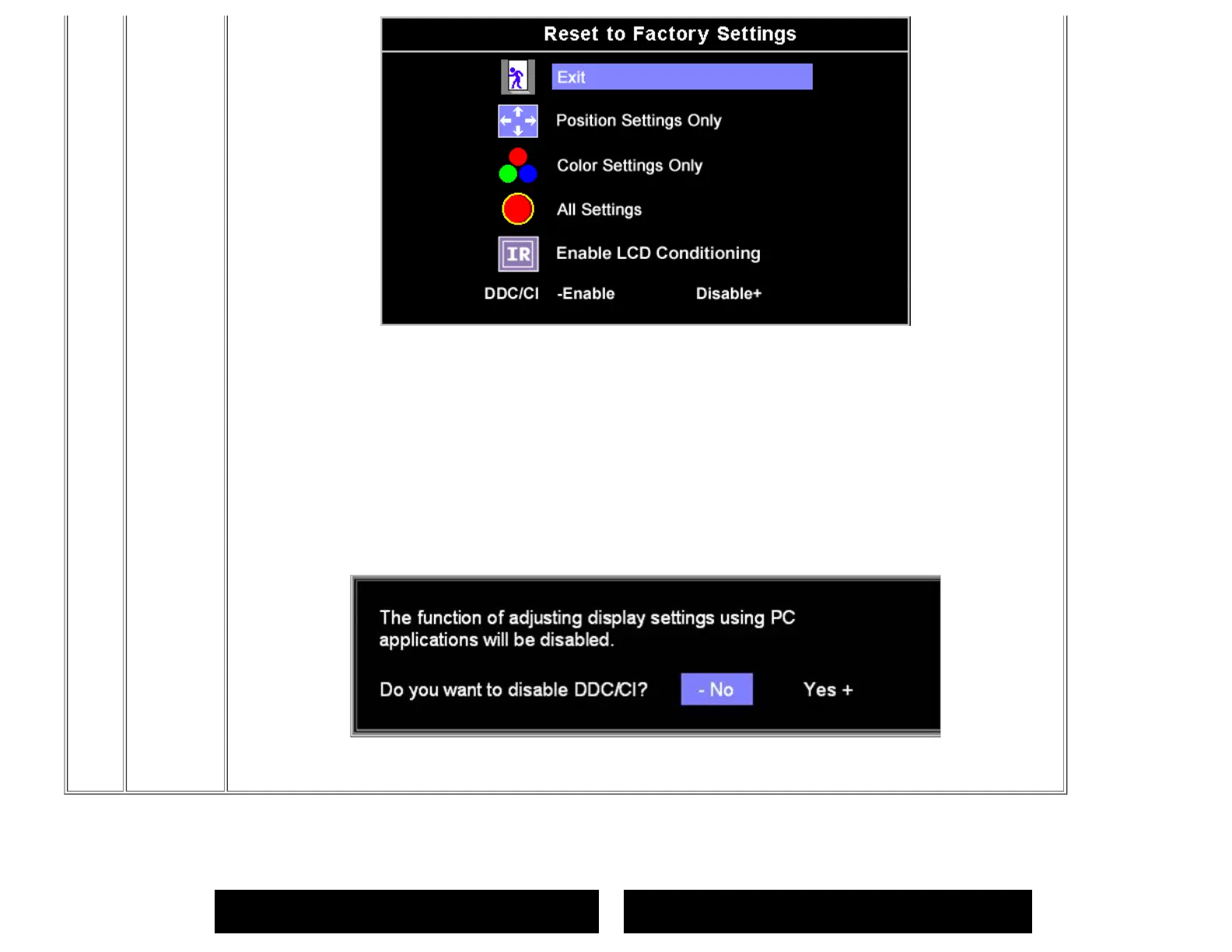
Exit — Select to exit out of Reset to Factory Settings menu without resetting any OSD options.
Position settings only — Change the settings for Image Position back to original factory settings.
Color settings only — Change the Red, Green, and Blue settings back to their original factory settings and set the default setting
for Normal Preset.
All settings — Change all the user-adjustable settings including color, position, brightness, contrast, and OSD hold time to the
factory defaults. The language of the OSD does not change.
IR (Image Retention) — The feature helps reduce minor cases of image retention.
DDC/CI (Display Data Channel/Command Interface) — allows you to adjust the monitor parameters (brightness, color, balance,
etc.) via software applications on your PC.
Select Disable to disable this feature.
For best user experience and optimum performance of your monitor, keep this feature enabled.
NOTE:If you select 'disable' for DDC/CI,a warning message as shown in the picture above appears on the screen.Then you can
select Yes or No according to need.
OSD Warning Messages
One of the following warning messages may appear on the screen indicating that the monitor is out of synchronization.
1 : Auto Detect (Analog Input)
Cannot Display This Video Mode
Optimum Resolution 1440 x900 60Hz
or
1 : Auto Detect (Digital Input)
Cannot Display This Video Mode
Optimum Resolution 1440 x900 60Hz



 To Next Page