Assigning Preset Modes to Applications │ 7
E1920H/E2020H/E2220H/E2420H/E2420HS/E2720H/E2720HS
NOTE: Preset Mode assignments for batch les scripts, loaders, and non-
executable les such as zip archives or packed les, are not supported.
Assigning Preset Modes to Applications
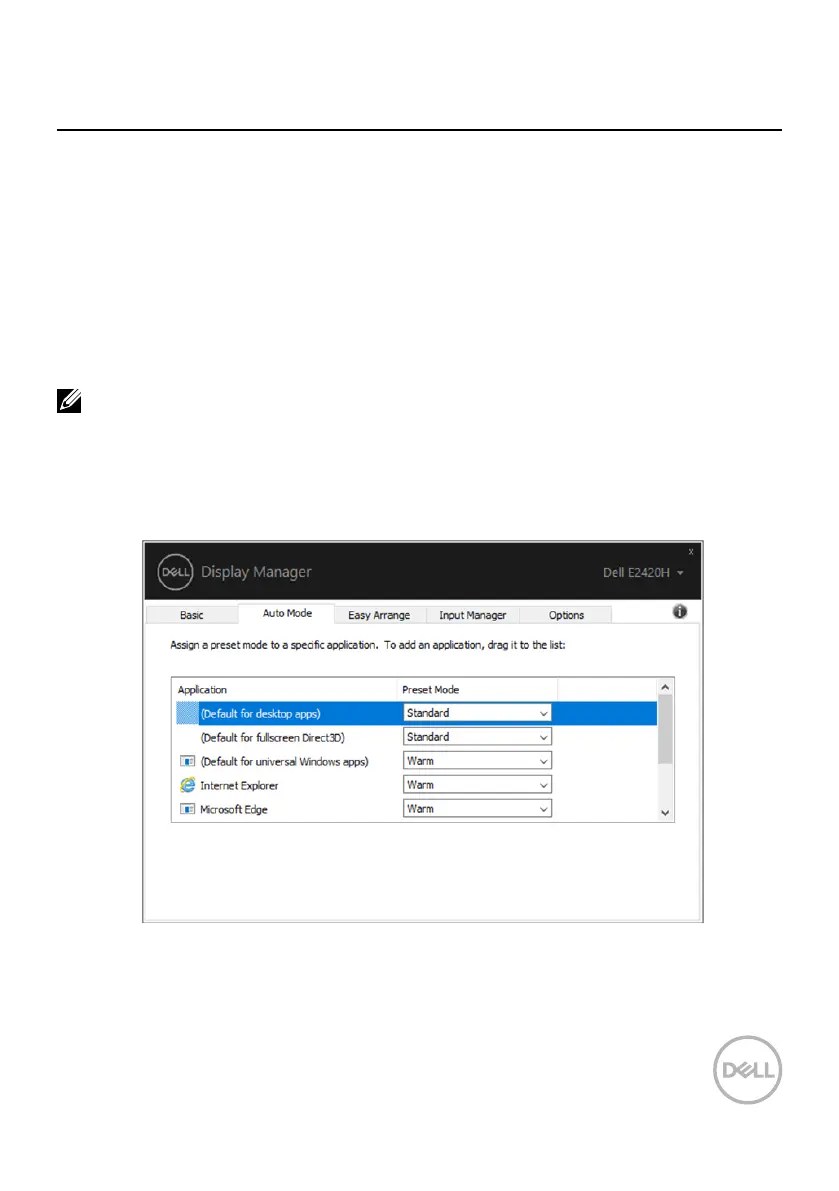
The Auto Mode tab allows you to associate a specic Preset Mode with a specic
application, and apply it automatically. When Auto Mode is enabled, Dell Display
Manager automatically switches to the corresponding Preset Mode whenever
the associated application is activated. The Preset Mode assigned to a particular
application may be the same on each connected monitor, or it can vary from one
monitor to another.
Dell Display Manager is pre-congured for many popular applications. To add a new
application to the assignment list, simply drag the application from the desktop,
Windows Start Menu or elsewhere, and drop it onto the current list.
You can also congure the Game preset mode to be used whenever a Direct3D
application runs in full-screen mode. To prevent an application from using mode,
assign a dierent preset mode to it.



 To Next Page